Dwi Wanna
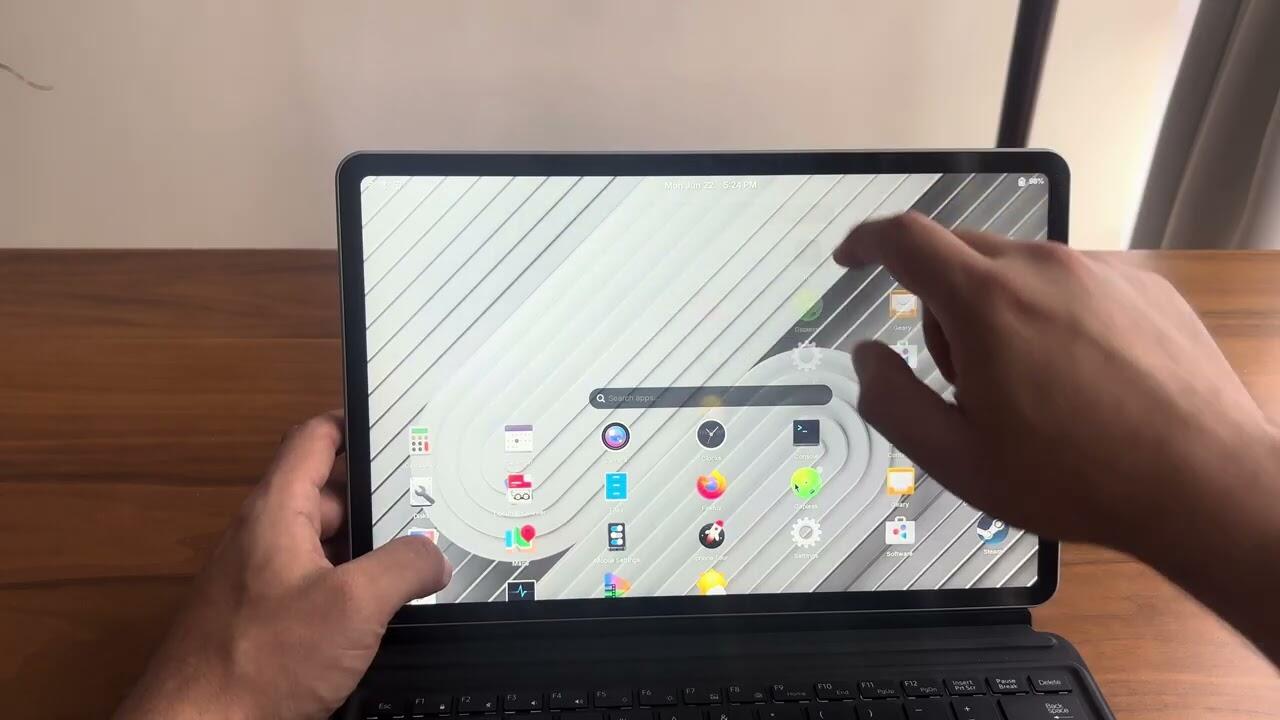
In a market dominated by the iPad’s iPadOS and the Microsoft Surface’s Windows integration, the niche for professional-grade Linux tablets has historically been difficult to navigate. Juno Computers, a prominent player in the Linux hardware space, has recently reignited this conversation with the announcement of its latest flagship device: the Juno Tab 4 WiFi. Positioned as a high-performance alternative to traditional mainstream tablets, the Juno Tab 4 WiFi promises to bring the flexibility, privacy, and power of desktop Linux to a portable 13-inch form factor.
With an Intel Core Ultra 5 processor, a 2K resolution display, and native support for major Linux distributions, this device is aimed squarely at developers, system administrators, and Linux enthusiasts who refuse to compromise on their operating system of choice.
Core Specifications and Performance Architecture
The Juno Tab 4 WiFi is not merely a tablet; it is a full-fledged mobile workstation. At the heart of the device lies the Intel Core Ultra 5-115U processor. This chip utilizes Intel’s sophisticated hybrid architecture, featuring eight cores: two performance cores (P-cores) for demanding tasks, four efficiency cores (E-cores) for background processes, and two low-power efficiency cores for idle tasks.
Graphics and Memory Capabilities
The integration of Intel Arc graphics (Xe-LPG architecture) marks a significant step up from the previous generation of Linux-based tablets. With three Xe-cores capable of reaching dynamic frequencies of up to 1.8 GHz, the device is well-equipped to handle light creative work, containerized development environments, and high-resolution media playback.
Supporting this processing power is 16 GB of soldered LPDDR5 RAM, clocked at a swift 6,400 MHz. While the lack of user-upgradable memory may frustrate some power users, the high-speed LPDDR5 standard ensures that system latency is kept to a minimum—a critical requirement for responsive desktop environments like KDE Plasma or GNOME. Storage is handled by a 1 TB M.2 NVMe SSD, which boasts read speeds of 3,500 MB/s and write speeds of 2,500 MB/s, ensuring that the system boots almost instantaneously and handles large file transfers with ease.
A Chronology of Linux Tablet Development
To understand the significance of the Juno Tab 4 WiFi, one must look at the trajectory of Linux hardware over the last decade.
- The Early Years (2010–2015): The market was dominated by attempts to port Android-based hardware to Linux, which often resulted in poor touch driver support, broken power management, and proprietary firmware nightmares.
- The Proliferation of Convertibles (2016–2020): Manufacturers shifted toward 2-in-1 laptops. While these offered full Linux compatibility, they were often bulky and lacked the true "tablet-first" experience that users desired.
- The Rise of Specialized Hardware (2021–2023): Companies like Juno Computers began focusing on devices designed from the ground up for Linux. The introduction of the Juno Tab series signaled a shift toward tablets that support modern standards like Wayland and PipeWire out of the box.
- The Modern Era (2024–Present): With the Juno Tab 4 WiFi, we are seeing the maturation of the segment. The focus has moved from "just getting it to run" to "optimizing for high-performance workflows." The inclusion of Intel Core Ultra silicon represents a bridge between mobile convenience and desktop-grade computation.
Technical Data and Build Quality
The Juno Tab 4 WiFi is designed for a professional aesthetic. Encased in a sleek silver chassis, the device measures 31.06 x 19.56 x 0.99 cm and weighs 0.85 kg. When paired with the optional Type-Cover, the total weight reaches 1.23 kg, making it competitive with ultra-thin laptops.

The Display Experience
The 13-inch IPS touchscreen is a focal point of the device. With a 2K resolution (1,600 x 2,560 pixels) and a 60 Hz refresh rate, it provides sharp, crisp visuals suitable for coding or digital art. While some users might have hoped for a 90 Hz or 120 Hz panel, the 60 Hz screen serves to preserve battery life, which is a common pain point for Linux devices.
Cooling and Connectivity
Managing the thermals of an Intel Core Ultra processor in a tablet form factor is no small feat. Juno has implemented a dual "Silent" fan system, ensuring that the device remains cool even during sustained tasks. For connectivity, the tablet includes:
- Two USB-C 3.1 ports for high-speed data and charging.
- One USB-A 3.0 port (a rarity in modern tablets) for legacy peripheral support.
- Realtek RTL8852BE wireless module supporting Wi-Fi 6 and Bluetooth 5.2.
The 42.71 Wh battery is rated for approximately 5.5 hours of average use. While this is modest by modern tablet standards, it is a direct consequence of the powerful x86-64 architecture utilized, which demands significantly more power than ARM-based tablets.
Official Stance: The "Open by Default" Philosophy
Juno Computers has built its reputation on the "Open by Default" philosophy. The Juno Tab 4 WiFi is not a device that forces a specific user experience; rather, it offers a modular choice. During the pre-order process, customers can select their preferred Linux distribution.
Options include:
- Debian: With a choice of Phosh (mobile-optimized), GNOME, or Plasma Mobile interfaces.
- Ubuntu/Kubuntu (26.04 LTS): Providing a rock-solid, enterprise-grade foundation for those who prioritize stability and long-term support.
By pre-installing these distributions, Juno ensures that drivers for the touchscreen, internal microphone, and the 5-megapixel webcam are configured correctly before the device ever leaves the factory. This eliminates the "distro-hopping" frustration that often plagues new Linux hardware owners.
Implications for the Linux Ecosystem
The release of the Juno Tab 4 WiFi has several far-reaching implications for the broader Linux community.
1. Bridging the Gap for Developers
As more developers shift to mobile workstations, the demand for tablets that can run native Docker containers, virtual machines, and IDEs (like VS Code or JetBrains) is growing. The Juno Tab 4 WiFi demonstrates that the x86 Linux tablet is no longer a toy; it is a legitimate tool for professional software development.
2. Pushing Hardware Vendors
By successfully integrating modern Intel components into a tablet, Juno puts pressure on major manufacturers like Dell, HP, and Lenovo. It proves that the "Linux tax" is a myth and that there is a viable, high-end market for hardware that does not require the Windows ecosystem to be functional.
3. Challenges in Localization
A notable hurdle for the Juno Tab 4 WiFi is the current limitation of the Type-Cover, which is exclusively available with an ANSI (US) layout. For European and international markets, this remains a significant barrier to entry. Future iterations will likely need to address ISO layout support to truly capture a global audience.
4. Supply Chain and Accessibility
The 90 to 100-day lead time for shipping highlights the challenges faced by smaller, specialized hardware vendors. Unlike tech giants, Juno operates on a build-to-order model. While this ensures high quality and specific configuration, it requires a degree of patience from the end user.
Conclusion
The Juno Tab 4 WiFi is a bold statement. It does not attempt to mimic the mass-market appeal of the iPad; instead, it leans into the strengths of the Linux community. By providing a high-performance, open-source-first platform, Juno Computers is carving out a vital space for those who demand total control over their computing environment.
While the device is not without its limitations—specifically regarding battery life and the current exclusivity of the US-style keyboard—it stands as one of the most capable Linux tablets on the market today. For the user who values privacy, customization, and the power of the Linux kernel, the Juno Tab 4 WiFi is arguably the most compelling tablet choice currently available. As the Linux ecosystem continues to evolve, devices like this will be the ones that move the needle, transforming Linux from a server and desktop OS into a truly ubiquitous platform for all form factors.


 Iffa Jayyana
 Muslim