

In a rapid-fire sequence of software releases that highlights Google’s commitment to refining its mobile operating system, the company has officially launched Android 17 QPR1 Beta 6. Coming just a single week after the rollout of Beta 5, this update serves as a critical milestone in the development lifecycle of the Android 17 Quarterly Platform Release (QPR1). With this release, Google has officially declared that the platform has reached "Platform Stability," signaling that the software is approaching its final, public-ready form.
For developers and early adopters, this is the most important update yet. By locking the API surface, Google is giving third-party app developers the green light to finalize their own software integrations, ensuring that the next major update to the Android ecosystem will be as seamless as possible for millions of users worldwide.
The Chronology of Android 17 QPR1 Development
The journey to the current build, CP31.260618.005, has been characterized by a high-frequency release schedule. Unlike the traditional slow-burn approach to major Android versions, the QPR (Quarterly Platform Release) track is designed to inject features and stability patches into the ecosystem at a faster cadence.
- Mid-June 2026: Google initiates the early beta phases for Android 17, focusing on structural optimizations.
- Two Weeks Prior: The release of Beta 4 introduced significant UI refinements and under-the-hood performance tweaks.
- Last Week: Beta 5 arrived, addressing several lingering bugs reported by the community and improving system stability.
- Today: The rollout of Beta 6 marks the "Platform Stability" milestone. This effectively ends the period of major experimental changes to how apps interact with the OS, shifting the focus entirely to polishing the user experience.
This accelerated timeline suggests that Google is prioritizing the synchronization of its software updates with its hardware cycles, particularly with the expanding Pixel lineup that now spans from the legacy Pixel 6 series all the way to the latest Pixel 10 generation.
Key Features and UX Refinements
While Beta 6 is largely a stability-focused release, it brings several noteworthy interface changes and functional upgrades that refine the user’s daily interaction with their device.
1. Revamped Home Screen Context Menu
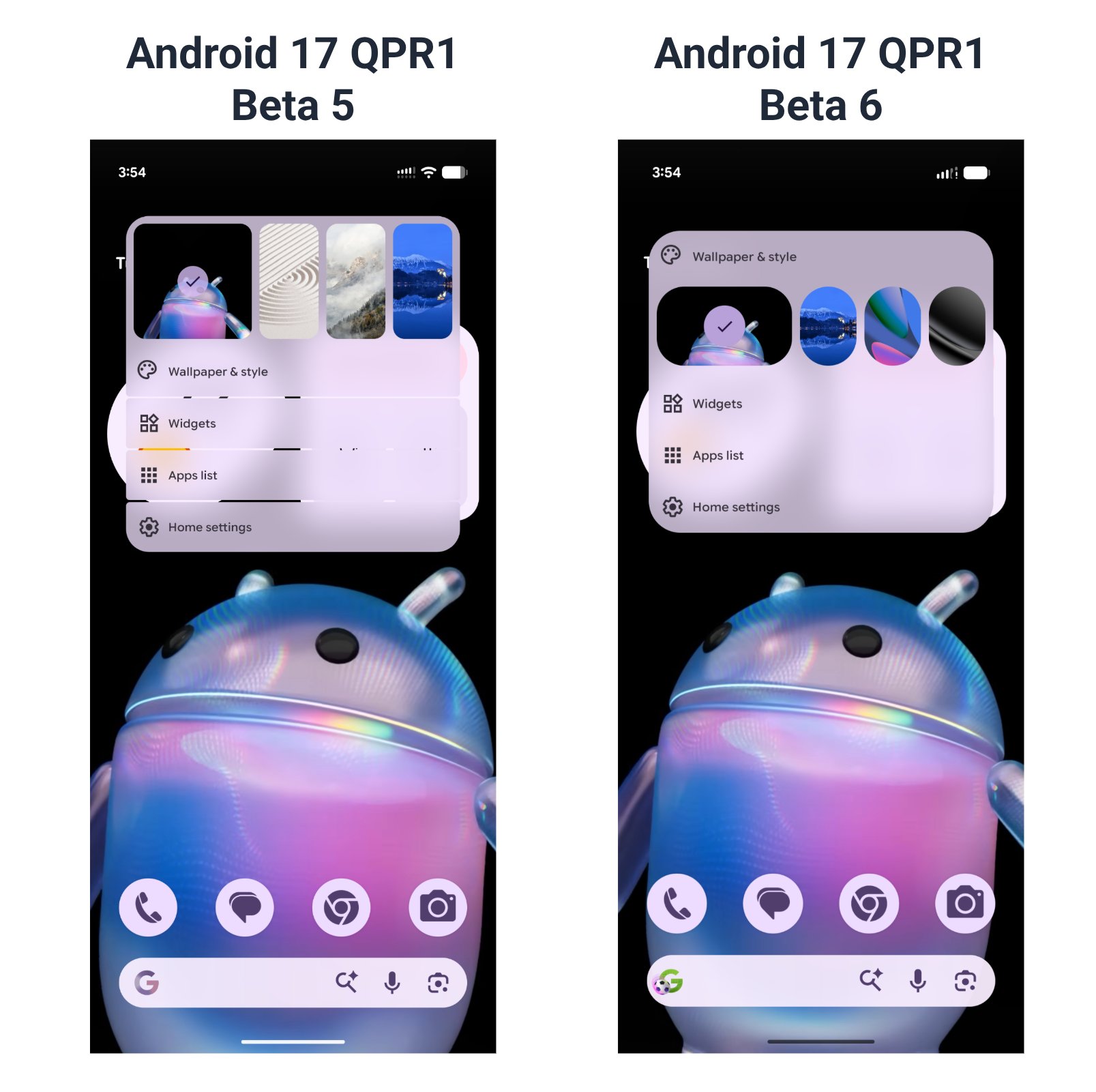
As identified by industry analysts, the home screen context menu has received a visual overhaul. The previous iteration featured a more segmented look with distinct spacing between menu items. The new design adopts a cleaner, more unified aesthetic. The "Wallpaper & style" shortcut has been promoted to the very top of the list, acknowledging the increased importance of personalization in modern Android versions. By removing the interstitial whitespace, the menu feels more compact and responsive, fitting seamlessly into the "Material You" design language that prioritizes readability and ease of navigation.
2. Enhanced Health Connect Metrics
Google’s Health Connect, the centralized hub for fitness and biometric data, is becoming more granular. With Beta 6, the API now supports advanced tracking for both distance and caloric expenditure. This is a significant boon for fitness enthusiasts and developers of health-tracking apps. By standardizing how these metrics are stored and shared between devices—such as between a Pixel Watch and a Pixel 10—Google is fostering a more cohesive health ecosystem that reduces data fragmentation.
3. Desktop Windowing Evolution
One of the most exciting developments in recent Android iterations is the push toward desktop-class multitasking. Beta 6 introduces two major changes to "Desktop Windowing":
- Taskbar Relocation: Taskbar icons have been moved from the bottom-center to the bottom-left of the display. This shift mimics traditional desktop operating systems (like Windows or ChromeOS), making the transition from mobile to desktop environments more intuitive for power users.
- Floating Picture-in-Picture (PiP): Previously, PiP windows were tethered to the left or right margins of the screen. In this update, PiP windows can now float freely anywhere on the desktop, offering much greater flexibility for users who are multitasking, such as watching a video while typing in a document.
Implications of "Platform Stability"
The most significant takeaway from this release is the attainment of "Platform Stability." In the world of Android development, this is a formal declaration. It means:
- API Lock: The set of tools and commands (APIs) available to developers is now finalized. Google will not introduce any new APIs or change existing ones for this version.
- App Compatibility: Developers can now confidently update their apps in the Google Play Store to support Android 17 QPR1, knowing that their code won’t break due to a sudden change in how the operating system handles permissions or background processes.
- Final Polish: The remaining weeks before the public release will be dedicated solely to squashing minor performance bottlenecks and ensuring maximum battery efficiency.
For the end user, this implies that the software is now safe for daily use on a primary device, though some minor hiccups may still exist compared to a finalized stable release.
Supporting Data: Device Compatibility
Google continues to demonstrate an impressive commitment to its hardware lifecycle. The list of devices eligible for the Android 17 QPR1 Beta 6 update is extensive, covering nearly five years of hardware releases:
- Pixel 6 Series: Pixel 6, 6 Pro, and 6a.
- Pixel 7 Series: Pixel 7, 7 Pro, and 7a.
- Pixel 8 Series: Pixel 8, 8 Pro, and 8a.
- Pixel 9 Series: Pixel 9, 9 Pro, and 9a.
- Pixel 10 Series: Pixel 10, 10 Pro, 10 Pro XL, 10 Pro Fold, and 10a.
- Tablets: All devices in the current Pixel Tablet series.
This broad support is a testament to Google’s internal hardware and software optimization efforts, ensuring that even users with older hardware can experience the latest features of the platform.
Official Responses and Community Feedback
The developer community on platforms like Reddit has been vocal about the rapid pace of these updates. The consensus among beta testers is largely positive, with many noting that the transition from Beta 5 to Beta 6 feels like a natural progression toward a finished product.
Google’s engineering team has emphasized that the goal of this QPR cycle is to bridge the gap between "experimental features" and "stable user experiences." By inviting feedback through the Android Beta Feedback app, Google has been able to iterate on the desktop windowing experience and the home screen design based on real-world usage patterns.
"The shift to a more compact context menu was a direct response to user feedback requesting faster access to personalization tools," said one anonymous contributor involved in the beta program. "Moving the taskbar to the left is a strategic decision to align the mobile experience with the productivity habits of users who use their tablets and phones as workstation replacements."
Conclusion: The Path to Public Release
As Android 17 QPR1 enters its final stage of development, the industry is looking toward the official public launch. By reaching platform stability, Google has essentially completed the "heavy lifting" of the development cycle. The focus now turns to final performance tuning and the preparation of the stable build for global distribution.
For those currently enrolled in the Android Beta program, Beta 6 represents the final opportunity to stress-test the system before the general public begins receiving the update. Users are encouraged to continue reporting bugs through the official channels to ensure the final version is as robust as possible.
The evolution of Android 17 is proving to be more than just a series of minor patches; it is a fundamental shift toward a more modular, desktop-capable, and health-centric mobile operating system. As we await the final stable release, it is clear that Google is successfully executing its vision of a unified, high-performance Android experience across its diverse hardware portfolio.











