

In the digital era, Adobe Photoshop stands as the undisputed industry standard for image editing, graphic design, and artistic expression. Whether you are a budding photographer aiming to perfect portraits or a designer looking to push the boundaries of visual storytelling, mastering Photoshop’s extensive toolset is a journey of continuous learning. This guide explores the most effective ways to sharpen your skills, covering everything from foundational retouching to advanced generative AI techniques.

Main Facts: The Architecture of Digital Mastery
At its core, Adobe Photoshop is a non-destructive workspace designed to transform raw pixels into polished masterpieces. Mastering this software is not merely about memorizing tool locations; it is about understanding the logic of layers, masks, blending modes, and smart objects.

The most effective learning path for any user involves a structured approach. By breaking down complex projects—such as photo manipulation, skin retouching, and graphic design—into manageable steps, users can avoid the frustration often associated with the software’s steep learning curve. The primary pillar of proficiency is consistency: practicing simple tasks like layer management and brush control eventually builds the muscle memory required for complex compositing.

Furthermore, the integration of AI-powered features, such as Generative Fill and advanced selection algorithms, has revolutionized how we approach traditional tasks, turning hours of tedious work into mere seconds of precise execution.

Chronology: The Evolution of Modern Photoshop Workflows
The workflow of a professional designer has shifted dramatically over the past decade. Historically, retouching and compositing relied heavily on manual labor—tedious "dodge and burn" techniques, pixel-by-pixel cloning, and manual path creation.

- The Manual Era: Early tutorials focused on fundamental tools like the Clone Stamp and Healing Brush. These were the building blocks of retouching, requiring a deep understanding of light, texture, and anatomy.
- The Era of Non-Destructive Editing: With the introduction of Adjustment Layers and Smart Objects, the industry shifted toward a workflow that preserved the original file. This allowed for experimentation without the risk of irreversible damage.
- The AI-Integrated Present: Today, we operate in an era of "hybrid editing." Tools like Adobe Firefly, Generative Fill, and advanced automated masking have allowed creators to combine traditional craftsmanship with machine learning. The current gold standard for a professional workflow is the "5-Stage Process": Base Adjustments, Object Removal, Global Color Grading, Sharpening, and Final Refinement.
Supporting Data: Techniques for Every Skill Level
To truly master Photoshop, one must engage with specific, high-impact techniques. Below is an overview of essential tutorials and methodologies that define modern professional standards.

The Art of Skin Retouching
Professional portraiture relies on subtle, natural-looking skin adjustments. Beginners are encouraged to master the "Frequency Separation" technique, which allows for the adjustment of skin texture and skin color on separate layers. Whether using the Mixer Brush or the Lasso Tool for smoothing, the goal is always the same: to fix blemishes while retaining the skin’s natural pore structure.

Advanced Photo Manipulation
Manipulation is the marriage of disparate images into a single, cohesive narrative. This involves:

- Color Matching: Using Curves and Color Balance to ensure all elements share a unified light source.
- Edge Refinement: Utilizing the "Select and Mask" workspace to handle complex hair and edges.
- Perspective Alignment: Ensuring the scale and horizon lines of imported elements match the background.
Graphic Design and Typography
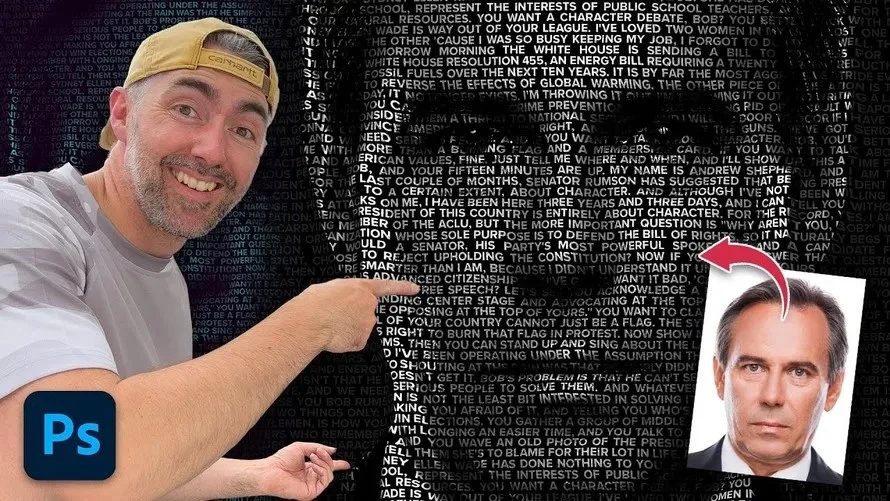
Modern design often utilizes "Calligrams"—a technique where text is warped to follow the contours of a subject’s face—and advanced mockups. By leveraging displacement maps and clipping masks, designers can wrap branding onto packaging or text around human forms with startling realism.

Official Perspectives: The Role of AI in Creative Design
Adobe’s official stance on the future of Photoshop, particularly regarding the inclusion of Generative Fill and AI-assisted matting, emphasizes "co-creation." According to industry experts and Adobe’s own development philosophy, these tools are not meant to replace the designer, but rather to act as a creative assistant.

The integration of tools like the "Aiarty Image Matting" or the "Generative Fill + After Effects" pipeline represents a paradigm shift. These tools empower creators to focus on the vision of the project rather than the execution of the mundane. By delegating background removal or complex pattern generation to the AI, designers can spend more time on high-level color grading and cinematic storytelling.

Implications: The Future of Digital Artistry
The democratization of high-end image editing through accessible tutorials has significant implications for the creative economy.

Increased Efficiency for Professionals
Professionals who adopt modern, AI-augmented workflows are seeing a massive increase in output. A project that once took a full day—such as complex object removal or creating a high-resolution mockup from a low-res source—can now be achieved in minutes. This speed allows for more client revisions, higher quality final products, and the ability to experiment with more creative concepts.

Lower Barriers for Beginners
The "1-minute hack" culture, which provides bite-sized, actionable advice, has lowered the barrier to entry. New artists can now achieve professional-grade results on their first day of using the software. This accessibility fosters a more diverse and vibrant community of digital artists.

The Importance of Human Oversight
Despite the power of automated tools, the "human touch" remains the differentiator in the industry. An AI can remove a background, but it cannot decide the emotional tone of a piece. It cannot intuitively know how to balance a cinematic grade to evoke nostalgia or tension. As the tools become more automated, the value of the artist’s aesthetic judgment, understanding of composition, and ability to tell a story through imagery will only continue to rise.

Final Thoughts: A Call to Continuous Learning
The path to mastering Photoshop is not a destination but a practice. As the software updates and new AI capabilities are introduced, the most successful designers will be those who remain curious.

Whether you are mastering the "Pencil Sketch Effect" to understand layer blending, or diving into "Cinematic Color Grading" to understand the psychology of light and mood, every tutorial you complete is a brick in the foundation of your career. Remember to always save your work in versions—a practice that allows you to compare your "Before" and "After" states—and never fear the "Undo" command. Experimentation is the engine of creativity.

As you move forward, challenge yourself to go beyond the tutorial. Once you learn how to create a "Candy Text" effect using Adobe Firefly, ask yourself how you can apply that same layering logic to a different material. When you learn to remove a background in seconds, spend the saved time refining the lighting to ensure the subject truly belongs in its new environment.

The tools are waiting. The vision is yours. Keep creating, keep questioning, and keep refining your craft.









No comments yet. Be the first to join the conversation!