

The landscape of digital art has undergone a seismic shift over the last decade, transitioning from static, mouse-driven software to the fluid, intuitive experience of tablet-based creation. At the heart of this revolution is Procreate, the powerhouse application for the iPad that has democratized high-end digital illustration. Central to its success—and to the unique "hand-made" quality of modern digital art—is the ecosystem of custom Procreate brushes.

For artists, designers, and hobbyists alike, these brushes have become more than just digital tools; they are the primary medium through which individual artistic voices are expressed. Whether it is the tactile grit of a charcoal sketch or the ethereal shimmer of liquid light, the right brush can bridge the gap between a vision and a finished canvas.

The Evolution of the Digital Canvas: From Stock to Specialized
In the early days of digital painting, artists were limited to the default brush sets provided by their software. While functional, these stock brushes often lacked the nuance required for professional-grade work. The "Digital Renaissance" truly began when developers and veteran artists realized that the key to organic-looking art lay in the simulation of traditional physics.

A Chronology of Digital Tooling
- The Early 2010s: Digital art was largely synonymous with desktop software. The introduction of the iPad Pro and the Apple Pencil fundamentally changed the ergonomic relationship between the artist and the screen.
- 2016–2019: The rise of independent marketplaces. Artists began packaging their custom-made brushes, born from their own workflow experiments, for the wider community to purchase.
- 2020–Present: The "Procreate Explosion." As the pandemic forced a move toward remote creative work, the demand for high-quality, specialized brush sets surged. Today, platforms like Envato Elements have turned these digital assets into an essential, high-volume industry.
The Mechanics of Mastery: Why Custom Brushes Matter
Why do professional illustrators spend hours testing and curating their brush libraries? The answer lies in the "physics of the stroke." A standard digital brush often feels "slippery" or "plastic" compared to traditional media. Custom brushes are engineered to mimic the friction of paper, the absorption of watercolor, or the resistance of oil paint.

The Role of Texture and Pressure
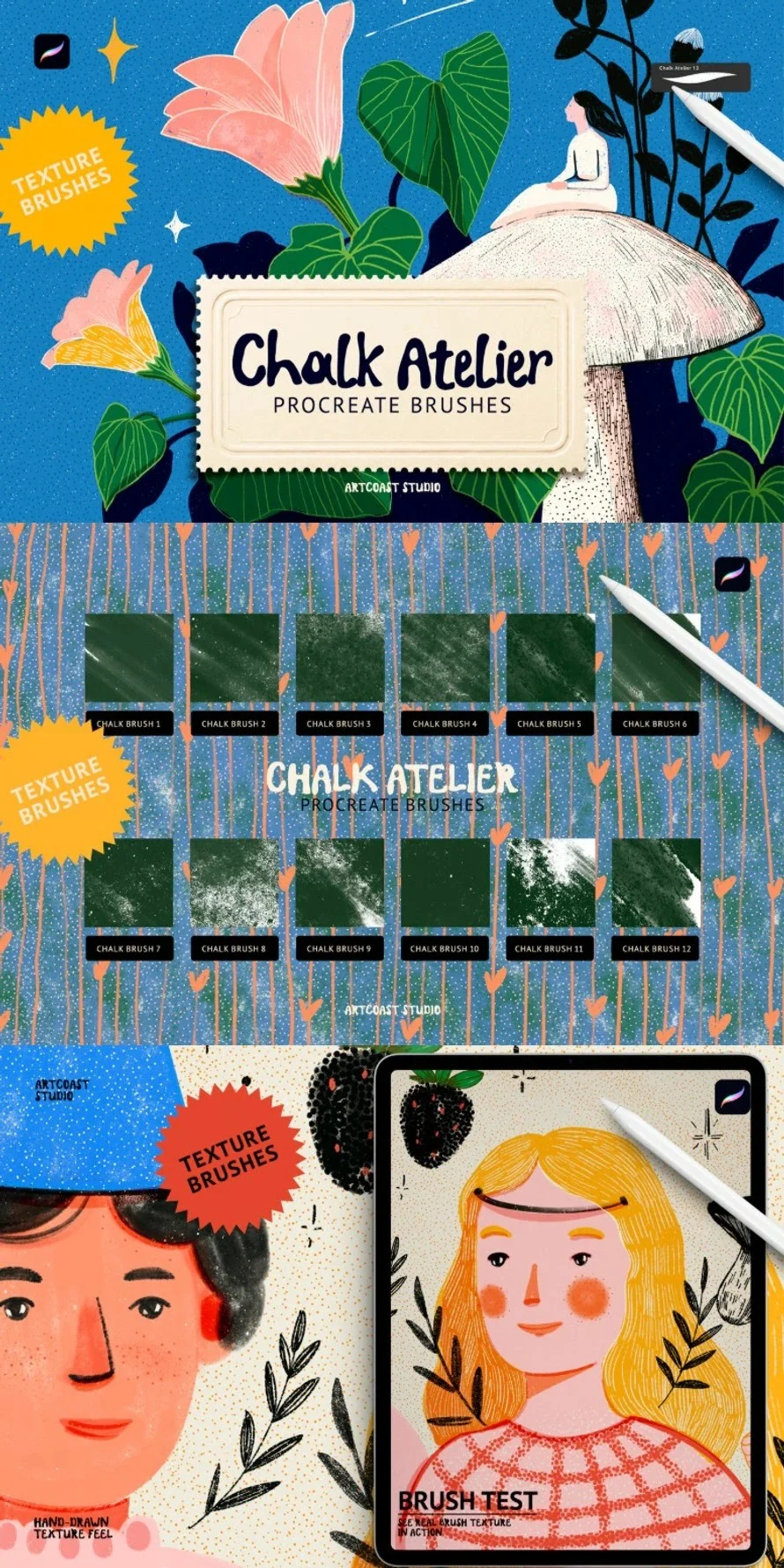
The true power of a custom brush lies in its metadata. By manipulating pressure curves, grain sources, and tilt sensitivity, creators can craft brushes that behave in unexpected ways. For instance, a "Chalk Atelier" brush pack does not just paint gray; it interacts with the digital canvas to deposit pigment in a way that suggests the tooth of a chalkboard. This creates a psychological effect: when the tool feels "real," the artist’s hand movements become more deliberate and expressive.

Supporting Data: The Procreate Ecosystem
The adoption rate of custom digital assets is staggering. Industry data suggests that the average digital illustrator now maintains a library of over 200 custom brushes, categorized by project type—inking, texturing, shading, and conceptual drafting.

According to market trends in the creative design space, the demand for specialized assets is driven by the need for speed. In a professional workflow, time is the most expensive commodity. A brush set that allows an illustrator to "stamp" a complex texture or a halftone pattern in seconds—rather than painting it pixel by pixel—can cut production time by up to 40%. This efficiency is what allows modern freelancers to compete in high-pressure creative markets.

Expert Perspectives: The Shift Toward "Hybrid" Artistry
We reached out to digital concept artists and professional designers to discuss the shift toward custom brush workflows.

"When you bring new brushes into Procreate, you aren’t just adding tools to a list," says Sarah Jenkins, a lead concept designer for the gaming industry. "You are effectively learning about your own drawing style. You start to see what pressure settings work for you, how you hold the Apple Pencil, and what kind of texture your art actually needs to ‘breathe.’ Real learning happens when you stop watching tutorials and start testing these assets in real-time."

The consensus among professionals is clear: while the software provides the engine, the custom brushes provide the soul of the work.

Implications for the Future of Creative Work
The rise of this marketplace has profound implications for the future of the industry. We are seeing a move away from "flat" digital aesthetics toward a "tactile" digital future. This is evidenced by the current popularity of retro halftone brushes, knit-stitch embroidery packs, and charcoal sets. Designers are actively trying to "un-digitalize" their work to make it feel more human, more flawed, and more authentic.

Furthermore, the accessibility of these tools means that the barrier to entry for beginners has been lowered significantly. A novice can download a high-end "ProInkers" set and instantly achieve the professional line-work that previously took years of traditional apprenticeship to master.

Curating Your Toolkit: Trending Sets to Consider
As we look at the current market, 20+ specific brush sets have emerged as industry standards for those looking to expand their capabilities. Here is a breakdown of why these specific categories are currently trending:

1. The Playful & Ethereal (Bubbles and Glitter)
These sets, such as the Bubbles Procreate Brushes and Sparkle Gold Glitter packs, are leading the charge in social media-driven design. They allow artists to create "magical" compositions that appeal to the current trend of vibrant, luminous illustrations.

2. The Traditionalist’s Toolkit (Chalk, Charcoal, and Pastel)
The Chalk Atelier and Charcoal Brushes represent a return to classic art forms. These are favored by illustrators who want their work to feel as if it were pulled directly from a sketchbook.

3. Structural Integrity (Grids, Plaids, and Patterns)
For designers working in fashion or product design, the Grid Pattern and Plaid brushes offer a way to map complex geometry onto 3D-feeling surfaces without the tedious process of manual alignment.

4. Technical Precision (Inking and Sketching)
The ProInkers and Sketch Line Pencil sets remain the backbone of the comic and webtoon industry. Clean, sharp, and responsive, these brushes are designed for the high-volume, high-detail work that defines contemporary sequential art.

Practical Advice: How to Integrate New Brushes
If you are currently expanding your digital arsenal, heed the following advice:

- Avoid "Feature Bloat": Do not install 500 brushes at once. Start with one focused set at a time. This prevents "creative paralysis," where you spend more time choosing a brush than actually drawing.
- Read the Documentation: Most professional-grade brush packs come with a small PDF guide. These guides often reveal "hidden" settings, such as specific blending modes or Apple Pencil tilt angles, that unlock the full potential of the brush.
- Trial and Error: Use a dedicated "test canvas" where you experiment with pressure and opacity before starting a commissioned piece. This is where you develop your muscle memory.
Conclusion: The Path Forward
The tools we use to create do not replace our talent; they amplify it. The current explosion of custom Procreate brushes is a testament to the fact that the digital art community is more vibrant and experimental than ever before. Whether you are aiming to recreate the tactile feel of an oil painting or the sharp precision of a Y2K-inspired pixel art piece, the resources exist to help you reach that goal.

As you explore these 20+ trending brush sets, remember that the goal is not to have the most tools, but to find the ones that best translate your vision onto the screen. In the hands of a curious artist, a simple digital brush becomes a gateway to an entirely new creative dimension.

Disclaimer: This article contains information on digital assets available for professional use. Always ensure you are downloading brushes from reputable marketplaces to protect your hardware and software integrity.









No comments yet. Be the first to join the conversation!