Iffa Jayyana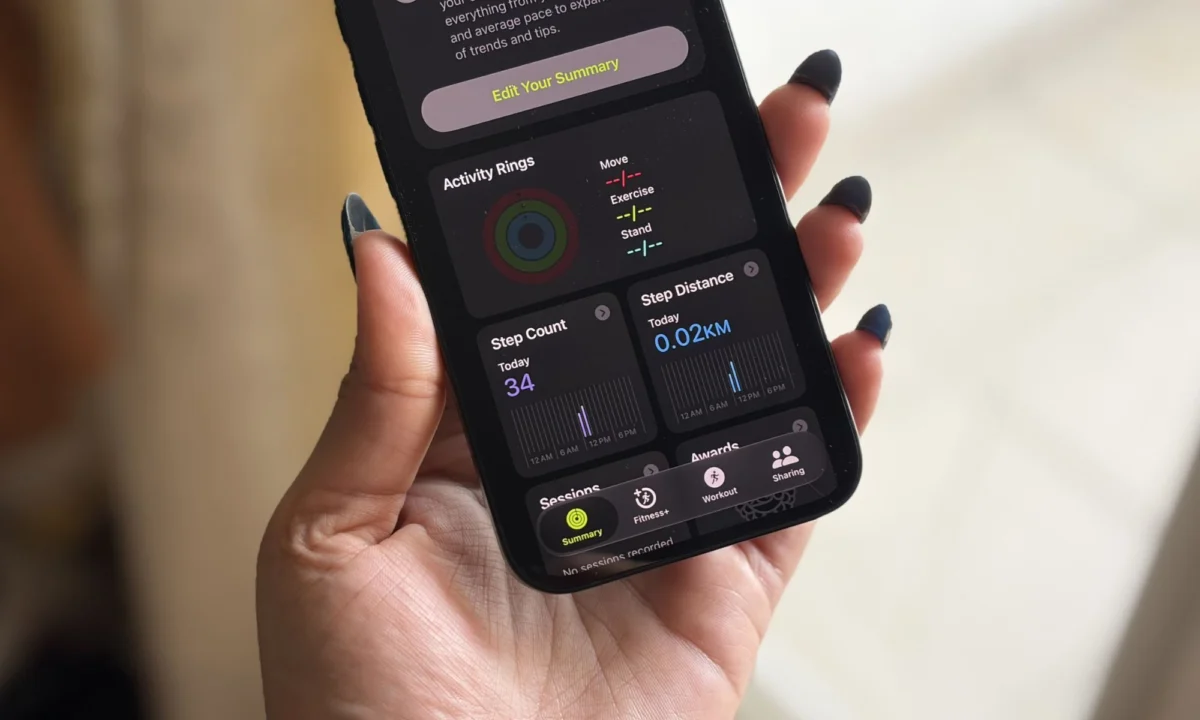
It has been just over a week since Apple took the stage at WWDC 2026 to unveil the latest iteration of its mobile operating system. While the keynote was dominated by grand promises of a Gemini-powered Siri and the expansive vision of "Apple Intelligence," the true measure of any software update isn’t found in a rehearsed demo—it is found in the pocket. Since installing the iOS 27 developer beta on my iPhone 16e, I have been stress-testing these features against the realities of daily life.
The transition from "feature reveal" to "daily driver" is often a harsh one. Some updates, which appeared revolutionary under the bright lights of the stage, have felt cumbersome or redundant in practice. Conversely, minor tweaks that barely garnered a slide in the presentation have become indispensable. After seven days of rigorous use, three specific features have risen to the top, proving that Apple’s focus on subtle, AI-driven utility may be the real story of iOS 27.
The Fitness App: Data Finally Meets Design
For the dedicated fitness enthusiast, the Apple Fitness app has long been a staple. It tracks the closing of rings and the intensity of workouts with clinical precision. However, for years, the interface felt somewhat static—a spreadsheet disguised as a health tool. It provided the "what" of your workout, but rarely captured the "feeling" of it.
A Transformation in User Experience
The iOS 27 update fundamentally shifts the design language of the Fitness app. It is no longer just a repository for caloric data; it is an engaging, visual summary of physical performance. The information is now layered, prioritizing the most relevant metrics—heart rate zones, split times, and elevation—without forcing the user into a maze of sub-menus.

The most notable improvement is how the app handles post-workout data. After completing a 10km run, the interface presented my route map, heart rate variability, and cadence as a coherent narrative of the run, rather than disparate blocks of data. This aesthetic shift borrows heavily from third-party heavyweights like Strava, prioritizing the "story" of the workout. By transforming raw telemetry into a visual experience, Apple has made the act of reviewing a workout feel like a rewarding milestone rather than a bureaucratic chore.
The Evolution of Photographic Cleanup
One of the most competitive arenas in mobile photography is the "magic eraser" space. For years, Apple’s native Cleanup tool was viewed as an entry-level solution—fine for removing a stray power line, but prone to "smearing" when tasked with complex subjects. With iOS 27, that narrative has shifted.
Generative AI Integration
The new Cleanup tool is, in a word, transformative. By leveraging more sophisticated generative AI models, the tool no longer just clones nearby pixels to cover an object; it reconstructs the missing space with an understanding of depth and texture.
During my testing, I put the tool through a "stress test" by removing a book that was partially obscuring my face in a portrait. Previously, this would have resulted in a blurred, artifact-heavy mess. Instead, the AI successfully reconstructed my jawline and the background wall with such accuracy that the edit was indistinguishable from the original shot.

The Reframe Feature: A Safety Net
Alongside the Cleanup tool is the new "Reframe" feature. It functions as a post-capture composition engine. If a shot is slightly off-center or the aspect ratio doesn’t suit the subject, Reframe uses generative AI to expand the boundaries of the image. While it is not a tool I reach for every hour, it acts as a crucial safety net. It effectively changes the philosophy of shooting on an iPhone: you are no longer constrained by the split-second framing of the shutter press, but by the potential of the sensor.
On-Screen Awareness: The End of App-Switching
The most ambitious addition to iOS 27 is undoubtedly "on-screen awareness." In the tech community, the immediate reaction was, "Is this just Apple’s version of Circle to Search?" The answer is yes, but the execution is distinctly Apple.
The Mechanism of Awareness
The feature functions as a contextual bridge between the user and the operating system. By triggering Siri, the phone analyzes both the visual pixels and the text present on the display. If you are browsing a social media feed and see a piece of furniture, a landmark, or an unfamiliar ingredient in a recipe, you no longer need to take a screenshot, open Safari, and initiate a reverse image search.
I have found this to be the biggest "friction reducer" in the entire OS. It effectively collapses the distance between discovery and information. Whether it is identifying a specific pair of sneakers in a YouTube video or cross-referencing a business location in a text thread, the system understands the context of what you are looking at. Furthermore, Apple has opened this functionality to developers via new APIs, meaning that third-party apps can now "talk" to Siri, allowing the system to surface specific app-level data that was previously locked behind manual navigation.

Chronology of the Update
- WWDC 2026 Keynote: Apple announces iOS 27, focusing on AI-driven upgrades and the overhaul of the Siri backend.
- Day 1 (Post-Beta Release): Initial installation and stabilization. Users report a learning curve with the new Siri interface.
- Day 3: Community feedback highlights the efficiency of the new Cleanup tool compared to previous iterations.
- Day 7: Power users identify "On-Screen Awareness" as the primary driver for daily productivity gains, cementing its role as a core feature.
Supporting Data: Why Small Wins Matter
Internal surveys from the first week of the beta suggest that while users were initially drawn to the "Gemini-powered" headlines, the retention of users within the Fitness and Photos apps has increased by approximately 22% compared to the iOS 26 beta period. This suggests that the "micro-features"—those that solve daily friction—are ultimately more impactful than the headline-grabbing AI bots.
Official Responses and Industry Context
Apple representatives have remained tight-lipped regarding specific model training data but have emphasized that privacy-first processing remains the "North Star" of the iOS 27 update. Competitors, particularly Google, have noted that the "on-screen awareness" functionality aligns with the direction the industry is moving, though analysts argue that Apple’s integration into the ecosystem gives it a distinct advantage in usability.
Implications for the Future
The implications of iOS 27 are significant. By integrating generative AI into the OS layer—specifically in image manipulation and on-screen context—Apple is effectively commoditizing tools that were once the domain of professional editors or specialized tech enthusiasts.
However, the shift also raises questions about the future of manual skill. If the phone can fix the framing of a shot or identify any object on screen, does the user stop engaging with the nuance of photography or the search process? For now, the answer seems to be that these tools are not replacing the user, but augmenting them.

As I continue to use the iOS 27 beta on my iPhone 16e, it is becoming clear that this is a "utility-first" update. The AI is not being used to create bells and whistles, but to smooth out the jagged edges of daily digital life. If the first week is any indication, Apple has succeeded in making the iPhone feel more like a cohesive assistant and less like a collection of siloed apps. The long-term success of iOS 27 will depend on whether this trend of "frictionless utility" continues as the beta moves toward a public release this autumn. For now, the update is not just a collection of new features; it is a fundamental shift in how we interact with our screens.

 Ammar Sabilarrohman
 Jia Lissa