
For the modern professional, the digital landscape is often a chaotic sprawl. Between synchronized desktop files, email attachments, and shared project documents, Google Drive has become the central repository for our collective professional and personal lives. However, for many, this convenience has morphed into a burden: the "digital junk drawer" phenomenon. Users frequently find themselves lost in a labyrinth of unorganized folders, duplicate files, and scattered assets that make retrieval a time-consuming chore.
Addressing this persistent pain point, Google has officially integrated its generative AI powerhouse, Gemini, into the Google Drive ecosystem. The new "Organize My Files in Drive" feature promises to do the heavy lifting that users have historically dreaded, applying machine learning to categorize and relocate loose files.
The Core Functionality: How AI Reshapes Storage
At its heart, "Organize My Files in Drive" is designed to act as an automated administrative assistant. The system analyzes the existing architecture of your Google Drive—the naming conventions, the folder hierarchies, and the frequency of access—to suggest a more logical home for your "orphan" files.
Unlike traditional search tools, which merely surface files based on keywords, Gemini operates on a contextual level. It observes how you interact with your data and proposes moves that align with your established organizational strategies. If you have a habit of keeping project-related PDFs in your root directory, Gemini will identify these and suggest moving them into the corresponding project folder. The system is built on a "Human-in-the-Loop" philosophy: Gemini proposes the action, but you retain the final authority. You simply review the AI’s suggestions and click "Approve" to finalize the reorganization.
A Chronological Evolution: From Testing to Implementation
The journey to this integration began in the autumn of 2025, when Google quietly initiated a beta testing phase for the organization tool. Early feedback from testers highlighted a significant demand for automated cleanup tools within enterprise environments. Following a successful testing period, Google transitioned the feature into a broader rollout for Workspace users in June 2026.

This rollout represents a major pivot in Google’s strategy. Historically, Google Drive’s web interface was criticized for its rigid, often cumbersome search functionality, which prioritized file names over metadata or visual context. By layering Gemini over the file structure, Google is effectively transforming Drive from a passive storage bin into an active, intelligent workspace.
Prerequisites and Access: What You Need to Know
While the promise of an AI-organized Drive is compelling, access is currently gated behind specific subscription tiers.
Subscription Requirements
The feature is not currently available to free, personal Google accounts. To leverage the power of Gemini for file management, users must possess a Google AI Pro or AI Ultra subscription. Priced at approximately $20 per month, this tier is marketed as a comprehensive productivity package. Beyond the AI organizational tools, the subscription offers significant value-adds, including 5TB of cloud storage and a bundled YouTube Premium Lite subscription.
Enterprise and Educational Constraints
The tool is also available to Business, Enterprise, and Education clients. However, Google has implemented strict guardrails regarding data privacy and collaboration. Specifically:
- No Cross-Account Organization: You cannot use your professional credentials to manage your personal Drive files.
- Private Folder Focus: The AI is restricted to private, user-owned folders. It cannot currently manipulate or reorganize files shared by colleagues or external collaborators, ensuring that your automated cleanup doesn’t accidentally disrupt shared team workflows.
Enabling the Feature
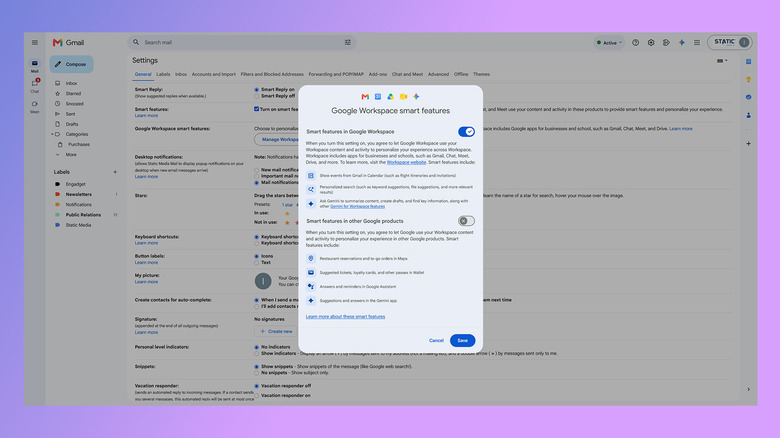
Before the AI can begin scanning your data, users must ensure that "Smart features in Google Workspace" are enabled. This toggle, typically turned on by default in most regions, serves as the gateway for Gemini to interact with your data. Users can verify this status through their account settings under the "Privacy & Personalization" dashboard.

Strategic Implications: The Limits of Machine Intelligence
While Gemini is a powerful tool, it is not a panacea for poor digital hygiene. As with any AI system, its efficacy is tethered to the quality of the input data.
The Metadata Hurdle
A crucial limitation of the current iteration is that Gemini does not appear to perform deep-content analysis of every document to derive meaning. Instead, it relies heavily on file names and existing folder structures. If your drive is littered with files named "Untitled Document 1" or "Scan_12345," the AI will struggle to determine their intent.
For the tool to be truly effective, users must maintain a base level of discipline. If a file lacks a descriptive name, the AI lacks the semantic context needed to categorize it correctly. Consequently, the tool serves as a "force multiplier" for those who already use basic naming conventions, rather than a magical "cleanup everything" button for those who have neglected their files for years.
Future Potential
Industry analysts suggest that this is merely the first step. As Gemini evolves, experts anticipate the introduction of content-aware organization, where the AI will read the body of a document—identifying an invoice, a medical record, or a project proposal—to suggest organizational homes based on the actual information contained within the file, rather than just the filename.
Privacy and Data Security
In an era of heightened concerns regarding AI, Google has emphasized that the "Organize My Files" feature operates within the existing, robust security framework of Google Workspace. Because the processing occurs within the user’s private environment, the data does not leave the secure ecosystem of the user’s account. This distinction is vital for enterprise clients who operate under strict compliance mandates regarding data residency and privacy.
The Verdict: Is It Worth the Upgrade?
For power users, freelancers, and small business owners who rely heavily on Google Drive for daily operations, the $20-per-month investment for the AI Pro subscription offers a compelling return on investment. The ability to reclaim hours spent manually sorting files is a significant productivity gain.
However, for the casual user, the necessity of maintaining a structured naming convention remains a prerequisite. The lesson here is that AI can help you manage your files, but it cannot fix the fundamental human habit of poor documentation.
As we look toward the future of cloud storage, the integration of AI is not merely a novelty; it is a necessity. As the volume of data we generate continues to explode, the ability to find, access, and organize that data will be the defining trait of an efficient digital workflow. Google’s latest update is a clear signal that the company intends to lead this transition, moving away from simple storage and toward a future of intelligent, autonomous document management.
Whether you view Gemini as a helpful assistant or a luxury add-on, one thing is certain: the era of the manual file-sorting chore is coming to an end. By embracing these tools, users can transition from being curators of digital clutter to architects of a more streamlined, AI-assisted information environment.