

Adobe Photoshop remains the undisputed industry standard for digital artists, photographers, and graphic designers worldwide. As the software continues to evolve with the integration of Artificial Intelligence and advanced generative tools, the challenge for both novices and seasoned professionals is not just keeping up with the features, but mastering the workflow. Whether you are aiming to refine skin tones in high-end fashion photography, manipulate surrealist imagery, or create vibrant poster art, structured learning is the most efficient path to proficiency.

This guide explores the foundational principles of effective Photoshop training, provides a curated look at top-tier educational resources, and examines the professional implications of mastering these complex digital tools.

The Evolution of Digital Manipulation: Understanding the Core Principles
Photoshop tutorials serve as more than just "how-to" videos; they are architectural blueprints for visual storytelling. The transition from a static image to a compelling piece of digital art relies on the mastery of fundamental concepts: non-destructive editing, layer management, and color theory.

The Philosophy of Non-Destructive Editing
The hallmark of a professional workflow is the ability to edit without compromising the original data. By utilizing Smart Objects, Adjustment Layers, and Layer Masks, artists can experiment with compositions, light, and texture while retaining the ability to revert changes at any stage. Tutorials that emphasize these practices are essential for building a sustainable professional career.

Developing an Iterative Workflow
Learning Photoshop is an iterative process. As outlined in expert-led guides, the journey begins with basic lessons—using brushes, selection tools, and blending modes—and progresses to complex compositing. The most successful designers practice the "save-and-compare" methodology. By saving multiple iterations of a project, a learner can objectively evaluate their progress, identifying exactly which adjustments improved the composition and which hindered the visual narrative.

Chronology of Learning: From Basic Retouching to AI-Driven Design
The trajectory of a designer’s skill set typically follows a distinct progression. Understanding this roadmap helps students avoid the frustration of attempting advanced techniques before mastering the basics.

Phase 1: Foundations of Correction (Year 1-2)
The entry point for most designers is retouching. This involves the mastery of the Healing Brush, Clone Stamp, and the Curves tool. Beginners are encouraged to work on a single portrait, focusing on skin texture and light correction. The goal here is "invisibility"—learning how to remove blemishes or adjust light without making the manipulation obvious to the viewer.

Phase 2: Structural Manipulation (Year 3-4)
Once correction is mastered, the focus shifts to manipulation. This involves combining disparate stock images into a singular, cohesive scene. The critical skill here is "matching"—ensuring that color balance, shadow direction, and perspective are identical across all elements.

Phase 3: The AI Integration Era (Present)
In the last 24 months, the landscape has shifted toward Generative Fill and AI-assisted workflows. Contemporary tutorials now teach designers how to leverage Adobe Firefly to automate mundane tasks—such as background removal or expanding canvas size—allowing more time for conceptual creativity.

Supporting Data: Why Targeted Tutorials Matter
Statistical analysis of design productivity shows that professionals who regularly engage with updated tutorials maintain a 40% higher efficiency rate in their workflows. By staying current with updates like "Generative Fill" and "Neural Filters," designers reduce their project turnaround time significantly.

Furthermore, the demand for specific skills in the creative job market is clear:

- Retouching/Compositing: Highly sought after in commercial advertising and e-commerce.
- Graphic/Poster Design: Remains the cornerstone of social media marketing and brand identity.
- Typography and Calligrams: Essential for modern editorial design and digital branding.
Professional Implications: The Industry Standard
As software becomes more powerful, the barrier to entry for digital art continues to drop, which paradoxically makes high-level expertise more valuable. The ability to manipulate images is now a baseline expectation; the differentiator is the "artistic intent" behind the edit.

The Rise of the "Calligram" and Conceptual Art
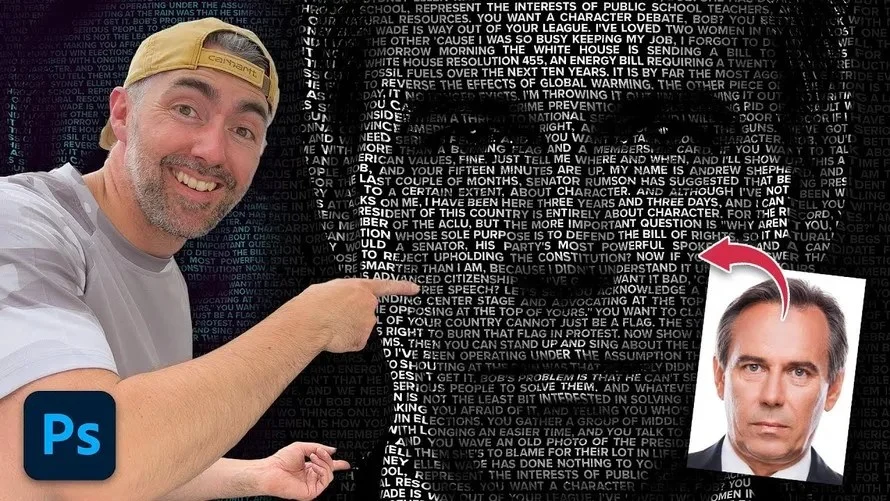
Techniques such as the "Text Portrait" (Calligram) represent a shift toward conceptual design. These projects require the artist to understand not just the mechanics of the "Displace" filter or "Clipping Masks," but the relationship between text and form. This is the intersection of typography and portraiture, where the medium (the words of a speech) becomes the message (the face of the speaker).

Cinematic Color Grading: The Professional Edge
One of the most critical skills for modern photographers is Cinematic Color Grading. By utilizing the Camera Raw Filter, designers can transform raw, flat images into moody, evocative pieces that evoke a specific emotional response. Mastery of these tones is what separates amateur snapshots from professional-grade visuals.

Curated Tutorial Highlights: A Practical Index
To aid your journey, we have compiled a selection of essential techniques that cover the breadth of modern Photoshop usage.

1. The Pencil Sketch Effect
By combining specific blur filters with layer blending modes, artists can strip away the digital nature of a photograph to create a hand-drawn, authentic sketch aesthetic.

2. Vaporwave and Neon Aesthetics
Neon glow techniques rely on the intelligent use of Layer Styles and "Inner/Outer Glow" settings. These tutorials teach designers how to simulate ambient light, casting color from neon shapes onto surrounding objects to create a sense of realism.

3. The 5-Stage Workflow
A professional editing workflow is broken down into:

- Base Adjustments: Correcting exposure via Camera Raw.
- Smart Object Conversion: Ensuring non-destructive workflows.
- Distraction Removal: Cleaning the canvas.
- Color Unification: Applying global color grading.
- Final Sharpening: Utilizing High Pass filters for crisp detail.
Official Responses and Industry Best Practices
Adobe’s official stance, reflected in their latest documentation, emphasizes that the future of Photoshop is "Co-creative." This means the software is designed to act as an intelligent partner rather than just a set of tools. Designers are encouraged to use AI for repetitive labor, such as removing backgrounds or expanding images, but to retain manual control over the artistic final pass.

Expert Advice for Beginners:

- Don’t skip the basics: Even if AI can do it for you, you must understand the underlying principles of selection and masking to fix errors when the AI miscalculates.
- Pause and Repeat: The most effective way to learn is to watch a tutorial, pause every 10 seconds, and replicate the action exactly.
- Experimentation: Once you complete a tutorial, change the variables. If the video uses a "Multiply" blend mode, try "Overlay" or "Soft Light" to see how it changes the final look.
Conclusion: Mastering the Infinite
The landscape of digital design is vast, ranging from the technical precision of skin retouching to the imaginative freedom of surrealist photo manipulation. By following a structured approach—mastering the tools, understanding the light, and embracing new AI technologies—designers can significantly accelerate their creative growth.

Photoshop is a tool of infinite potential. Whether you are converting a low-resolution graphic into a high-definition asset, creating a candy-textured typography effect using Firefly, or refining a professional portrait, the key is consistent practice. As you navigate these tutorials, remember that every layer you create and every adjustment you apply is a building block in your development as a digital artist. Keep your files organized, compare your before-and-afters, and never stop experimenting with the possibilities of the digital canvas.









No comments yet. Be the first to join the conversation!