Suro Senen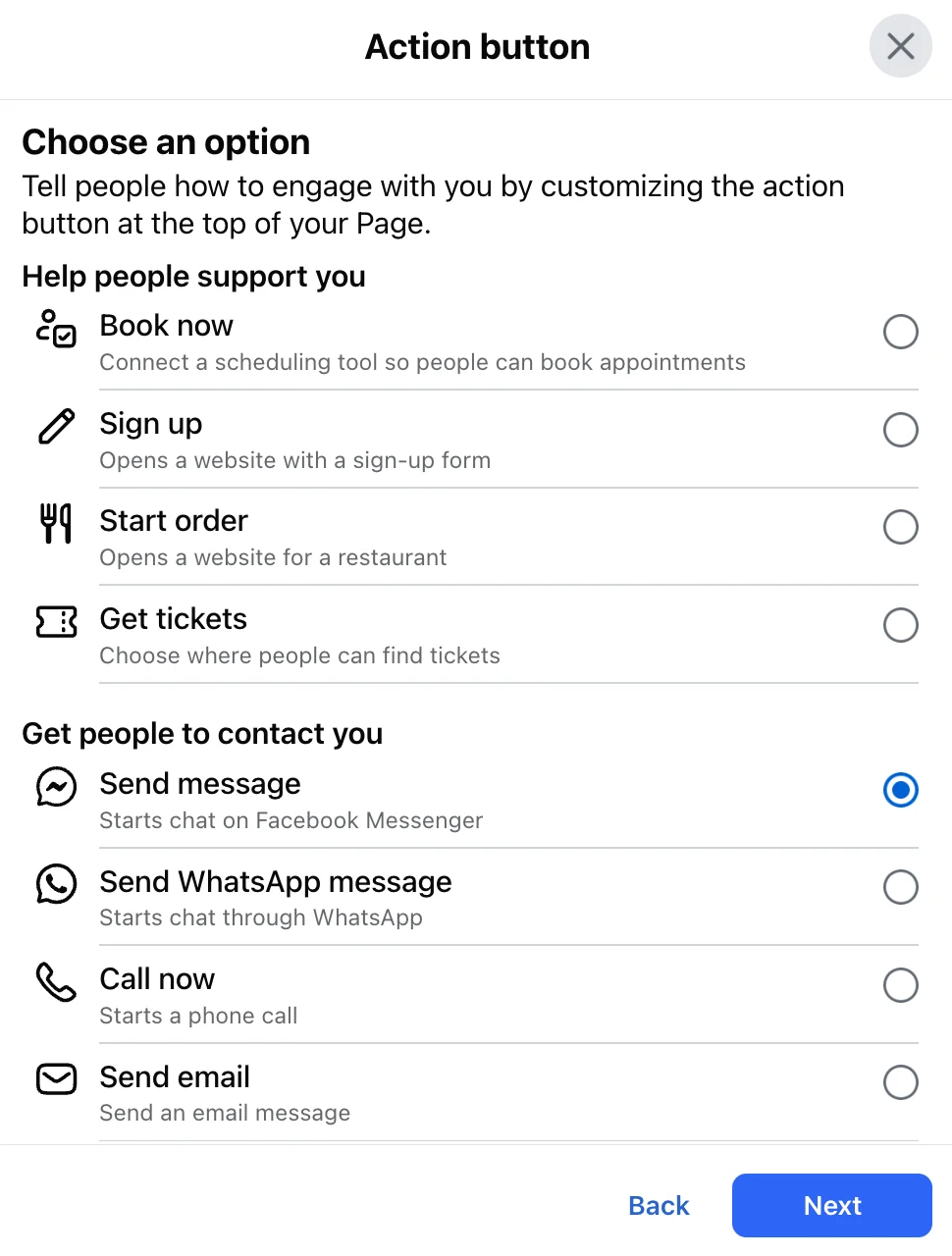
In the fast-paced ecosystem of social media marketing, Facebook remains a cornerstone for brand visibility. Yet, many businesses treat their presence on the platform as a digital brochure rather than a high-performance sales funnel. The "Link in Bio"—the most prominent, clickable real estate on your Facebook Business Page—is the bridge between passive scrolling and active conversion.
While individual posts and Reels may lose relevance as they descend in the feed, your bio link serves as a permanent, evergreen "home base." When optimized correctly, this single point of contact functions as a powerful tool for lead generation, sales, and community engagement. This guide explores the mechanics of maximizing your Facebook link in bio, from technical setup to advanced analytics.
1. The Anatomy of a Facebook Link in Bio
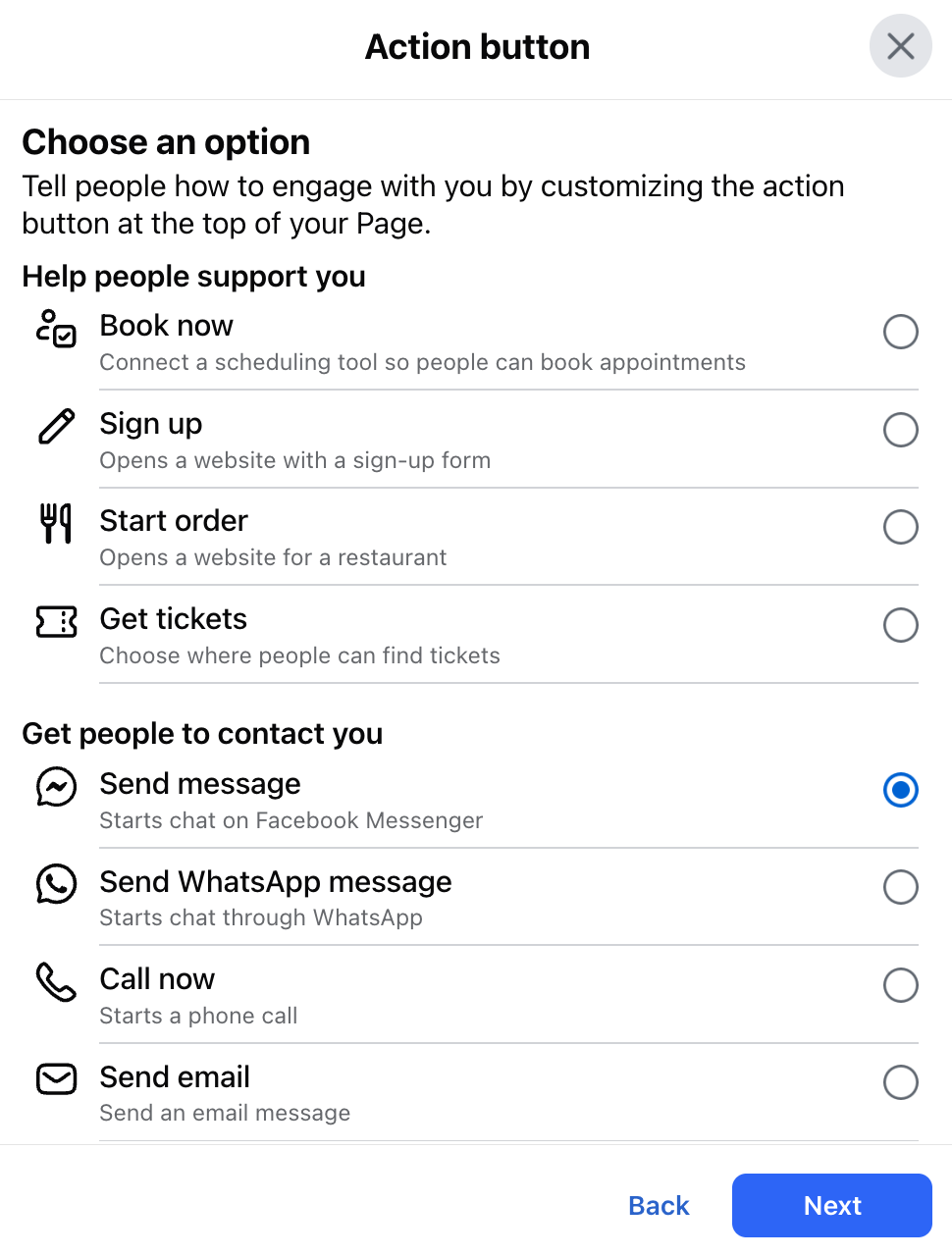
Your Facebook link in bio is officially recognized as the "Action Button" located at the top of your Business Page, situated just beneath your cover photo. It is the most prominent, clickable destination on your profile, designed by Meta to facilitate immediate interaction.
The Action Button vs. The Links Section
It is important to distinguish between the two primary ways to direct traffic on Facebook:
- The Action Button: This is the primary blue button that users see immediately upon visiting your page. It is customizable and allows you to set a specific goal, such as "Shop Now," "Book Now," or "Learn More." Because you can only have one active button at a time, its placement is critical for your primary business objective.
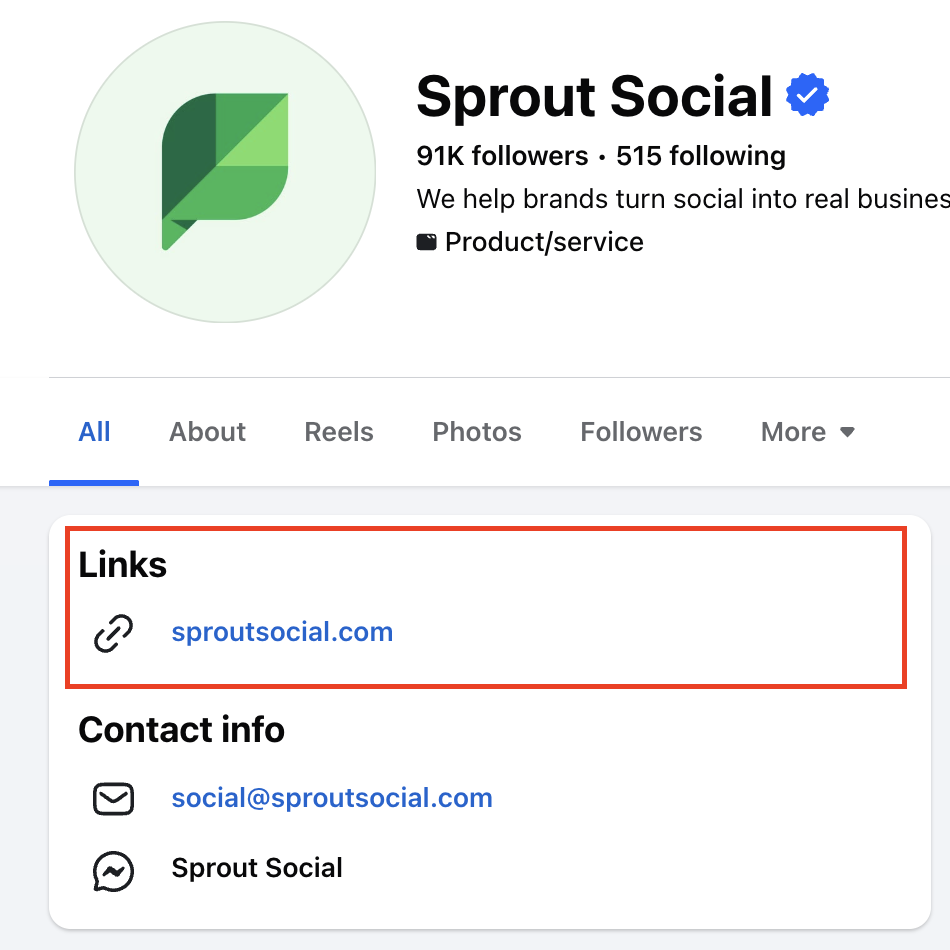
- The Links Section: Facebook also allows users to add up to 10 URLs in the "Links" section, found within your "About" tab and often displayed as a block below your Page name. While these are useful for secondary traffic (e.g., linking to your Instagram, Twitter, or a secondary landing page), they lack the visual prominence of the primary Action Button.
2. Strategic Chronology: From Setup to Optimization
Integrating a link in bio is a straightforward process, yet it is often overlooked by small businesses and legacy brands alike. Following a logical implementation path ensures your profile remains a dynamic conversion tool.
Phase 1: The Technical Setup
Whether you are on desktop or mobile, the process is designed for accessibility:

- On Desktop: Navigate to your Business Page, click the three-dot menu under your cover photo, select "Edit Action Button," and follow the prompts to choose your label and enter your destination URL.
- On Mobile: Open the Facebook app, tap your profile icon, select "Edit Page," and follow the same prompts to customize your button.
Phase 2: Maintaining Relevance
Once the button is live, the strategy shifts to maintenance. A common mistake is using a "set it and forget it" approach. If your Action Button points to a seasonal promotion that ended three months ago, you are effectively creating a "dead end" for potential customers.
- Quarterly Audits: Review your primary CTA (Call to Action) every three months to ensure it aligns with current marketing campaigns.
- Evergreen vs. Campaign-Specific: If you lack the bandwidth for frequent updates, point the button toward a high-converting evergreen destination, such as your main product catalog or a newsletter signup page.
3. Supporting Data: Why the Bio Link Converts
Research into consumer behavior on social platforms consistently shows that users are more likely to interact with brands that provide a frictionless path to action.
The Friction-Free Journey
When a user clicks on a Facebook post, they are often still in "discovery mode." However, when a user clicks a Link in Bio, they are in "high-intent mode." By providing a clear, direct path to your website, you reduce the number of clicks required for a transaction.
- Conversion Efficiency: Studies suggest that businesses using a clearly labeled Action Button see a 15–20% increase in traffic to their primary landing pages compared to those relying on links buried in post captions.
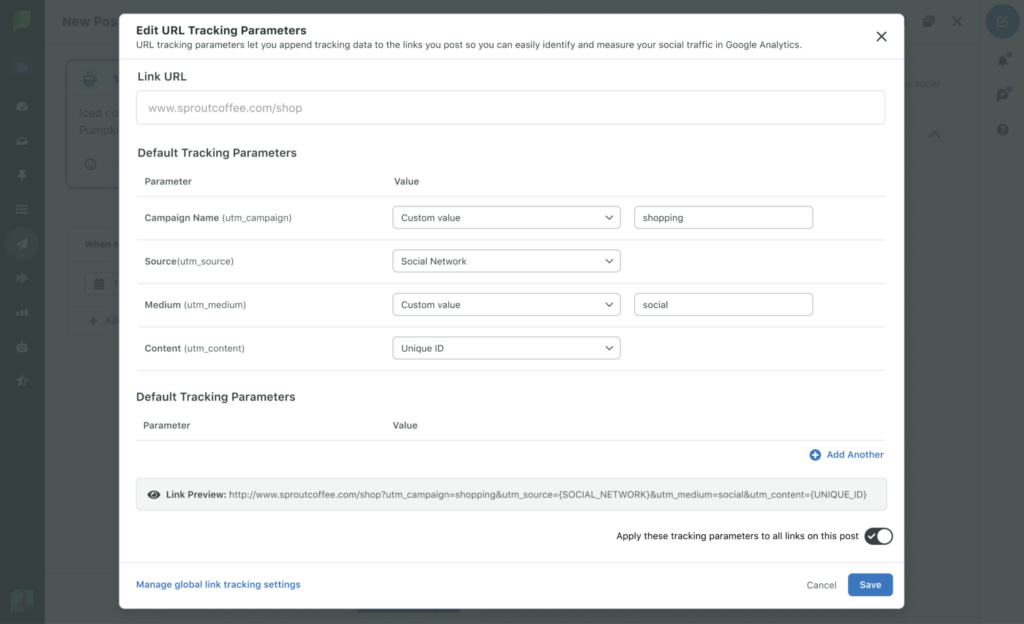
- Tracking Capabilities: Because the Action Button uses a single URL, it is arguably the easiest metric to track in your marketing stack. By applying UTM (Urchin Tracking Module) parameters, you can isolate exactly how much revenue or how many sign-ups originated from your Facebook profile versus organic search or paid advertising.
4. Professional Best Practices for Optimization
To ensure your link is not merely present but effective, adopt these professional standards:
Choose a CTA That Resonates
Don’t use generic labels if you don’t have to. If you are a local service provider, "Book Now" is infinitely more powerful than "Learn More." Match the button label to the psychological state of the user. If they are ready to buy, "Shop Now" is the imperative they need to see.
Embrace Multi-Link Landing Pages
When you have multiple priorities—such as a new podcast launch, a flash sale, and a contact form—don’t force them into one link. Utilize a multi-link landing page (such as those provided by Linktree or proprietary internal pages). This allows the user to self-segment, choosing the journey that best suits their needs.
Maintain Brand Consistency
A common pitfall is linking to a page that looks vastly different from your Facebook aesthetic. If a user clicks a button on your Facebook page and arrives at a site with different colors, fonts, or voice, they may doubt the legitimacy of the destination. Ensure your landing pages carry the same branding as your social presence to foster trust.
5. Implications for Future Marketing Strategy
The evolution of the "Link in Bio" reflects a broader shift toward "social commerce." As platforms like Facebook continue to integrate shopping features directly into their interfaces, the line between social media and e-commerce is blurring.
The Shift to Data-Driven Decisions
The primary implication for marketers is the need for integrated analytics. You can no longer afford to treat social media reporting and website analytics as silos. The most successful brands now use integrated platforms—such as Sprout Social—to centralize their data. By seeing the performance of their Facebook links alongside their publishing schedules and audience sentiment, they can pivot their strategy in real-time.
The Role of Automation
As agencies and brands manage an increasing number of touchpoints, manual updates to bio links are becoming obsolete. Automated workflows, where a change in a central dashboard updates your Facebook Action Button, your Instagram link, and your internal reporting sheets simultaneously, represent the next stage of efficiency.
6. Official Insights: Measuring Success
To measure the effectiveness of your Facebook link in bio, focus on these three core metrics:
- Click-Through Rate (CTR): This measures how many people who visited your Page actually clicked the button. A low CTR indicates that your button is either invisible, the label is confusing, or the value proposition isn’t compelling enough.
- Bounce Rate: If your link sends users to a landing page where they immediately leave, the issue isn’t your Facebook link—it’s your landing page content. Your link in bio is only as good as the destination it serves.
- Conversion Attribution: By utilizing UTM parameters, track how many "goal completions" (sales, sign-ups, downloads) were initiated via the Facebook Action Button.
Expert Conclusion
The Facebook link in bio is more than a button; it is the most critical call-to-action in your social media arsenal. By treating it as a dynamic, measurable asset—regularly auditing its performance, refining its label, and tracking its contribution to your bottom line—you move from simply "posting on Facebook" to building a sophisticated, high-intent sales funnel. Whether you are a solo entrepreneur using a simple aggregator or an enterprise brand utilizing an integrated management platform, the principles remain the same: simplify the path, provide clear direction, and let the data guide your next move.

 Asro
Asro
 Nila Kartika Wati