

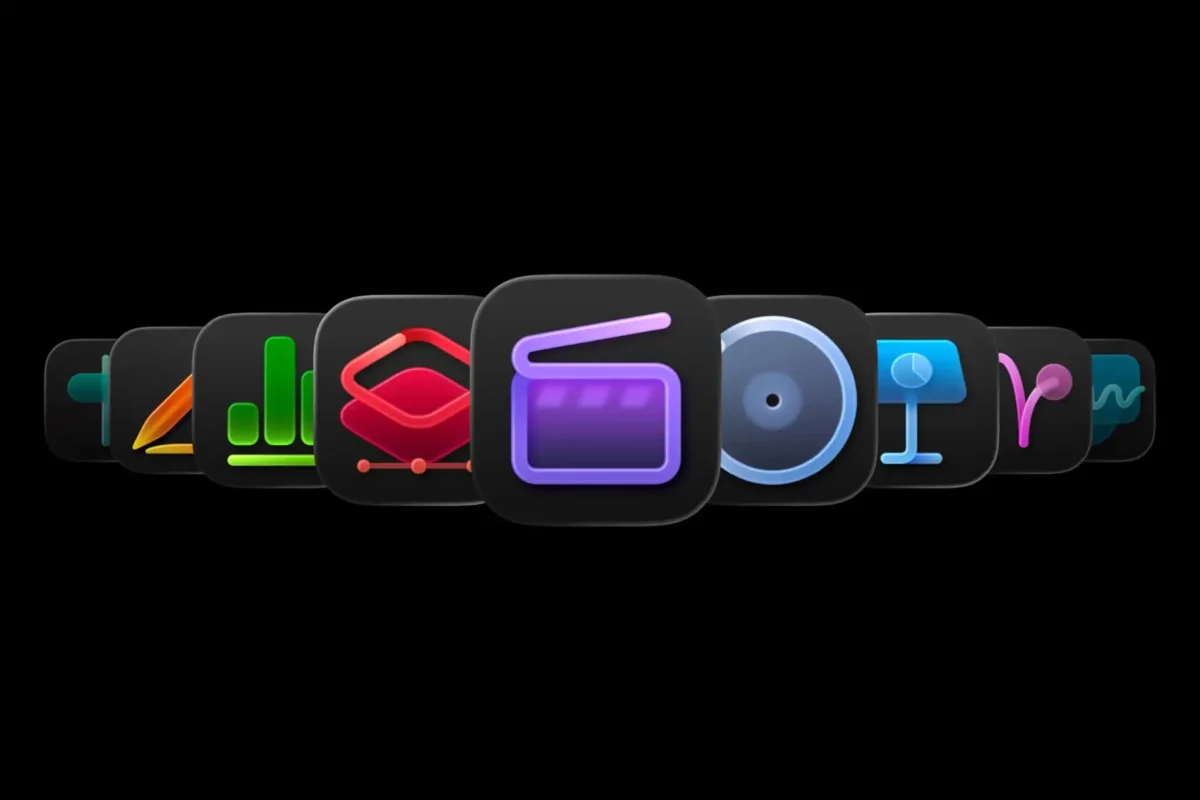
In the world of user interface (UI) design, the icon is the ultimate shorthand. It is a visual command, a tiny, pixel-perfect ambassador for a complex software process. For decades, Apple has been the industry standard-bearer for intuitive design, championing the principle that a user should never have to think about how to use a tool—they should simply know.
However, the recent release of the new "Creator Studio" suite has sparked a firestorm in the design community. Moving away from the highly illustrative, functional iconography that once defined its software, Apple has introduced a series of abstract, minimalist symbols that are so opaque they have necessitated an official, step-by-step user guide. This shift has left designers, casual users, and industry analysts questioning whether Apple has prioritized aesthetic "purity" over the fundamental accessibility that once cemented its reputation.
The Core Conflict: Form Over Function
The new Creator Studio icons represent a departure from the visual clarity seen in previous iterations. Where Apple once employed icons that offered clear, metaphorical representations of their functions—a pencil for drawing, a note for writing, a waveform for audio—the new suite adopts a style reminiscent of the recent macOS Tahoe aesthetic.
The icons are characterized by muted tones, geometric abstraction, and a lack of descriptive imagery. While this look might satisfy a certain minimalist design philosophy, it fails the primary test of UI design: glanceability. When a user navigates their dock or home screen, they rely on muscle memory and visual recognition. By stripping away the familiar visual cues, Apple has effectively introduced a "cognitive speed bump" into the daily workflow of its professional user base.
A Chronology of the Aesthetic Shift
To understand why this change is causing such friction, one must look at the evolution of Apple’s design language over the last decade.
- 2013: The Great Flattening: The transition from the skeuomorphic (realistic, textured) design of iOS 6 to the flat, clean aesthetics of iOS 7 was initially controversial but eventually hailed as a masterclass in modernizing digital interfaces.
- 2020: The Big Sur Refinement: Apple began introducing more depth and uniform shapes to icons, aiming for a balance between the playful, colorful history of the brand and a more "Pro" aesthetic.
- 2024: The Abstract Turn: With the introduction of the Creator Studio update, Apple has moved into a "post-illustrative" phase. By focusing on abstract, concept-led shapes rather than representational imagery, the design team has moved further away from the tangible reality of the software tools themselves.
This progression suggests a company leaning heavily into its own internal design culture, perhaps becoming somewhat detached from the lived experience of the average user who views an icon not as art, but as a gateway to productivity.
The Paradox of the "User Guide"
Perhaps the most telling indictment of this design choice is the existence of an official Apple support document dedicated to explaining the icons.
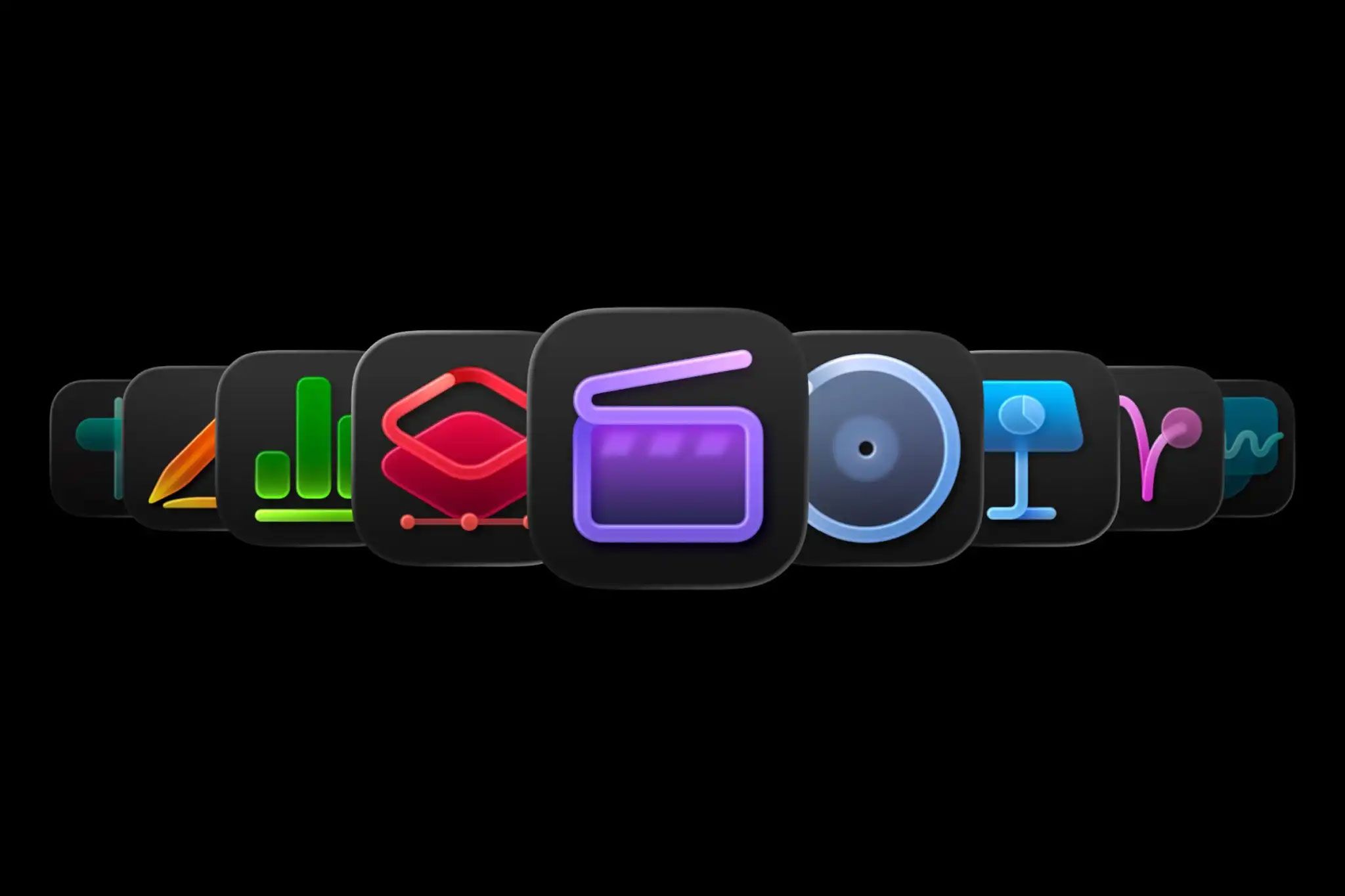
In a field where "good design is invisible," the need for a manual to decode a navigation menu is the antithesis of user-centric development. If an icon requires an accompanying key, it has fundamentally failed its purpose. This has led to a significant amount of criticism from UI/UX professionals who argue that Apple has prioritized a "clean" look at the expense of usability.
Why Abstraction Fails in a Suite
The problem is amplified when these icons appear in a set. In isolation, a cryptic symbol might be intriguing. However, when placed in a dock alongside five other similarly cryptic, muted, and abstract icons, they lose their distinctiveness. The human brain processes patterns and colors faster than it processes complex shapes. By muting the color palette and standardizing the abstract form, Apple has effectively forced users to "read" their interface rather than "recognize" it.
Supporting Data: The Cost of Cognitive Load
Cognitive Load Theory (CLT) suggests that when users are forced to expend mental energy identifying tools, their capacity for the actual task—the creative work within Creator Studio—is diminished.
While Apple has not released internal metrics on the efficiency of these icons, anecdotal reports from early adopters highlight several key issues:
- Increased Latency: Users report a hesitation—a momentary pause—before clicking an icon to ensure they are opening the correct application.
- Lack of Context: Unlike the previous design, which utilized varying color schemes to help differentiate apps, the new, muted palette makes the icons bleed into one another visually.
- Accessibility Concerns: For users with visual impairments or those who rely on high-contrast visual cues, the new, subtle designs are significantly harder to differentiate, potentially alienating a demographic that Apple has historically championed.
The Industry Context: A Season of Discontent
Apple is not the only tech giant struggling with this trend. Google, too, has faced significant backlash for its shift toward uniform, multicolored, and highly abstract icons across its Workspace suite.
In both instances, the logic appears to be the same: a desire for a unified "brand language" across all platforms. However, there is a point at which brand cohesion infringes upon utility. The success of the "parody" icons—user-created alternatives that restore the clear, representative visual language of the past—proves that there is a massive appetite for design that actually works. When users are actively creating their own "fixes" to restore functionality, it is a clear signal that the official design has missed the mark.
Implications: Where Does Apple Go From Here?
The current situation poses a difficult question for Apple’s design team: Do they stick to their guns in the name of visual consistency, or do they acknowledge the user frustration and iterate toward a more functional design?
The "Apple Way" of Adaptation
Historically, Apple is not known for rapid course correction in response to public outcry. However, they are known for quiet refinement. It is highly probable that future updates to Creator Studio will introduce subtle changes—perhaps more distinct color coding or the reintroduction of subtle metaphorical elements—without ever formally admitting that the current design was flawed.
The Future of Professional Design
The broader implication of this shift is a potential divide in the software industry. We are seeing a move away from "functional design" (where the look is dictated by the task) toward "lifestyle design" (where the look is dictated by the brand’s overall aesthetic). For professional-grade software like Creator Studio, this is a dangerous pivot. When software becomes a professional tool, it must prioritize the user’s workflow over the designer’s portfolio.
Conclusion: Lessons in Intuitive Design
The backlash against the new Creator Studio icons serves as a timely reminder that technology exists to serve human intent. When an icon—the smallest unit of digital communication—requires a manual, the design has become a barrier rather than a bridge.
Apple remains the most influential design force on the planet. Their choices dictate trends for the rest of the industry. If they continue to prioritize abstract minimalism over the tried-and-true principles of functional design, we risk a future where our digital tools are beautiful to look at, but frustrating to use.
Ultimately, the best design is that which goes unnoticed. It is the design that allows the user to achieve their goal without a second thought. As Apple moves forward, one hopes they will rediscover that the most "minimalist" approach of all is the one that allows the user to find what they need, the moment they need it, without having to consult a guide.
What remains to be seen is whether Apple will listen to the feedback from its most loyal creative professionals, or if they will continue to drift further into an aesthetic that values the "look" of creativity over the act of creating itself. For now, the user manual stays in the dock—a quiet monument to a design choice that, for many, simply doesn’t add up.









No comments yet. Be the first to join the conversation!