Reynand Wu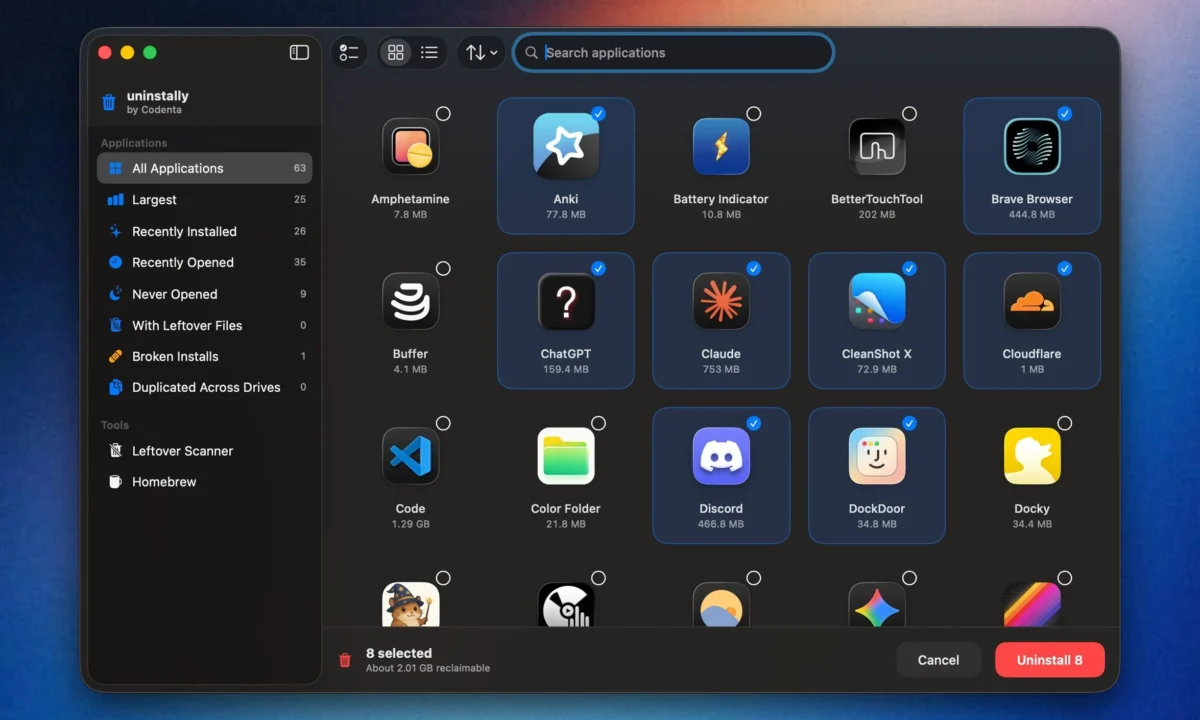
Uninstalling an application on macOS has long been sold to users as a trivial task: simply drag the application icon into the Trash, empty it, and consider the job done. While this "drag-and-drop" simplicity is a hallmark of the Mac user experience, it hides a persistent reality that plagues power users and casual owners alike: digital rot.
When you remove an application in the traditional way, the actual executable is deleted, but the ecosystem it leaves behind remains. Support files, deep-seated caches, obscure preference files, application containers, and sprawling log files often persist in the hidden depths of the macOS Library folder. Over time, these orphaned files accumulate, consuming valuable storage space and potentially leading to performance degradation. While industry veterans have long relied on tools like AppCleaner to mitigate this, a new open-source contender, Uninstally by Codenta, is challenging the status quo with a sophisticated, granular approach to system hygiene.
The Problem: Why Your Mac Never Truly "Forgets"
To understand why tools like Uninstally are gaining traction, one must first understand the architecture of macOS. Unlike some operating systems that use a centralized registry, macOS relies on a distributed file system. An application is not just a single file; it is a "bundle" that interacts with dozens of disparate locations across your hard drive.
When an application is launched, it creates configuration files in ~/Library/Preferences, temporary data in ~/Library/Caches, and persistent state information in ~/Library/Application Support. When that application is deleted, macOS does not automatically trigger a "deep clean" of these locations. This is by design—Apple assumes these files might be needed if you decide to reinstall the software later. However, for the vast majority of users, this results in gigabytes of "ghost data" that serve no purpose other than occupying disk space and cluttering the system.
Uninstally: A New Paradigm in App Management
Uninstally, developed by Codenta, enters the market as a high-precision alternative to legacy cleanup utilities. While its predecessor, FreeMacSoft’s AppCleaner, has remained a staple for years, Uninstally differentiates itself through its deep integration with the macOS Finder and its advanced heuristic engine.
Integration and User Workflow
One of the most significant barriers to using third-party cleanup tools is the friction of workflow. Opening a separate utility, searching for an app, and running a scan can feel like a chore. Uninstally addresses this by integrating directly into the Finder. By enabling the application’s Finder extension, users can simply right-click any .app bundle and select "Uninstall with Uninstally."
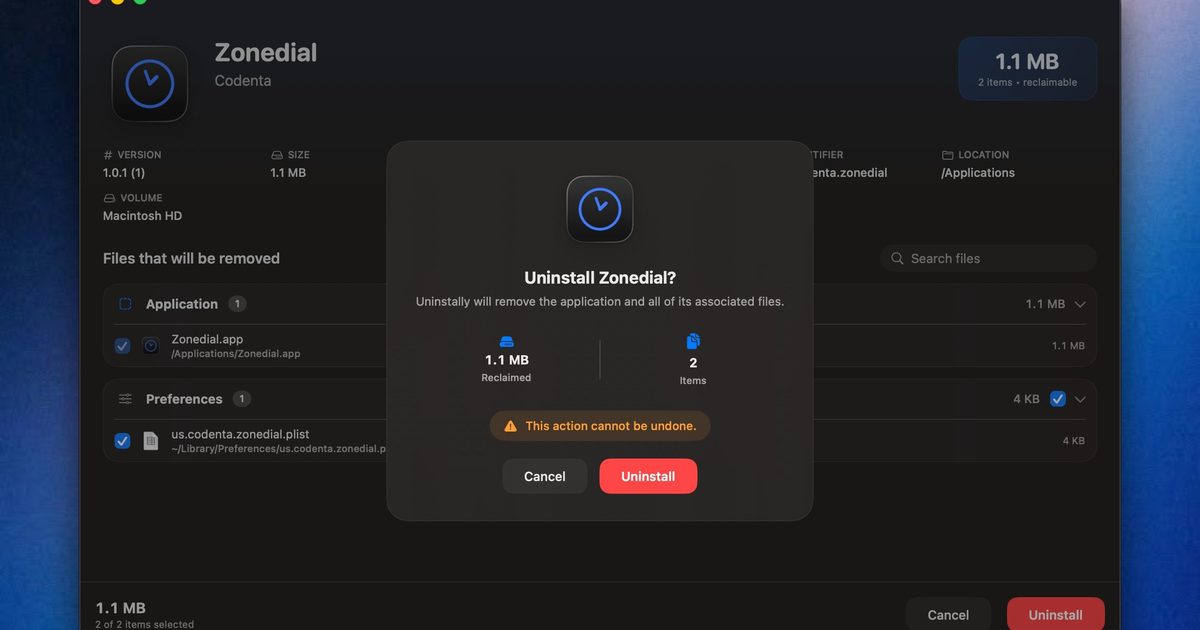
This triggers a contextual menu that bypasses the need to navigate through a separate application window. It provides an immediate, streamlined confirmation dialog, offering a level of convenience that makes routine maintenance feel like a natural part of file management.
Advanced Heuristics and Intelligence
The true strength of Uninstally lies in how it identifies "leftovers." Many older utilities rely on simple string matching—looking for folder names that happen to match the name of the deleted app. This is prone to error and can sometimes miss critical files or, worse, incorrectly flag unrelated system files.
Uninstally utilizes the application’s unique bundle identifier and helper namespaces. By mapping these specific identifiers across the entire Library hierarchy, the software creates a comprehensive map of every dependency associated with that application. Before any deletion occurs, Uninstally presents a detailed breakdown to the user, including:
- The application icon and name.
- The total amount of reclaimable storage.
- A count of individual files to be purged.
- A granular review screen, allowing users to deselect specific items if they wish to retain certain data (such as local configuration profiles).
The Evolution of Mac Cleanup: A Chronology
The history of Mac maintenance software is a roadmap of the operating system’s own evolution. In the early 2000s, manual deletion was the only path. Users were expected to be "file-system savvy," manually navigating to the ~/Library folder to scrub residuals.
- The Early Era (2005–2010): As applications grew more complex, the first wave of "app zappers" emerged. These were often simple scripts designed to hunt for files with matching metadata.
- The Maturity Era (2010–2020): Tools like AppCleaner became the gold standard. They introduced graphical user interfaces (GUIs) that made the process accessible to the average consumer.
- The Modern Era (2025–Present): With the advent of Apple Silicon and more complex sandboxing, the requirements for a cleaner have changed. Modern tools must account for containerized data and, increasingly, command-line package managers like Homebrew. Uninstally represents this new generation, focusing on transparency and deep-system awareness.
Beyond Simple Deletion: A Comprehensive Suite
While the primary function of Uninstally is the removal of active apps, its utility extends significantly further. Its standalone browser is a powerful diagnostic tool for any Mac user looking to audit their storage.
Data-Driven Cleanup
The browser view allows users to sort applications by various metrics, which is invaluable for those managing smaller SSDs. Users can filter by:
- Largest Apps: Identifying the heavy hitters that are consuming the most space.
- Recently Installed: A great way to prune trial software that was only used once.
- Never Opened: Highlighting "zombie" applications that are just taking up space.
- Broken Installs: Identifying apps that have missing components, which often lead to system instability.
The Leftover Scanner
Perhaps the most impressive feature is the dedicated "Leftover Scanner." For those who have been using their Mac for years without a cleanup utility, the Library folder is likely filled with remnants of software long forgotten. Uninstally’s scanner acts as a forensic tool, aggregating orphaned support files, caches, and logs into a single, actionable list. This allows users to perform a "deep clean" of their entire machine in one session, potentially reclaiming significant amounts of storage.
Homebrew Support and Power User Capabilities
For developers and IT professionals who rely on Homebrew, Uninstally offers a unique advantage. Homebrew is a powerful command-line package manager, but its "casks" and "formulae" often leave behind hidden configurations that are difficult to track.
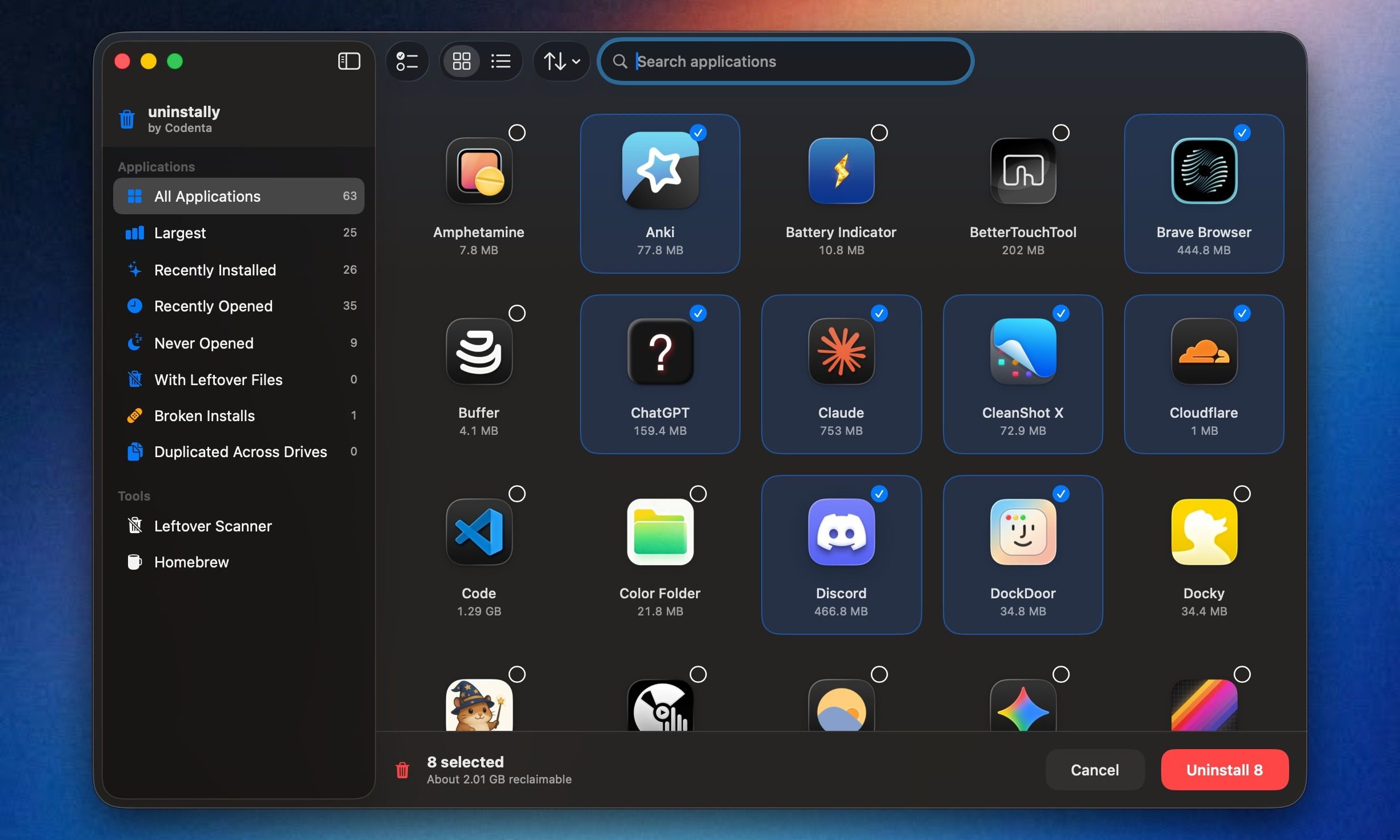
Uninstally provides native support for Homebrew, allowing users to view dependency relationships and perform "zap" cleanups. By handling both standard GUI applications and command-line tools, Uninstally positions itself as a dual-purpose tool—serving both the casual user and the technical enthusiast. It handles user-domain files with standard permissions, while automatically triggering administrator prompts for privileged system items, ensuring that the cleanup is both thorough and secure.
Implications for System Health and Performance
Does removing these files actually make a difference? While modern macOS versions are highly optimized, the accumulation of thousands of tiny cache files and preference entries can lead to what is colloquially known as "system bloat."
Storage and Spotlight Efficiency
When Spotlight indexes a drive, it crawls through the Library folders. By removing thousands of unnecessary files, you are effectively thinning out the index. This can lead to snappier file searches and a more responsive system. Furthermore, for users on smaller storage configurations (such as base-model MacBook Airs), the cumulative effect of reclaiming hundreds of megabytes—or even gigabytes—of space can be the difference between a functional system and one that is constantly triggering "Disk Full" warnings.
Stability and Conflict Mitigation
Preferences and support files are occasionally the root cause of application crashes. If an app is reinstalled but the old, corrupted preference file remains, the new installation may inherit the same bug. By ensuring a "clean slate" upon removal, tools like Uninstally facilitate a more robust computing environment.
Conclusion: The Case for Digital Hygiene
As we continue to rely on our computers for increasingly complex tasks, the maintenance of the operating system itself becomes a vital aspect of digital literacy. The "drag to trash" method, while simple, is insufficient for a modern, high-performance machine.
Uninstally, by Codenta, succeeds because it respects the user’s autonomy. It does not force an automated, blind cleanup; instead, it provides the tools, visibility, and power to make informed decisions about what stays and what goes. By bridging the gap between the simplicity of the macOS interface and the complexity of its underlying architecture, it offers a sophisticated solution to a persistent problem.
Whether you are a casual user looking to reclaim space or a developer managing a complex Homebrew environment, Uninstally is a compelling addition to the macOS ecosystem. It is available for download through Codenta’s website or via their GitHub repository, marking a new, transparent, and highly effective chapter in the history of Mac system utilities. In an era of increasing digital complexity, having a tool that helps your computer "forget" the past is, perhaps, the ultimate form of modern convenience.


 Asep Darmawan
 Pevita Pearce