Rifan Muazin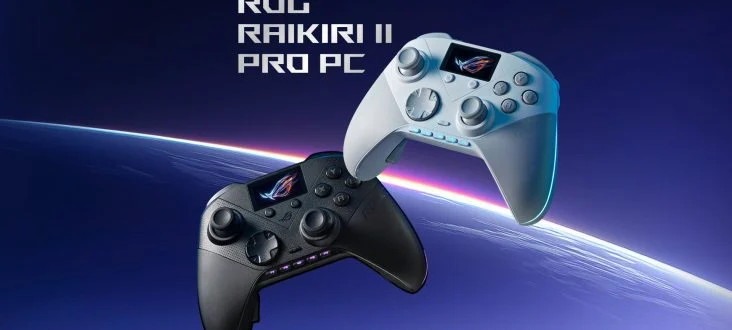
By Mustafa Mahmoud
While the world of console gaming often sees hardware manufacturers prioritizing a conservative, "if it ain’t broke, don’t fix it" approach to controller design, the PC gaming peripheral market has become the true crucible of innovation. Freed from the rigid ecosystem requirements of first-party manufacturers, third-party brands are pushing the boundaries of what a controller can do. Leading this charge, ASUS has officially pulled back the curtain on the ROG Raikiri II Pro PC controller, a device that promises to redefine the interaction between player and machine.
Main Facts: A Paradigm Shift in Input Hardware
The ROG Raikiri II Pro is not merely a controller; it is a high-end command center designed specifically for the discerning PC enthusiast. ASUS Republic of Gamers (ROG) has packed the device with a suite of premium features, aiming to bridge the gap between traditional gamepad comfort and the deep customization typically reserved for professional-grade PC gaming peripherals.
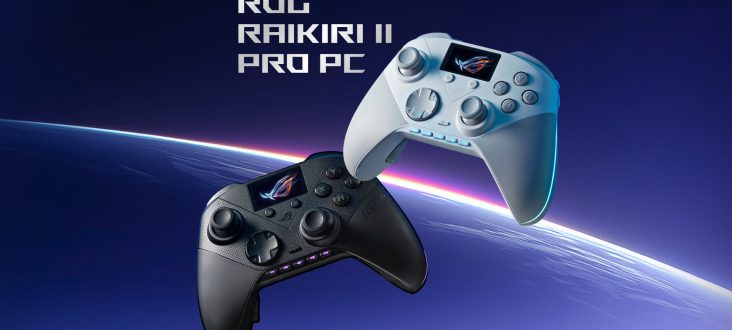
At the heart of the Raikiri II Pro’s appeal is its "Full Colour Panel." Integrated into the face of the controller—occupying the space where one might expect a standard touchpad—this OLED display serves as a dynamic interface for the user. Unlike static buttons or simple LED strips, this panel offers granular control over the controller’s hardware settings, allowing users to switch profiles, monitor battery life, adjust RGB lighting, and even display custom animations or status indicators without ever needing to minimize their game or open desktop software.
Beyond the display, the controller features a tri-mode connectivity setup (Bluetooth, 2.4GHz RF, and USB-C wired), ensuring that latency is a non-issue regardless of the player’s setup. It also incorporates customizable rear paddles, adjustable trigger travel depths, and high-fidelity onboard audio processing, signaling ASUS’s intent to make this the definitive choice for competitive and casual PC gamers alike.
Chronology of Development: From Concept to Command Center
The evolution of the Raikiri series reflects a broader shift in ASUS’s strategy toward the gaming peripheral space. For years, ASUS focused heavily on mechanical keyboards and high-end mice, but the gap in the market for a truly premium, PC-first controller became impossible to ignore.
- Phase 1: Market Research (2022): ASUS identified a demand among its ROG user base for a controller that matched the build quality and aesthetic of their flagship keyboards and mice. The focus was on "PC-native" features—functionality that didn’t feel like a port of a console peripheral.
- Phase 2: Prototyping (2023): Initial internal testing focused on the viability of an integrated display. Early feedback suggested that while gamers loved the idea, it had to be functional rather than purely decorative. This led to the development of the menu-navigation system for the OLED panel.
- Phase 3: Beta Testing and Refinement (Early 2024): ASUS engaged with competitive esports players to refine the haptic feedback, joystick tension, and trigger responsiveness. The addition of the rear paddles was finalized during this stage, drawing inspiration from existing pro-controllers but adding custom mapping software.
- Phase 4: Official Unveiling (Present): The Raikiri II Pro is now the culmination of years of iterative design, aiming to set a new standard for high-end PC gaming controllers.
Supporting Data: Technical Specifications and Performance
The ROG Raikiri II Pro is engineered for performance, with hardware that prioritizes speed and reliability. Below are the key technical pillars that distinguish the controller:
1. Connectivity and Latency
The controller utilizes a low-latency 2.4GHz connection mode for competitive scenarios, ensuring the signal is as fast as a wired connection. For those who prefer a cleaner desk, the Bluetooth connectivity allows for easy pairing with laptops and tablets, while the USB-C wired mode ensures zero-latency, lag-free performance during intense competitive play.
2. The OLED Command Center
The full-color panel is more than just a screen; it is a hardware-integrated menu system. Key features include:
- Real-time Profile Switching: Swap between custom button layouts on the fly.
- Visual Status Monitoring: View battery levels and connectivity status.
- Aura Sync Integration: Customize the controller’s RGB lighting zones directly from the device.
- Custom Graphics: Users can upload their own logos or animations to personalize their unit.
3. Ergonomics and Customization
ASUS has implemented "step-trigger" locks, which allow users to shorten the travel distance of the triggers. This is essential for competitive shooters, where a hair-trigger response can mean the difference between winning and losing. Additionally, the four programmable rear buttons allow for complex macros to be executed without removing thumbs from the joysticks.
4. Audio Quality
The controller includes a built-in ESS DAC, providing superior audio clarity for wired headsets plugged directly into the controller’s 3.5mm jack. This ensures that the Raikiri II Pro isn’t just a gaming input device, but a high-fidelity audio pass-through for the PC.
Official Responses and Industry Outlook
While ASUS has not provided a specific price point, the industry consensus suggests a premium tier. Given the inclusion of the OLED panel, the high-end DAC, and the proprietary wireless technology, analysts expect the Raikiri II Pro to compete directly with products like the Xbox Elite Series 2 and the Scuf Envision Pro.
In a recent press statement, a representative for ASUS ROG noted: "The ROG Raikiri II Pro represents our commitment to the PC gamer who refuses to compromise. We aren’t trying to make a console controller for the PC; we are building a PC peripheral that happens to take the shape of a controller. Every aspect of this device, from the OLED panel to the custom DAC, was chosen because it enhances the PC gaming experience specifically."
Implications: The Future of Peripheral Design
The release of the Raikiri II Pro highlights a broader trend: the "PC-ification" of gaming controllers. As PC gaming continues to see growth, the demand for hardware that bridges the gap between traditional keyboard/mouse precision and controller comfort is skyrocketing.
The "Gimmick" vs. "Feature" Debate
Critics may argue that an OLED screen on a controller is an unnecessary "gimmick." However, the industry is increasingly moving toward "smart peripherals." If a screen can prevent a player from having to alt-tab out of a game to adjust their audio mix or sensitivity, it provides a tangible quality-of-life improvement. The success of the Raikiri II Pro will likely determine whether other manufacturers follow suit with integrated displays.
The Ecosystem Play
ASUS’s focus on integrating the controller into the Armoury Crate ecosystem suggests they are building a cohesive "ROG experience." By allowing users to sync their controller’s RGB lighting, audio settings, and button mappings with their ASUS motherboard, monitor, and keyboard, the brand is creating a "sticky" ecosystem that encourages users to buy exclusively within the ROG line.
Conclusion
The ROG Raikiri II Pro is a bold statement of intent from ASUS. It acknowledges that the PC controller market is no longer a secondary consideration but a primary frontier for innovation. Whether the full-color panel becomes a standard feature or remains a luxury touch for the high-end market, ASUS has undeniably moved the needle forward.
For the competitive gamer, the combination of hardware-level customization, low-latency connectivity, and high-fidelity audio makes the Raikiri II Pro an intriguing prospect. While we await the official pricing, the features alone ensure that this controller will be at the top of many wishlists this year. As the line between console-style comfort and PC-level customization continues to blur, the Raikiri II Pro stands as a testament to the fact that in the world of high-end hardware, there is always room to do more.
What do you think of the ROG Raikiri II Pro? Does the OLED screen offer legitimate utility for your gaming sessions, or is it an unnecessary addition? We invite our readers to share their perspectives in the comments section below.

 Asro
Asro
 Basiran