

For years, Apple’s built-in macOS screenshot utility has been the reliable workhorse for casual users. With a simple Command + Shift + 4, users can capture regions, windows, or the entire screen. It is functional, integrated, and free. However, for power users, content creators, and professionals who rely on visual communication, the native tool often feels like a relic—a basic utility that fails to scale with the demands of modern workflows.
Enter CleanShot X, a third-party application that has quietly revolutionized how Mac users handle visual data. It does not just augment the native macOS experience; it fundamentally replaces it with a suite of professional-grade tools that address the primary pain points of digital documentation. From scrolling captures and advanced OCR to seamless cloud integration, CleanShot X has transformed from a niche utility into a staple of the Mac power-user ecosystem.

Main Facts: The Anatomy of a Power Utility
CleanShot X is designed with a singular philosophy: eliminate friction. While the macOS utility forces users to save files to the desktop, hunt for them, and manually open them in an editor, CleanShot X operates via a "Quick Access Overlay." This floating menu allows users to pin, copy, save, or share their captures instantly.
The core value proposition of CleanShot X lies in its comprehensive feature set:

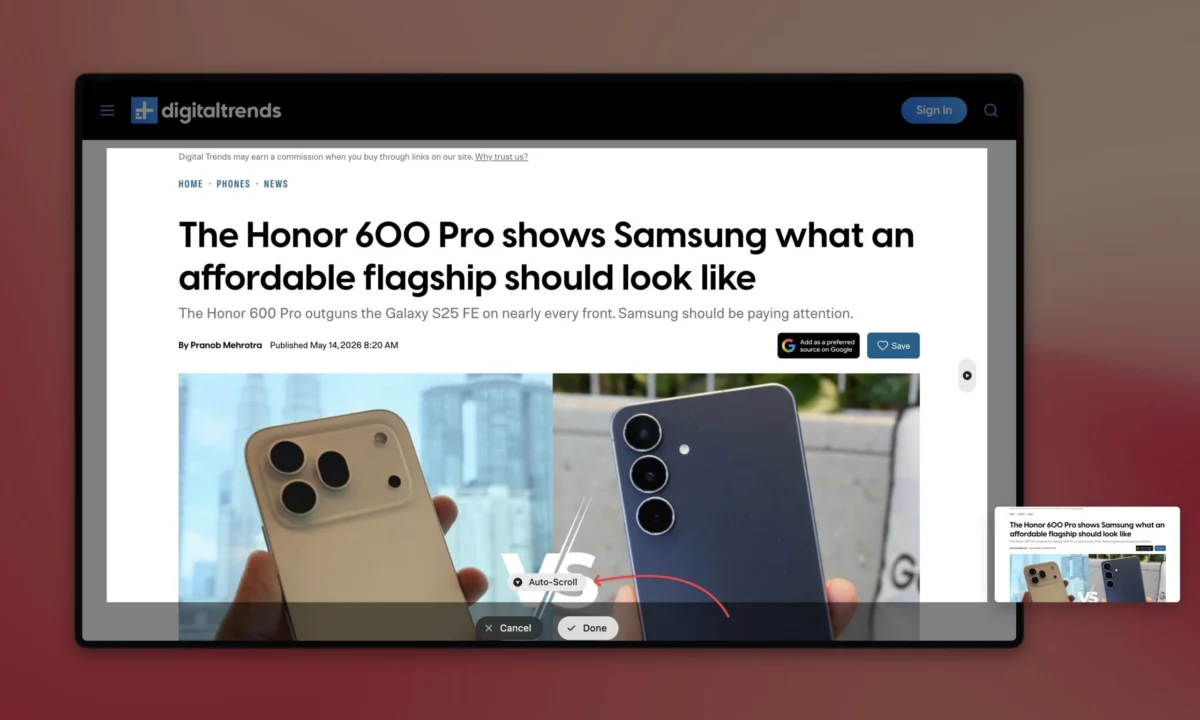
- Scrolling Capture: The ability to bypass the "visible window" limitation by auto-scrolling through long webpages or chat logs.
- Precision Timing: A built-in self-timer for capturing transient UI elements that disappear upon mouse interaction.
- Integrated OCR: A robust text-recognition engine that extracts data from images or video streams.
- Professional Annotation: A toolkit that includes customizable arrows, shapes, spotlight effects, and text.
- Privacy Controls: Sophisticated redaction tools that blur or pixelate sensitive information.
- Recording Capabilities: High-performance screen recording with support for GIF export, webcam overlays, and keystroke visualization.
Chronology: The Evolution of the Screenshot Workflow
To understand the rise of CleanShot X, one must look at the historical trajectory of macOS screenshot tools. In the early days of OS X, screenshots were limited to basic file saves. Over time, Apple introduced the Shift + Command + 5 overlay, which brought minor improvements like screen recording and basic window selection.
However, the "golden age" of remote work—roughly 2020 to the present—exposed the limitations of these native tools. As remote collaboration increased, the need to share technical issues, document complex bugs, and provide visual feedback became paramount.

During this period, CleanShot X moved beyond a simple capture tool. It began integrating cloud infrastructure, allowing users to upload images to a dedicated server and share a URL instantly. This shifted the workflow from "save-attach-send" to "capture-paste-done." By 2025, the application had firmly established itself as a must-have for developers, designers, and project managers, iterating its interface to become faster and more unobtrusive with every macOS update.
Supporting Data: Why Efficiency Matters
The economic argument for tools like CleanShot X is built on the concept of "micro-efficiencies." If a user takes an average of ten screenshots a day, and the process of saving, renaming, and attaching them takes 30 seconds longer using native tools than with CleanShot X, the user loses five minutes of productivity daily.

Over a standard work year of 260 days, that translates to over 21 hours saved. When accounting for more complex tasks—like manually stitching together four screenshots of a long document—the time savings are even more dramatic.
Furthermore, user sentiment analysis on platforms like Reddit and X suggests that the "Quick Access Overlay" is the most cited reason for switching. By keeping a screenshot "hovering" in the corner of the screen, the app prevents the common "desktop clutter" phenomenon, where users end up with dozens of stray .png files that require manual deletion at the end of the week.

Official Responses and Industry Reception
While Apple has not commented directly on third-party utilities like CleanShot X, the company’s internal development of macOS features often mirrors the functionality introduced by these developers. For instance, the introduction of native OCR ("Live Text") in recent versions of macOS indicates that Apple acknowledges the demand for intelligent text extraction.
Despite these native advancements, industry experts argue that Apple’s focus remains on the "general consumer," leaving a significant gap for "prosumer" tools. CleanShot X occupies this gap by offering depth that Apple intentionally omits for the sake of simplicity. The app’s consistent placement in "Best Mac Utilities" lists across tech media underscores its position as the industry standard for screen-based documentation.

Implications: The Future of Visual Communication
The implications of adopting a tool like CleanShot X extend beyond simple convenience. In an era where digital communication is dominated by screenshots and video snippets, the ability to annotate, redact, and share information rapidly is a core competency.
The Security Angle
Perhaps the most critical implication is the security of the user. In the past, leaking an API key, a personal email address, or a confidential client name in a screenshot was a frequent occurrence. With the built-in, one-click redaction tool, CleanShot X lowers the barrier to privacy. By making it easier to blur sensitive data than to leave it visible, the software encourages better security hygiene among its users.

The Professional Polish
The ability to add custom backgrounds, shadows, and rounded corners to screenshots has changed the landscape of technical blogging and corporate presentations. A screenshot captured with CleanShot X looks polished, uniform, and professional. For companies, this ensures brand consistency across internal wikis and external customer support documentation.
Choosing Your Path: Subscription vs. One-Time Purchase
CleanShot X offers a flexible pricing model that caters to different user profiles. The one-time purchase provides access to the core software, which is sufficient for the vast majority of individual power users. This "buy it and own it" model is increasingly rare in the SaaS-dominated landscape, providing a sense of ownership that users appreciate.

Conversely, the cloud-based subscription model is targeted at teams and heavy users who require:
- Unlimited Cloud Storage: For hosting a massive library of visual assets.
- Custom Branding: Allowing companies to replace the CleanShot logo with their own in shared links.
- Password Protection: Essential for sharing sensitive internal data securely.
- Custom Domains: Ensuring that shared links carry the company’s professional identity.
Conclusion
The transition from the native macOS screenshot tool to CleanShot X is rarely a difficult decision for those who spend significant time at their desks. It is an investment in workflow optimization. By treating the screenshot not as a temporary file but as a vital unit of communication, CleanShot X enables users to share clearer information, maintain higher security standards, and save precious time.

While the built-in tool will always be sufficient for the occasional capture, CleanShot X remains the definitive choice for those who view their Mac as more than just a computer—but as a highly efficient engine for productivity. If your work involves documenting, teaching, or collaborating, the cost of the app is quickly offset by the clarity and efficiency it brings to every single click.












No comments yet. Be the first to join the conversation!