Ali Ikhwan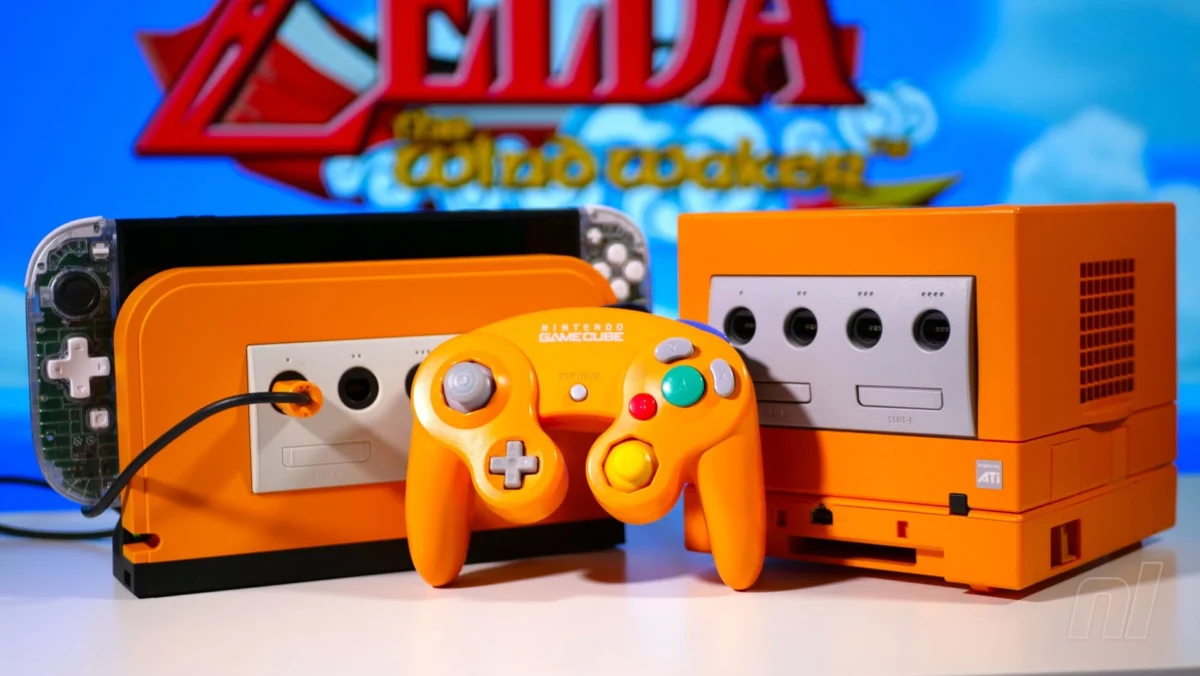
The allure of classic gaming experiences is a powerful force, and Nintendo’s recent foray into bringing beloved GameCube titles to the Nintendo Switch 2 via Nintendo Switch Online has ignited a passionate demand for authentic control. While Nintendo itself offers a premium wireless GameCube controller replica, a more budget-friendly and versatile solution has emerged for those who cherish their original wired GameCube peripherals: the Retro Fighters Battle Dock. This innovative accessory promises to unlock the full potential of legacy controllers, offering a compelling pathway to low-latency, nostalgic gameplay on the latest Nintendo console.
The landscape of retro gaming on modern consoles is often a delicate balance between convenience and authenticity. Nintendo Switch Online’s GameCube library, featuring gems like The Legend of Zelda: The Wind Waker, F-Zero GX, and SoulCalibur II, presents an enticing proposition for seasoned gamers. However, replicating the precise feel of the original GameCube controller, particularly for competitive titles such as Super Smash Bros. Ultimate (and potentially future inclusions like Super Smash Bros. Melee), has been a key consideration for many.
Nintendo’s official "Nintendo Classics" wireless GameCube pad replica aims to address this, offering a modern, wireless iteration of the iconic controller. While it undoubtedly delivers on convenience and a familiar feel, its premium price point can quickly escalate when multiple players are involved, particularly for titles like Super Mario Strikers which benefit greatly from local multiplayer. This financial barrier has left a segment of the gaming community seeking more economical alternatives to relive their GameCube glory days.
The Genesis of the Battle Dock: Meeting the Demand for Original Peripherals
For years, the primary solution for utilizing original wired GameCube controllers with Nintendo consoles has been the official Nintendo GameCube Controller Adapter. Initially released for the Wii U, this adapter proved remarkably versatile, maintaining compatibility with the original Nintendo Switch and now, the Nintendo Switch 2. It served as a crucial bridge, allowing players to connect their cherished GameCube controllers to a modern gaming environment.
However, the official adapter, while functional, is no longer in active production and can be difficult to acquire at a reasonable price. This scarcity, coupled with the increasing popularity of GameCube titles on the Switch 2, created a void in the market. Enter Retro Fighters, a company known for its dedication to retro gaming accessories, with their latest offering: the Battle Dock.
The Battle Dock emerges as a direct contender to the functionality of the now-scarce official adapter, aiming to provide a robust and accessible solution for gamers seeking to leverage their existing wired GameCube controllers. Its design philosophy centers on maximizing compatibility and minimizing the cost associated with experiencing GameCube games as intended.
Unpacking the Battle Dock: Design and Functionality
At first glance, the Battle Dock is an intriguing piece of hardware. Despite its name, it’s crucial to understand that the Battle Dock is not a direct replacement for the Nintendo Switch 2’s primary dock. Instead, it functions as an intermediary hub, ingeniously connecting to the Switch 2’s dock via a proprietary cable system. This cable features two USB-A connectors and a single USB-C connector. The USB-A pair are designed to plug into the dual USB ports found on the standard Switch 2 dock. The USB-C end then connects to the Battle Dock itself. The Switch 2 dock then slots neatly into a dedicated shelf on the Battle Dock, creating a cohesive and aesthetically pleasing unit.
This thoughtful integration ensures that the Battle Dock doesn’t merely add functionality but also enhances the overall setup. The inclusion of a dedicated shelf for the Switch 2 dock not only keeps things tidy but also prevents accidental dislodging of cables.
A notable aspect of the Battle Dock’s design is its adaptability. While its shell is specifically molded to accommodate the Switch 2’s dock, it is also compatible with the original Nintendo Switch dock. The underlying mechanism for functionality lies in the crucial USB connection between the two docks. However, it’s important to note that the original Switch dock cannot be physically slotted into the Battle Dock’s shelf. This means that while functionality is preserved, the visual neatness achieved with the Switch 2 dock is somewhat diminished when using its predecessor. Nonetheless, for those prioritizing controller compatibility over aesthetic perfection, this flexibility remains a significant advantage.
The Heart of the Matter: Four GameCube Controller Ports
The most significant feature of the Retro Fighters Battle Dock is undoubtedly its front-facing panel, which boasts an impressive four GameCube controller ports. This allows players to connect their original, beloved wired GameCube controllers directly, bypassing the need for any wireless adapters or intermediary devices. This direct connection is paramount for achieving the ultra-low latency gameplay that many competitive gamers prioritize. The benefits of minimal input lag are particularly pronounced in fast-paced titles where split-second reactions can determine victory or defeat.
Beyond original wired controllers, these ports also demonstrate impressive compatibility with modern wireless solutions. The inclusion of Wavebird support means that the classic wireless GameCube experience is also within reach. Furthermore, the Battle Dock is designed to work seamlessly with other contemporary wireless GameCube-style controllers, such as Retro Fighters’ own BattlerGC. This broad compatibility ensures that a wide range of players can find a comfortable and effective control scheme.

A Touch of Nostalgia: Customizable Faceplates
Adding a delightful layer of personalization and nostalgia, the Battle Dock comes bundled with four distinct faceplates. These plates are designed to meticulously match the iconic color schemes of original GameCube consoles. The default plate is a classic Jet Black, but users also receive interchangeable Spice Orange, Indigo, and Platinum Silver options. These magnetic faceplates snap on with ease, allowing for quick and simple customization to suit individual preferences or to match the color of your GameCube controller.
The magnetic attachment mechanism is both convenient and visually appealing. However, during testing, it was noted that these plates can, at times, be too easy to dislodge. Accidental bumps or brushes against the dock could lead to the faceplate being inadvertently knocked off, a minor but noticeable quirk in an otherwise well-designed accessory. This is a small trade-off for the ease of customization, but it’s worth being mindful of during regular use.
Plug-and-Play Simplicity: Getting Started with the Battle Dock
The Retro Fighters Battle Dock embodies the spirit of plug-and-play simplicity. Setting it up is an exceptionally straightforward process, requiring minimal technical know-how. Once connected to the Switch 2 dock, the Battle Dock is immediately recognized, and the GameCube controller ports become active. This ease of use ensures that gamers can transition from unboxing to playing their favorite GameCube titles with minimal delay.
The primary advantage of the Battle Dock, especially when compared to Nintendo’s wireless replica, becomes evident when considering the ubiquitous nature of wired controllers. The Battle Dock directly addresses the needs of those who already own and prefer their original wired GameCube pads. This eliminates the need to invest in new hardware and allows for immediate immersion into the gaming experience.
However, the inherent nature of wired controllers does present a practical consideration. The presence of multiple cables emanating from the Battle Dock, the Switch 2 dock, and the GameCube controllers themselves necessitates careful cable management. Depending on the user’s setup, this might require repositioning the entire docking station or sitting closer to the television to avoid the tangling and visual clutter of numerous wires. This is a trade-off that many retro gaming enthusiasts are willing to accept for the sake of authentic control.
Navigating the Nuances: Limitations and Workarounds
While the Battle Dock offers a compelling solution for GameCube controller enthusiasts, it’s not without its limitations, primarily stemming from the inherent design of the original GameCube controller itself. A notable omission on the GameCube controller is the absence of dedicated "Home" and "Minus" buttons. These buttons are integral to the Nintendo Switch 2’s user interface, allowing for quick access to the system’s Home screen, menu navigation, and other system-level functions.
Consequently, players using the Battle Dock with GameCube controllers will need to ensure they have an alternative input device readily available. This typically means keeping a Joy-Con or a Pro Controller within reach. This secondary controller will be essential for performing actions such as exiting a game, adjusting settings, or accessing the system’s main menu. While Retro Fighters has done an admirable job of replicating the GameCube controller experience, this particular limitation is a fundamental aspect of the original hardware that cannot be overcome by the Battle Dock itself. It’s a minor inconvenience, but one that users should be aware of to avoid frustration.
The Verdict: A Solid Investment for Nostalgic Gamers
Despite the minor drawbacks, the Retro Fighters Battle Dock presents a compelling value proposition for a specific, yet significant, segment of the Nintendo Switch 2 gaming community. For a price of $40, users can unlock the full potential of their existing GameCube controllers, breathing new life into legacy hardware and avoiding the considerable expense of purchasing multiple new wireless controllers.
The primary draw of the Battle Dock lies in its ability to deliver virtually lag-free input, a critical factor for any gamer who values precision and responsiveness. This is especially true for titles that demand split-second timing and quick reflexes. The Battle Dock ensures that the connection between player input and on-screen action is as immediate as possible, closely mirroring the experience of playing on original hardware.
For those who unequivocally prioritize the authentic GameCube controller experience when playing on their Switch 2, the Battle Dock is a solid and highly recommended purchase. Its affordability, coupled with its robust functionality, makes it an accessible gateway to reliving cherished gaming memories.
The Battle Dock is arguably the perfect companion for Super Smash Bros. Ultimate, a game that thrives on precise input and competitive play. As Nintendo continues to expand its Nintendo Switch Online GameCube library, the anticipation for potential future additions like Super Smash Bros. Melee is palpable. Should Melee indeed make its way to the service, the demand for the Battle Dock is likely to surge, solidifying its position as an indispensable accessory for competitive retro gaming on the Nintendo Switch 2. It’s a testament to how thoughtful third-party accessories can significantly enhance the gaming experience by bridging the gap between past and present.

 Lina Irawan
 Sagoh
Sagoh