Nana Wu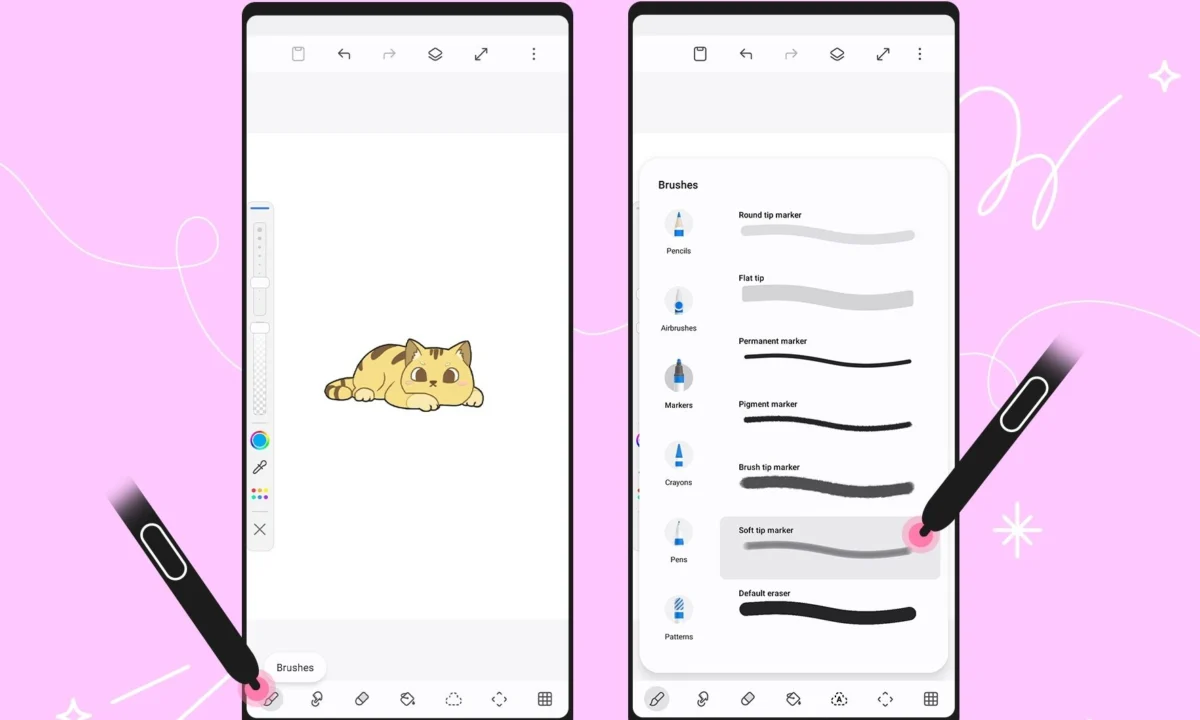
For years, Samsung’s PenUp application has occupied a unique space in the mobile ecosystem. Positioned as a digital sanctuary for sketching, coloring, and community-driven art, it has served as the perfect companion for the S Pen—the signature stylus that defines the premium experience of Galaxy devices. With the release of version 3.9.22.23, Samsung is signaling that it is no longer satisfied with PenUp being a mere "doodling" tool. By introducing a suite of professional-grade features and refined UI elements, the tech giant is blurring the lines between casual mobile sketching and serious digital illustration.
The Core Transformation: What’s New in Version 3.9.22.23
The latest update to PenUp is, by all accounts, a significant step forward for mobile artists. At the heart of the update is a massive expansion of the user’s creative toolkit: 53 new, distinct brushes have been added to the library, accessible via the "Download more brushes" portal. This expansion provides artists with a wider variety of textures, opacities, and stroke behaviors, allowing for more nuanced work that goes beyond simple line art.

Perhaps the most technical addition is the new "Dual Brush" feature. This tool is designed to allow two different brush strokes to interact in real-time, enabling users to create complex layered effects and gradients with a single motion. For digital painters, this is a time-saver that mimics the behavior of physical media, where different paint types or pencil lead grades might overlap to create depth.
Refined Workflow and UI Enhancements
Beyond the brushes themselves, Samsung has overhauled the brush control interface. Historically, navigating brush settings could be cumbersome on a mobile screen. Now, by double-tapping a brush from the selection screen, users are greeted with a dedicated, isolated menu for that specific tool. This menu features a live preview window, allowing artists to test the stroke’s behavior, pressure sensitivity, and opacity settings before returning to the canvas. This shift from a global settings menu to an object-oriented approach significantly reduces friction in the creative process.

A Chronological Look at PenUp’s Maturity
To understand why this update is a turning point, one must look at the evolution of PenUp over the last few years.
- The Early Days: PenUp started as a social network for S Pen enthusiasts—a place to share images created on the Galaxy Note series. Its focus was heavily community-centric, with coloring templates serving as the primary engagement hook.
- The Integration Phase: As Samsung expanded S Pen support to the Galaxy S-series Ultra models and the Galaxy Tab S-series, the app began to integrate more deeply with system-level features, such as Air Command and improved palm rejection.
- The Pro-sumer Transition: With the recent 3.9.22.23 update, the focus has shifted toward portability and technical fidelity. By introducing "Export Draft" and "Import Draft" functionality, Samsung is acknowledging that users are no longer just sketching for fun; they are starting projects on their phones during commutes and finishing them on tablets or PCs.
This chronology illustrates a clear trajectory: Samsung is transforming PenUp from a social "gallery" into a viable, lightweight creative studio that competes with third-party apps like Sketchbook or Concepts.

Supporting Data: Why This Matters for Galaxy Ecosystems
The utility of these updates is anchored in the hardware prowess of modern Galaxy devices. The latest S Pen, with its low-latency performance and high pressure-sensitivity levels, requires software that can keep up.
Data regarding the user base of PenUp reveals that a significant portion of its traffic comes from users utilizing the S Pen’s pressure sensitivity. By providing 53 new brushes, Samsung is leveraging the hardware’s capability to track minute variations in force. Furthermore, the introduction of the "Auto Select" feature within the Lasso tool indicates a move toward AI-assisted editing. The ability to automatically isolate objects within a drawing is a standard feature in high-end desktop software like Adobe Photoshop or Clip Studio Paint; bringing this functionality to a mobile app significantly enhances the "productivity-per-second" metric for users on the go.

Cross-Device Continuity
One of the most requested features for any mobile art app is the ability to move work between devices without losing layers. The new .penup file format, which preserves individual layers and metadata, is a critical piece of infrastructure. When combined with Samsung Account synchronization, a user can start a sketch on a Galaxy S26 Ultra and, minutes later, open that exact file on a Galaxy Tab S10 to finalize the details with a larger screen. This ecosystem-wide consistency is the primary differentiator between Samsung’s native tools and generic third-party applications.
Official Stance and Development Philosophy
While Samsung has not issued a lengthy manifesto regarding the app, the documentation accompanying version 3.9.22.23 emphasizes "Creative Fluidity." The company’s design philosophy for this update appears to be one of "invisible technicality." By keeping the interface clean while hiding advanced controls behind a double-tap, Samsung is attempting to serve two masters: the casual user who wants to color a template, and the budding digital artist who needs control over brush flow and layer blending.

The inclusion of "Finger Drawing" mode, which remains a staple of the app despite the push for S Pen usage, underscores that Samsung remains committed to accessibility. While the app is optimized for the stylus, it does not alienate users who may be without their S Pen, ensuring that the app remains a default "must-have" for any Galaxy device owner, regardless of their hardware configuration.
Implications for the Mobile Creative Industry
The update to PenUp has several far-reaching implications for the mobile creative landscape:

- The Decline of "Toy" Apps: As native apps like PenUp become more powerful, the barrier to entry for paid third-party illustration apps increases. If a user can achieve professional-looking results with a free, pre-installed app, they are less likely to subscribe to external services.
- Hardware-Software Synergy: This update reinforces the value proposition of the S Pen. For years, critics argued that the S Pen was a niche tool. By continually updating the software ecosystem around it, Samsung proves that the stylus is a core component of the "Ultra" and "Tablet" experience, not just an afterthought.
- The Rise of Mobile-First Workflows: We are moving toward a reality where the "mobile" in mobile device is being taken literally. Creative professionals are increasingly expecting their handheld devices to be capable of handling significant portions of their workflow. Samsung’s focus on file portability suggests they are positioning the Galaxy line as a legitimate alternative to the iPad-Apple Pencil combination, specifically by emphasizing the flexibility of the Android file system and cloud sync.
Challenges and Future Outlook
Despite these advancements, PenUp still faces challenges. The app lacks the non-destructive editing depth of desktop-class software, and the "social" aspect of the app—while nostalgic—often feels secondary to the creative tools. Looking forward, we may expect to see generative AI integration, perhaps allowing users to prompt-generate backgrounds or textures that can then be modified with the new brush library.
Final Verdict
Samsung’s latest update to PenUp is a masterclass in platform optimization. It respects the existing user base while providing the necessary depth to attract more serious digital artists. By focusing on the "dual" nature of modern computing—where users oscillate between quick mobile interactions and deep-work sessions—Samsung has ensured that the S Pen remains the gold standard for mobile input. Whether you are a casual doodler or an aspiring illustrator, the new brushes and workflow improvements make PenUp an essential download for any Galaxy device owner looking to unlock the true potential of their screen.


 Reynand Wu