


For years, the Windows user base has been vocal about its frustrations regarding the interface design of Windows 11. Since its launch, the operating system has faced criticism for stripping away foundational customization features that had been staples of the Windows experience for over a decade. In a significant shift toward user-centric development, Microsoft has announced a series of long-awaited updates to the Windows 11 taskbar and Start menu. These changes, currently rolling out to the Experimental channel for Windows Insiders, represent a major pivot for the company, suggesting a newfound willingness to listen to its most critical users.
The Core Updates: Restoring Functionality and Flexibility
The primary focus of this update is to return control to the user. The most significant change—and arguably the most requested—is the ability to reposition the taskbar. In Windows 11’s current iteration, the taskbar is locked to the bottom of the screen, a design choice that proved deeply unpopular with power users, software developers, and those utilizing ultra-widescreen monitor setups.
Microsoft has confirmed that users will soon be able to move the taskbar to the top or either side of their desktop. This functionality, which was a core feature of Windows 10, restores the workflow flexibility that many professionals rely upon. Furthermore, Microsoft is introducing granular control over icon alignment. Whether the taskbar is positioned at the top, bottom, or sides, users will be able to toggle between a centered layout or a left-aligned configuration, accommodating both traditionalists and those who prefer the modern, centered look.
In addition to placement, the update introduces a "small taskbar" mode. Previously, the taskbar’s size was dictated automatically by the system based on screen resolution and display scaling. By allowing users to manually force a smaller taskbar with reduced button sizes, Microsoft is directly addressing complaints about screen real estate wastage—a critical issue for users working on smaller laptop displays.

The Start Menu: From "Start Screen" to Streamlined Launcher
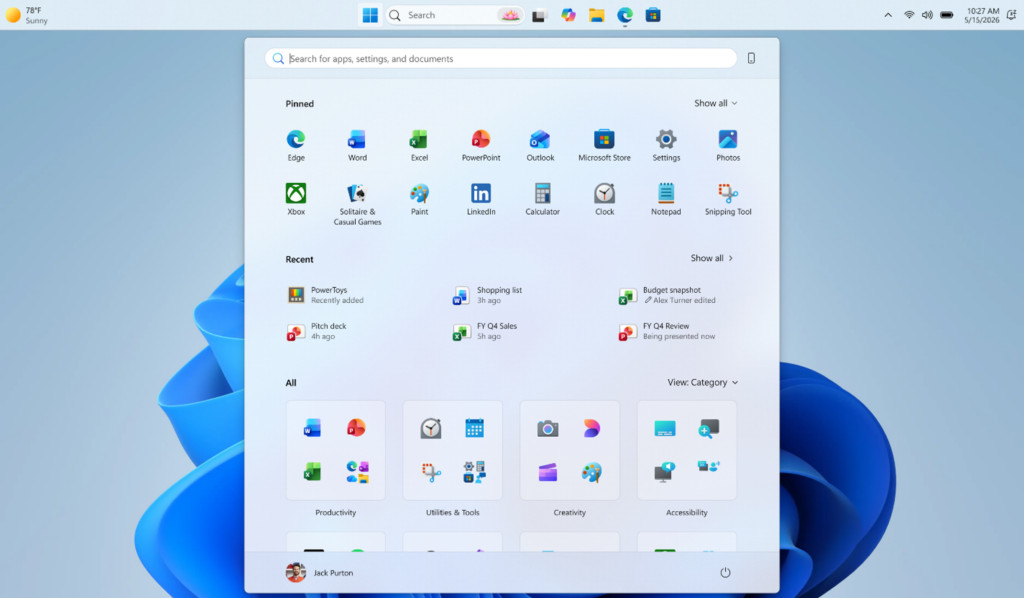
The Windows 11 Start menu has faced persistent criticism for its overwhelming design, which many users felt had devolved into a bloated "Start screen" reminiscent of the ill-fated Windows 8 era. The current implementation, which heavily prioritizes "Recommended" content and expansive grid layouts, has been described by critics as obstructive rather than helpful.
Microsoft is responding with a multi-pronged overhaul:
- Size Controls: Users will be given the ability to adjust the size of the Start menu, allowing them to choose between "small" and "large" configurations. This ensures that the menu doesn’t dominate the entire workspace.
- Modular Toggles: The company is introducing simple, clear toggles for specific sections of the menu, including the "Pinned" area, the "Recommended" section, and the "All Apps" list.
- Decoupled Recommendations: Perhaps most importantly, Microsoft is fixing a major pain point regarding the "Recommended" panel. Previously, disabling this feature also disabled jump lists and recent files within File Explorer. The new update decouples these systems, allowing users to keep their File Explorer history intact while completely removing the intrusive recommendations from the Start menu.
The result is a more modular, "bare-bones" launcher option, allowing users to create a clean, minimalist environment that displays only their chosen pinned applications.
Chronology: A Path to This Moment
To understand the magnitude of these changes, one must look at the timeline of user feedback and internal company resistance.

- October 2021: Windows 11 is released. Almost immediately, the community notes the lack of taskbar customization and the aggressive nature of the new Start menu.
- Early 2022: Third-party developers release tools such as "ExplorerPatcher" and "Start11" to fill the functional gaps left by Microsoft. These apps become wildly popular, signaling to Microsoft that the "stock" experience is failing to meet user expectations.
- Late 2023: Microsoft launches its "Fix Windows 11" campaign. This internal initiative, driven by feedback from both casual users and tech enthusiasts, marks a shift in corporate culture. Executives begin participating in forums and social media discussions, acknowledging that the "one-size-fits-all" approach to the UI was a mistake.
- May 2026 (Current): Microsoft officially confirms in a blog post, "Making Taskbar and Start more personal," that these features are moving from the design phase to active testing in the Experimental Insider channel.
Supporting Data: Why Customization Matters
The demand for these features is not merely aesthetic; it is rooted in productivity. Data from professional workstations and developer surveys indicates that taskbar placement is a major factor in "flow state" maintenance. For users running dual-monitor or ultra-widescreen setups, having the taskbar on the side of the primary monitor provides extra vertical space for IDEs (Integrated Development Environments) and web browsers.
Furthermore, a study conducted by tech analytics firms suggests that the "Recommended" section in the Start menu has a low engagement rate. Only approximately 15% of users report finding the "Recommended" files useful, while nearly 60% of users in professional settings report actively wanting to hide the section to reduce cognitive load. By allowing users to toggle these elements off, Microsoft is moving toward a "leaner" OS, which may also improve system resource allocation and startup speeds.
Official Responses and Strategic Implications
Microsoft’s official stance, as expressed by internal team leads, is that the company is aiming for "harmony between accessibility and power-user control." The blog post emphasized that while the company wants to provide a modern, sleek aesthetic, they recognize that "personalization is the hallmark of the Windows experience."
The implications of this move are significant for the future of the OS. By admitting that the initial design choices for Windows 11 were flawed, Microsoft is signaling a change in its product development strategy. This is not just a UI patch; it is an admission that the top-down, locked-in design philosophy of the early 2020s was not compatible with the diverse needs of its global user base.
Looking Ahead: The Next Frontiers
While these updates are a triumph for the community, the conversation surrounding Windows 11 is far from over. The next major battleground for users remains the "forced integration" of Microsoft services.
The Local Account Question
One of the most persistent demands from privacy advocates is the removal of the requirement to use a Microsoft Account during the initial setup of Windows 11. While workarounds exist, they are often complex and technically daunting for the average user. Recent reports suggest that engineers are working on a more streamlined path to local account creation, though no official announcement has been made.
The Problem of "Promotional Bloat"
Even with a cleaned-up Start menu, the OS remains filled with "promotional bits"—ads for OneDrive, Bing, Microsoft Edge, and various first-party games. For many, the inclusion of these items in an operating system that requires a paid license is a point of deep contention. The ultimate "win" for users would be a system-wide "Kill Switch" that removes all ads and service upsells.
While Microsoft executives have hinted at a "calmer, more chill" OS, the reality of the business model—which relies on service integration—makes a total removal of ads unlikely. However, if the current, positive response to the taskbar and Start menu updates is any indicator, continued pressure from the community could force Microsoft to at least provide more granular controls over these promotional elements.
Conclusion
The decision to restore taskbar mobility and modularity to the Start menu is a landmark moment for Windows 11. It demonstrates that even a tech giant as large as Microsoft can be held accountable by its user base. These changes will undoubtedly improve the day-to-day experience for millions of users, particularly those who have felt alienated by the OS’s previous restrictive design.
As we look toward the next iteration of the platform, the question remains: will this trend of listening to the community continue? By proving that they can fix the mistakes of the past, Microsoft has earned a temporary grace period from its critics. Whether they use this opportunity to build a truly user-centric OS, or whether they continue to push service-heavy, restrictive updates, will determine the long-term legacy of Windows 11. For now, users can take heart in the fact that their voices have been heard, and the desktop is finally becoming a place they can truly call their own again.


No comments yet. Be the first to join the conversation!