Lina Hope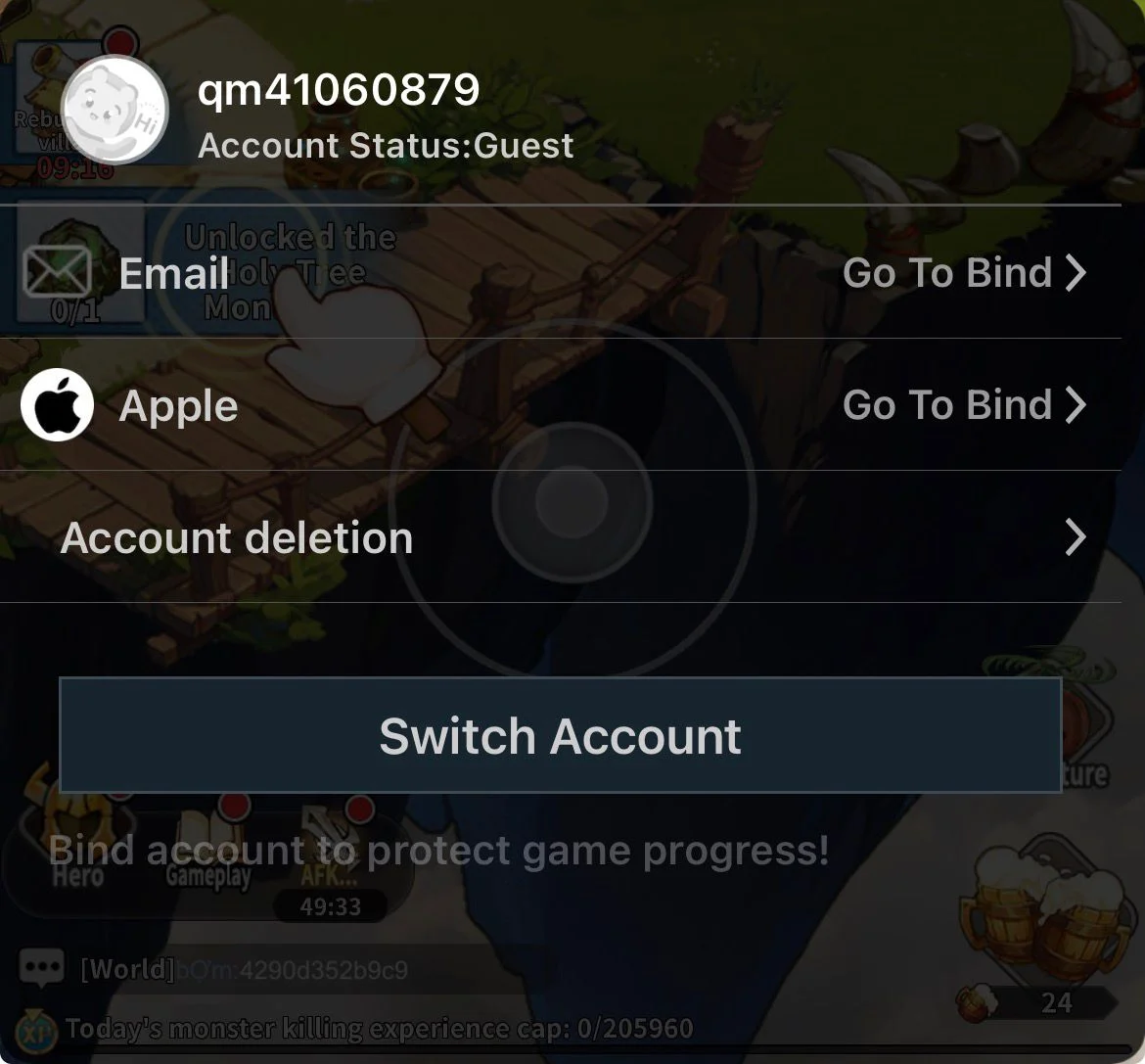
In the competitive landscape of modern mobile RPGs, the difference between a frustrating early-game experience and a seamless progression journey often comes down to a single, critical factor: your starting roster. Mori Tale, the latest fantasy-adventure title to capture the attention of the gacha community, places a heavy emphasis on hero synergy and team composition. As players dive into this immersive world of high-stakes battles and intricate hero abilities, the realization quickly sets in that your initial summons act as the foundation for your entire journey.
For seasoned veterans and newcomers alike, "rerolling"—the process of resetting one’s account to secure top-tier units early—has become an essential tactical maneuver. This comprehensive guide will walk you through the mechanics of rerolling in Mori Tale, provide optimized workflows for various platforms, and offer expert insights into securing your account once you have achieved the perfect pull.
The Strategic Importance of Rerolling
In Mori Tale, your combat strength is inextricably linked to the rarity and utility of your heroes. While the game provides ample opportunities to earn rewards through gameplay, the initial "pity" or starter summons offer the best chance to secure high-rarity units without exhausting long-term resources.
By rerolling, you are essentially front-loading your account with powerful assets. This allows you to clear higher-difficulty stages earlier, climb leaderboards faster, and conserve premium currency for future limited-time banners. Because Mori Tale incorporates an account deletion feature, the barrier to entry for this strategy is significantly lower than in other titles that require complex file manipulation or re-installation.
Chronology of the Reroll Process
To maximize efficiency, players should follow a structured approach. The goal is to reach the recruitment tab, perform your summons, and determine if the result is satisfactory within the shortest possible timeframe.
Phase 1: The Initial Setup
Upon launching Mori Tale, navigate through the tutorial sequences. While these sections are designed to introduce game mechanics, they are also your primary time-sink. Your objective is to reach the point where the game grants you your first set of premium currency or "summoning tickets."
Phase 2: Execution
Once the recruitment system is unlocked:

- Navigate to the Summoning/Gacha Portal: Utilize all available free tickets and currency provided by the initial login rewards or early mission milestones.
- Evaluate the Pull: Compare your results against current community tier lists. Are you looking for specific "must-have" units that enable specific team archetypes?
- Reset if Necessary: If the results are sub-optimal, proceed to the account settings menu. Locate the "Delete Account" or "Reset Data" option. By resetting, you clear your progress on the current server, allowing you to bypass the need to re-download game assets.
Supporting Data: Platform-Specific Optimization
While the core logic of rerolling remains consistent across all devices, the execution varies slightly depending on your hardware.
Android Device Workflow
Android users benefit from the ability to switch servers easily. If the "Delete Account" option is not preferred, simply switching to a different server within the same region often acts as a "fresh start," allowing you to reroll without needing to clear data. However, for a clean slate, utilizing the internal game settings to wipe your user ID is the standard professional approach.
iOS Device Considerations
The iOS ecosystem is more restrictive regarding file management. Because Apple’s security protocols prevent direct access to game cache files, users must rely heavily on the in-game account management tools. The process is identical in outcome to Android: reach the summon point, check your luck, and reset via the settings menu if you fail to pull your target heroes.
The Emulator Advantage: Multi-Instance Rerolling
For players who prioritize speed and efficiency, Android emulators such as LDPlayer, BlueStacks, or MEmu are the gold standard.
The Multi-Instance Workflow:
- Create Instances: Open your emulator’s manager and create 4 to 6 instances of the game.
- Synchronized Controls: Enable "Sync" or "Multi-instance" mode. This feature allows your keyboard inputs to be mirrored across all instances simultaneously.
- Mass Summoning: Play through the tutorial on all instances at once. By the time you reach the gacha screen, you are essentially performing 5+ rerolls in the time it takes for one.
- Selection: Once you identify the instance with the best pull, discard the others and bind your successful account.
Official Responses and Developer Stance
While some developers view rerolling as a violation of the "spirit" of the game, the developers of Mori Tale have, by design, included an account deletion feature. This implies a tacit acknowledgement of the practice. By providing a clean, legal way to reset progress, the developers have effectively minimized the need for third-party scripts or prohibited file-editing techniques.
However, players are reminded that the use of third-party macros or unauthorized automation software remains a violation of most Terms of Service (ToS). Stick to official emulator features and in-game menus to ensure your account remains in good standing.

Implications of a Successful Reroll
Securing a "God-tier" start has profound implications for your progression.
Long-Term Resource Management
Players who start with a top-tier damage dealer or a versatile support unit can allocate their future premium currency toward specialized units rather than being forced to spend on "filler" characters just to progress through the mid-game content.
Securing Your Asset: The Binding Process
A common pitfall for many players is forgetting to bind their successful reroll account. Once you have confirmed your desired units, you must act immediately to secure the data:
- Access Settings: Open the main menu and locate the "Account" or "Profile" tab.
- Select Bind: Choose a stable, permanent service such as Google, Facebook, or a dedicated developer account.
- Verification: Ensure that you receive a confirmation notification. Binding your account not only protects you from data loss if your device malfunctions but also allows you to play on multiple devices seamlessly.
Final Considerations and Expert Tips
Rerolling is not merely about getting the rarest unit; it is about obtaining a cohesive starting lineup. A single top-tier hero is often less valuable than a balanced team of synergy-driven units.
- Check the Meta: Before you begin, spend time on community forums or official Discord servers to identify which characters have high longevity.
- Don’t Over-Reroll: There is a point of diminishing returns. If you spend 20 hours rerolling, you have missed 20 hours of potential event rewards, stamina generation, and level progression. Determine a "stopping point" where your team is "good enough" and begin playing.
- Utilize Redeem Codes: Mori Tale frequently releases promotional codes. Once you have settled on a good account, redeem all active codes to further bolster your resources.
As you embark on your journey through Mori Tale, remember that the game is a marathon, not a sprint. A strong start is the best possible opening move, but consistent engagement and smart resource management will define your long-term success. Whether you are a casual player or a competitive strategist, mastering the reroll process is the first step toward becoming a legend in the world of Mori Tale.
Did you find this comprehensive reroll guide useful? Stay tuned to our ongoing coverage for more character spotlights, team-building strategies, and the latest updates on Mori Tale. Join our community on Discord and Telegram for real-time discussions with fellow adventurers.


 Asro
Asro
 Nana Wu