Layla Zulfa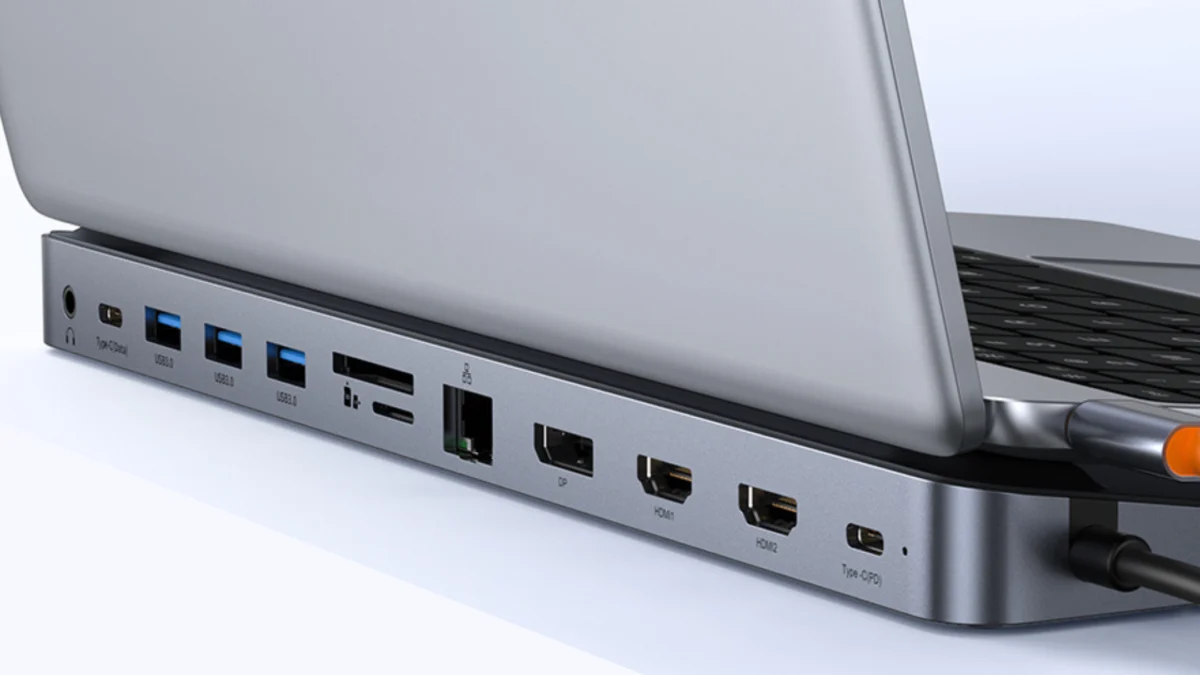
In the contemporary professional landscape, the laptop has cemented its position as the primary engine of productivity. From remote-first corporate environments to the creative freelance sector, the portability of modern hardware—exemplified by ultrabooks and sleek, thin-and-light workstations—has been a triumph of engineering. However, this shift toward extreme portability has come at a distinct cost: the systematic removal of physical connectivity.
As manufacturers prioritize aesthetics and chassis rigidity, the traditional suite of ports—Ethernet, multiple USB-A inputs, SD card readers, and legacy display outputs—has largely vanished. This has created a "productivity gap," where users are forced to rely on a daisy-chain of dongles or find themselves tethered to a desk with limited peripheral support.
Addressing this shortfall, the Baseus 12-in-1 Docking Station has emerged as a standout solution. Currently available with a significant 48% price reduction, bringing the cost down to just $52, it represents a pivotal accessory for power users looking to reclaim their workspace utility without the exorbitant price tags usually associated with high-end enterprise docks.
The Anatomy of the Productivity Gap
To understand why a docking station is no longer an optional "extra" but a fundamental necessity, one must look at the design trajectory of the laptop over the last five years.
The Evolution of Slim-Chassis Engineering
In the race to reach sub-15mm thickness, laptop designers have systematically deprecated I/O (Input/Output) ports. While USB-C and Thunderbolt 4 offer incredible bandwidth and versatility, the transition has been painful for professionals who rely on legacy peripherals, high-speed wired networking, and multi-monitor setups.
A laptop user today often finds themselves with a single USB-C port, which is frequently occupied by the power delivery cable. This leaves the user with zero expansion options. The Baseus 12-in-1 docking station bridges this divide by consolidating a wide array of connectivity standards into a single, centralized hub.
Chronology of Connectivity: From Dongles to Docks
The history of laptop connectivity can be divided into three distinct eras:
- The Legacy Era (Pre-2015): Laptops were bulky, heavy, and featured every port imaginable. VGA, Ethernet, multiple USB-A ports, and DVD drives were standard. Connectivity was never an issue, but portability was a major burden.
- The Dongle Era (2015–2020): As laptops became thinner, users were forced to carry individual "dongles" for HDMI, Ethernet, or USB expansion. This led to "dongle fatigue," where professionals would often forget the specific adapter needed for a client presentation or a home office setup.
- The Docking Era (2021–Present): The current standard favors a single-cable solution. By connecting a laptop to a high-capacity docking station, a user can instantly transform their mobile device into a desktop-class workstation.
The current Baseus offering is a culmination of this evolution, providing a "one-stop-shop" approach that effectively ends the era of carrying multiple adapters.
Supporting Data: Why 12-in-1 Matters
The technical specifications of the Baseus 12-in-1 dock are designed to meet the rigorous demands of modern workflows. For many users, the primary bottleneck is not CPU or RAM, but the inability to effectively utilize external peripherals simultaneously.
The Breakdown of Ports
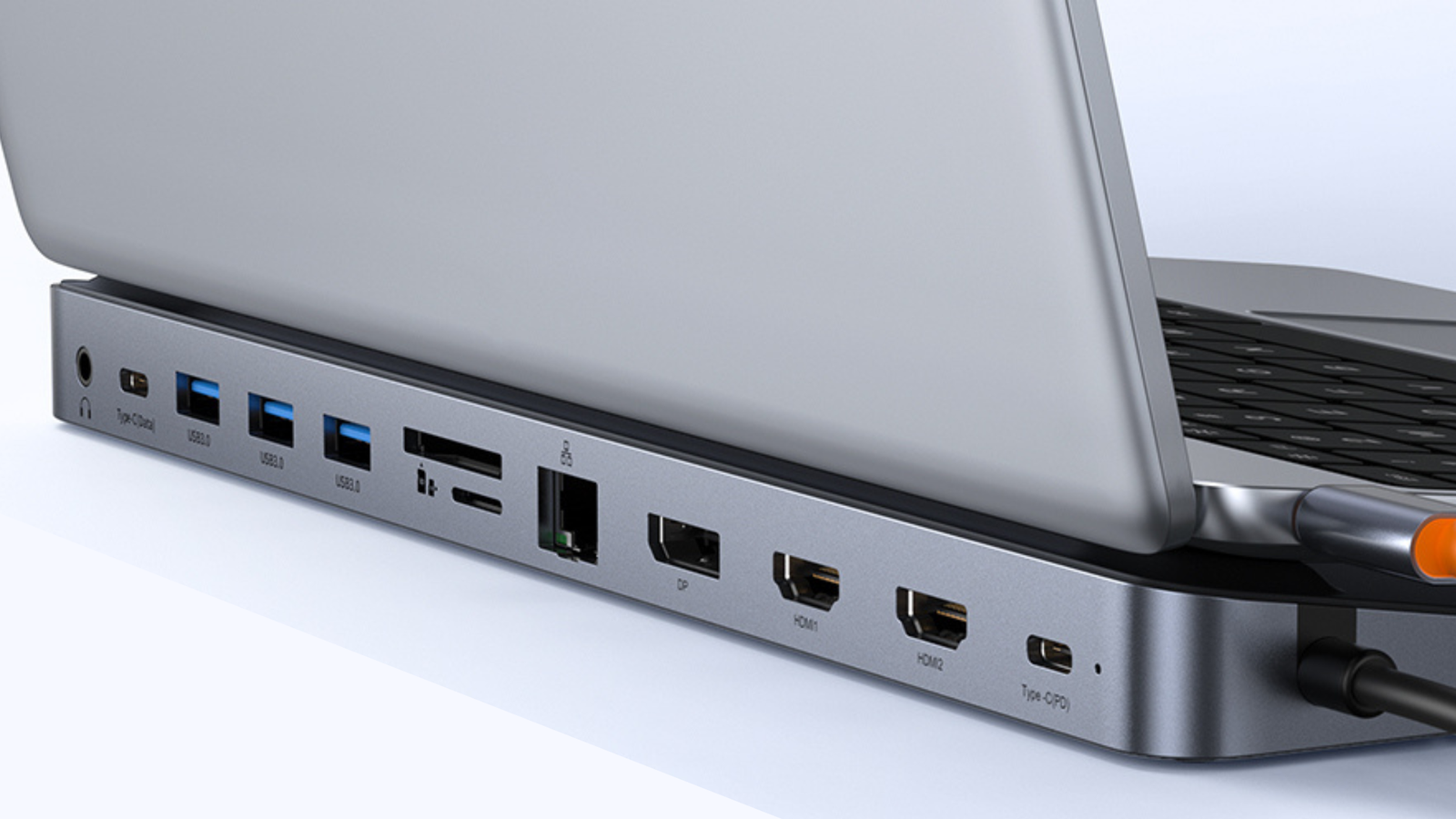
The Baseus unit provides a comprehensive suite of connections:
- Three USB-A 3.0 Ports: Essential for legacy peripherals, including mechanical keyboards, mice, external drives, and specialized hardware like high-end microphones or audio interfaces.
- One USB-C 3.0 Port: Provides high-speed data transfer for modern external SSDs.
- Gigabit Ethernet Port: For users who require stable, low-latency internet connections, which are still superior to even the fastest Wi-Fi for video conferencing and large file transfers.
- 4K HDMI and DisplayPort: Allows for dual or triple-monitor configurations, which studies have shown can increase user productivity by up to 40% due to expanded screen real estate.
- SD and MicroSD Card Readers: A critical requirement for photographers, videographers, and content creators who move large media files daily.
- 3.5mm Audio Jack: Ensures compatibility with professional-grade wired headphones and studio monitors.
- 100W Power Delivery (PD): This is the "secret sauce" of the device. It allows the dock to charge the laptop while simultaneously powering all connected peripherals, meaning only one cable is connected to the laptop at any given time.
Official Perspective and Market Implications
Industry analysts have observed a growing trend where consumers are shifting away from expensive, proprietary "manufacturer-branded" docks—which often cost between $250 and $400—in favor of third-party, high-value alternatives like Baseus.
The Shift Toward Third-Party Value
The Baseus brand has positioned itself in a "sweet spot" of the market: it offers premium-feel hardware and reliable chipsets without the "brand tax" imposed by major laptop manufacturers. At the $52 price point, the barrier to entry for setting up a professional-grade home office has been slashed.
"The market is moving toward democratization," says tech industry consultant Mark Halloway. "When you provide enterprise-level I/O for under $60, you aren’t just selling a piece of plastic and circuitry; you are effectively allowing the consumer to double the lifespan and utility of their current laptop. It changes the economic calculation of buying a new machine versus upgrading your current environment."
The Implications for the Future of Work
As the hybrid work model becomes the standard for the global workforce, the physical environment of the home office is under constant refinement. The implications of adopting a robust docking station go beyond mere convenience; they impact ergonomics, efficiency, and hardware longevity.

Ergonomics and Workspace Health
By utilizing a dock, users can keep their laptops on stands at eye level, using external keyboards and mice. This setup is significantly better for long-term spinal health compared to hunching over a laptop screen for eight hours a day. The Baseus dock enables this transition by acting as the central nexus for all these ergonomic peripherals.
Hardware Longevity
Frequent plugging and unplugging of cables into a laptop’s native ports can lead to physical wear and tear on the chassis. A docking station acts as a "buffer." By leaving your peripherals permanently plugged into the Baseus dock, you only have to connect one cable to your laptop, significantly reducing the mechanical stress on the device’s internal ports.
Conclusion: An Investment in Efficiency
The Baseus 12-in-1 Docking Station is not merely an accessory; it is a fundamental infrastructure upgrade. While the market is flooded with cheap, unreliable hubs, the Baseus model manages to balance high-speed throughput, a comprehensive port selection, and a competitive price point that is difficult to ignore.
For the student, the professional, or the digital nomad, the decision to invest in a docking station is a decision to optimize the workspace. At a 48% discount, this device is currently one of the most cost-effective ways to enhance a computer setup. By offloading the burden of connectivity to this hub, users can ensure their laptop remains the versatile, powerful tool it was designed to be, whether at home, in the office, or on the move.
As we look toward the future of computing, where ports will likely continue to disappear in favor of wireless and single-cable standards, hardware like the Baseus 12-in-1 is the necessary bridge that ensures we don’t lose the functionality that made the desktop computer the standard of productivity in the first place. For those currently juggling dongles and fighting with limited ports, this represents an opportunity to streamline their digital life for less than the cost of a high-end dinner.

 Rifan Muazin