

For many drivers, the daily commute is synonymous with the soundtrack of their lives. Whether it is an immersive podcast, a high-fidelity jazz album, or a high-energy playlist, the integration of Android Auto has revolutionized the in-car entertainment experience. However, a common frustration persists: the feeling that the audio quality—despite having a premium sound system or a high-end smartphone—just isn’t hitting the mark.
Many users instinctively turn to hardware upgrades, assuming a high-bandwidth USB cable or a new aftermarket head unit will solve the problem. Yet, in the world of digital audio, the truth is often more nuanced. Improving your Android Auto audio experience is less about buying "audiophile-grade" cables and more about understanding the complex interplay between streaming platforms, signal processing, and vehicle-specific software.
The Myth of the "Magic Cable"
Understanding Data Throughput vs. Audio Quality
A pervasive misconception in the automotive enthusiast community is that expensive, high-speed USB cables—often marketed with 5Gbps or 10Gbps transfer rates—will magically improve audio fidelity. It is time to debunk this: audio data is essentially a stream of digital packets. As long as your cable is functional and capable of maintaining a stable connection without data loss or dropouts, increasing the theoretical bandwidth capacity will not change the sound signature of your music.
If your audio is cutting out, stuttering, or experiencing frequent disconnects, a high-quality, shielded cable is indeed a necessary troubleshooting step. However, this is a matter of connectivity stability, not audio resolution. For the vast majority of users, if the music is playing without interruptions, your cable is not the bottleneck. Focusing on the digital source and the signal chain is where the real improvements are found.
Chronology of an Audio Signal: From Server to Speaker
To understand why your music might sound underwhelming, it is helpful to visualize the journey of the audio data. The process follows a specific lifecycle:
- Source Retrieval: The app (Spotify, Tidal, YouTube Music) fetches the file from the cloud.
- Processing: The phone’s software, including EQ settings and normalization, modifies the signal.
- Transmission: The data is sent via USB or Wi-Fi Direct to the vehicle’s infotainment system.
- Decoding: The head unit processes the data and sends it to the Digital-to-Analog Converter (DAC).
- Amplification: The car’s internal amplifier boosts the signal and drives the speakers.
At any point in this chain, the signal can be degraded. If you are experiencing poor quality, you must move backward through this chain, starting from the application settings rather than the vehicle hardware.
Don’t Blame the Hardware: The Music App Factor
Before you touch your car’s settings, you must look at the source. Streaming apps are designed to be "smart," often sacrificing audio quality for stability when cellular signal is weak.
The Impact of Network Stability
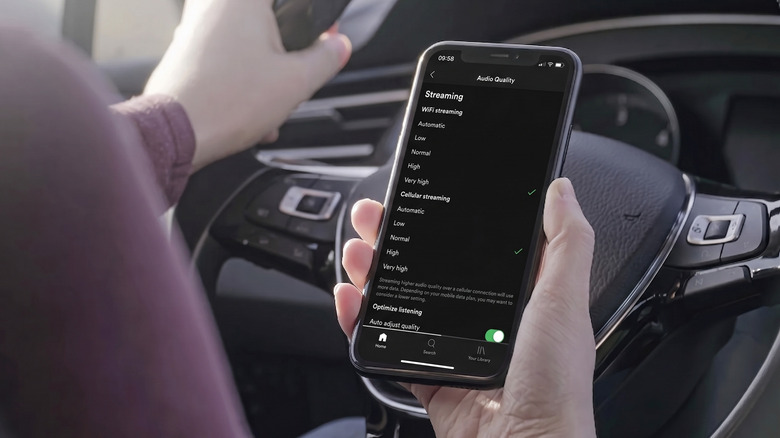
Streaming services like Spotify utilize "Automatic" quality settings by default. When you drive through areas with fluctuating cellular coverage, the app will aggressively downsample your music to prevent buffering. This results in a noticeable "muddying" of the sound.
- The Fix: If you commute through areas with poor reception, prioritize downloading your playlists and albums while on a stable Wi-Fi connection. By playing offline content, you remove the variable of cellular bandwidth limitations entirely.
Quality Settings and Normalization
Many users fall into the trap of cranking every setting to "Highest" or "Very High." While this seems logical, it can sometimes introduce issues if your phone’s processor or the car’s head unit struggles with high-bitrate files. Furthermore, look closely at Audio Normalization. This feature attempts to keep all songs at the same volume, but it often does so by applying a "limiter" that crushes the dynamic range of the music, making tracks sound flat and lifeless. Turn this off or set it to "Normal" to see if your audio regains its punch.
Wireless vs. Wired: Identifying the Culprit
Wireless Android Auto is a triumph of convenience, but it introduces a new layer of complexity. Unlike standard Bluetooth, which uses a compressed protocol, Wireless Android Auto leverages a combination of Bluetooth for the handshake and Wi-Fi Direct for the actual data transfer.
The Diagnostic Process
If you suspect your audio quality is sub-par, perform a side-by-side comparison:
- Test via Wired Connection: Connect your phone using a high-quality USB cable. If the audio suddenly sounds "correct," the issue lies within your phone’s Wi-Fi transmission or interference in the vehicle’s cabin.
- The Developer Options Trap: Many online forums suggest digging into Android Developer Options to change Bluetooth codecs like LDAC or aptX. In the context of Android Auto, these settings are largely irrelevant because Android Auto utilizes its own dedicated protocol for transmission. Spending time here is usually a futile exercise.
- The 5GHz Requirement: Remember that Wireless Android Auto performance is heavily reliant on a stable 5GHz Wi-Fi connection. If your phone or car head unit is defaulting to a congested 2.4GHz band, you may experience packet loss that manifests as poor audio quality.
The Role of the Vehicle Infotainment System
Even with a perfect digital signal, your car’s head unit can be its own worst enemy. Automotive manufacturers often apply heavy digital signal processing (DSP) to make basic factory speakers sound more "exciting."
Flattening the Signal
Most modern infotainment systems come with "enhancements" turned on by default:
- Bass Boost: Often creates a "boomy" or distorted sound that masks mid-range clarity.
- Surround/Spatial Processing: Can create phase issues that make the soundstage feel artificial.
- Factory EQ: Many cars apply a "V-shape" EQ curve that boosts bass and treble while sucking out the mids.
The Strategy: Set your vehicle’s audio settings to "Flat" or "Neutral." Turn off all "Spatial," "Surround," or "Dynamic" processing. Once the car is outputting a raw, uncolored signal, then—and only then—should you introduce your own EQ adjustments. Adjust one frequency at a time, listen to a track you know intimately, and iterate slowly.
Official Recommendations and Implications
While Google provides little in the way of granular "audio tuning" menus, their official support documentation consistently emphasizes one point: System Compatibility.
Firmware Updates
A frequently overlooked aspect of in-car audio is the firmware of the head unit itself. Many aftermarket receivers (from brands like Pioneer, Kenwood, or Alpine) and even OEM systems receive firmware updates that specifically address audio buffer management and connectivity stability. Check your car manufacturer’s website or the manufacturer of your aftermarket unit to ensure you are running the latest software.
The Future of Android Auto Audio
The industry is moving toward higher-resolution streaming, but the limitation remains the vehicle’s hardware. Most automotive DACs are not designed for high-resolution audio (192kHz/24-bit). Pushing high-res files to a car system often results in the phone’s processor downsampling the signal anyway. The goal for the end-user should be transparency—ensuring the signal is transmitted without interference or unnecessary software-based compression.
Conclusion: A Systematic Approach to Audio Excellence
Improving your Android Auto audio is a process of elimination. By following these steps in order, you can methodically remove the barriers between you and your music:
- Download your music to bypass cellular bandwidth limitations.
- Adjust app-level settings, specifically disabling volume normalization and excessive EQ.
- Isolate the connection by comparing wired and wireless performance to rule out interference.
- Flatten the vehicle’s EQ and disable artificial audio enhancements.
- Check for firmware updates on your infotainment system to ensure optimal software compatibility.
By treating the audio chain as a logical sequence rather than a mystery, you can move past the frustration of "poor sound" and reclaim the high-quality listening experience your audio system is truly capable of delivering. Remember: the best-sounding car audio is often the one that interferes the least with the original recording.











