

In the digital age, the cycle of device replacement has accelerated to a frantic pace. Every year, millions of consumers upgrade to the latest flagship smartphone, leaving their previous devices to suffer a slow, silent death in the back of junk drawers, shoeboxes, and forgotten desk compartments. However, these discarded devices are far from obsolete. Beneath the outdated processors and degraded batteries lies a potent piece of hardware: a high-definition camera, a wireless radio, and a powerful computer.
Rather than letting these devices contribute to the growing global e-waste crisis, tech-savvy homeowners are increasingly turning them into sophisticated, budget-friendly security solutions. With a simple software bridge and a few strategic adjustments, your "obsolete" smartphone can become a vigilant sentry for your home.
The Core Concept: Repurposing Hidden Potential
At its heart, the DIY security camera movement is about resourcefulness. A dedicated home security camera, such as those sold by major smart-home brands, can cost anywhere from $50 to over $300 per unit. When you multiply that by the number of rooms or entry points you wish to monitor, the costs quickly become prohibitive.
By contrast, the hardware required for this project is likely already sitting in your house. Most smartphones manufactured within the last seven to eight years feature cameras that rival or exceed the optical quality of entry-level security cameras. By utilizing apps like AlfredCamera, which bridge the gap between a standard mobile device and a cloud-monitored surveillance system, users can achieve 24/7 monitoring without the subscription bloat or high hardware overhead associated with proprietary security ecosystems.
Chronology of the Setup: A Five-Minute Transformation
Setting up a repurposed security system is surprisingly intuitive, designed to be accessible even to those who do not consider themselves "tech-savvy." The process follows a streamlined digital workflow:
- Preparation (Minutes 0-1): Locate your old smartphone and your current daily driver. Ensure both are connected to a stable Wi-Fi network. If the device has been dormant for years, perform a factory reset to clear out legacy caches, bloated temporary files, and personal data. This ensures the device operates at peak efficiency.
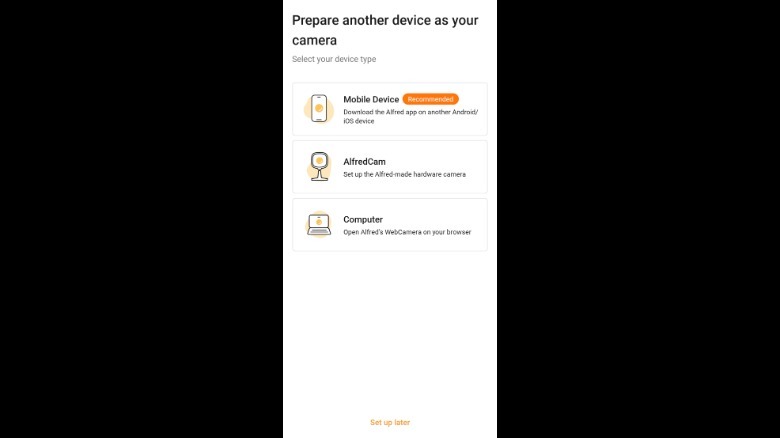
- Software Installation (Minutes 1-2): Download a reputable cross-platform surveillance application, such as AlfredCamera, onto both devices. This software is specifically designed to handle the "handshake" between the capture device (the old phone) and the viewing device (your current phone).
- Authentication (Minutes 2-3): Launch the application on both devices. You will be prompted to sign in using a unified account. Most systems offer a quick QR-code pairing feature, which bypasses the need for manual IP configuration or port forwarding—the technical hurdles that previously made DIY security projects difficult for the average consumer.
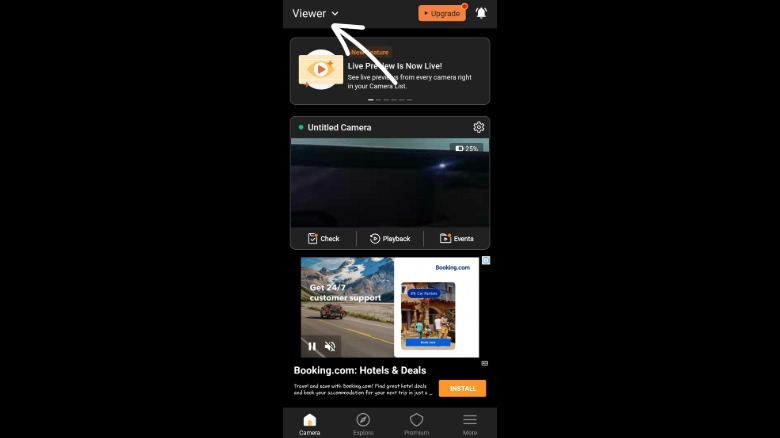
- Role Assignment (Minutes 3-4): Within the application interface, designate the old phone as the "Camera" and your current phone as the "Viewer."
- Placement and Power (Minutes 4-5): Position the camera device in its desired location. Connect it to a permanent power source to ensure the device does not power down during critical monitoring hours.
Supporting Data: Efficiency and Performance Metrics
The viability of this DIY approach is backed by the technical specifications of modern mobile hardware. Smartphones feature advanced image sensors, autofocus capabilities, and low-light sensors that are often superior to the mass-produced lenses found in budget security cameras.
Software Capabilities
While basic setups provide a simple live stream, the current generation of surveillance apps offers a robust suite of features:
- Two-Way Audio: The built-in microphone and speaker on your phone allow for real-time communication, whether you are checking on a pet or deterring an intruder.
- Motion Detection: Using advanced algorithms, these apps monitor for pixel changes in the frame, instantly triggering alerts to your primary device.
- Low-Light Optimization: Through software-level gain control, many apps can simulate "night mode" on older camera sensors, allowing for visibility in dimly lit environments.
- Cloud Integration: Most services offer tiered subscription models. For example, a "Standard" plan (typically ~$5.99/month) expands functionality to include HD streaming, multi-camera support (up to four), and 14 days of cloud-stored event history.
Hardware Considerations
Battery management is the primary challenge in this configuration. Since the camera will be recording or monitoring motion constantly, the device will consume power at a rate that standard standby mode does not. It is essential to keep the device plugged into a wall outlet. Furthermore, if you are using an Android device, it is critical to disable "Battery Optimization" for the surveillance app within the system settings. Failure to do so will result in the operating system force-closing the app to save power, effectively turning off your security system.
Implications for Home Security and Sustainability
The shift toward DIY surveillance has broader implications for both the consumer market and environmental impact.
The Sustainability Argument
E-waste is one of the fastest-growing waste streams in the world. According to reports from the United Nations, millions of tons of electronic waste are generated annually, much of which contains hazardous materials. By extending the lifecycle of a smartphone by even two or three years through repurposing, a user is significantly reducing their personal carbon footprint and delaying the need for the manufacturing of new, plastic-heavy surveillance hardware.
Privacy and Security Implications
One must acknowledge the security trade-offs. Using a third-party app to manage your surveillance means you are trusting that developer with your data. To mitigate risks:
- Factory Resetting: Always wipe the device of all personal photos, messages, and accounts before setting it up as a camera.
- Dedicated Accounts: Create a dedicated, secondary email account specifically for your security camera setup rather than using your primary personal email.
- Network Segmentation: If your router allows, set up a "Guest" Wi-Fi network for your smart home devices. This isolates the camera traffic from your main network where your personal computer and sensitive financial data reside.
Strategic Placement: Maximizing Your Coverage
A DIY system is only as effective as its placement. To get the most out of your hardware:
- The "Window-Mount" Strategy: If you need to monitor an exterior area, avoid mounting the phone directly outside unless you have a high-quality, weather-proof, and temperature-controlled enclosure. Instead, mount the phone inside, pressed against a window pane. Use a suction-cup mount to secure it, and consider using a black cardstock shroud around the lens to eliminate glare and reflections from the glass.
- Power Management: Invest in long-reach charging cables (10-15 feet) to allow for flexible positioning away from outlets.
- Stability: Use a tripod or a dedicated phone stand. A wobbly, improvised mount can lead to motion blur, which makes the motion detection algorithm less effective.
Conclusion: The New Life of Old Tech
The transformation of an old smartphone into a security camera is a perfect intersection of utility, cost-savings, and environmental responsibility. It challenges the consumerist narrative that hardware is "trash" the moment a new model hits the shelves.
By taking five minutes to reconfigure your old device, you aren’t just saving money—you are engaging in a form of technological recycling that keeps functional equipment out of landfills while simultaneously enhancing your home’s security. Whether you are keeping an eye on your pets while at work, monitoring a nursery, or adding an extra layer of oversight to your front entrance, your old phone is ready to get back to work. All it needs is a little power, a bit of internet, and a new purpose.











