Nana
Nana
In the modern digital landscape, the boundary between the physical world and our digital devices has become increasingly porous. Apple’s suite of camera-integrated features has fundamentally shifted how users interact with their surroundings, transforming the iPhone camera from a mere lens for capturing memories into a powerful tool for information retrieval. Among these, "Live Text" stands as the foundational technology for text recognition, while the more recent "Visual Intelligence" represents a leap into the realm of generative AI and contextual analysis.
Main Facts: What is Live Text?
At its core, Live Text is an optical character recognition (OCR) engine integrated directly into the iOS Camera app and Photos library. Since its introduction in iOS 15, the feature has allowed users to point their iPhone cameras at physical objects—posters, menus, street signs, or handwritten notes—and treat that text as if it were on a computer screen.
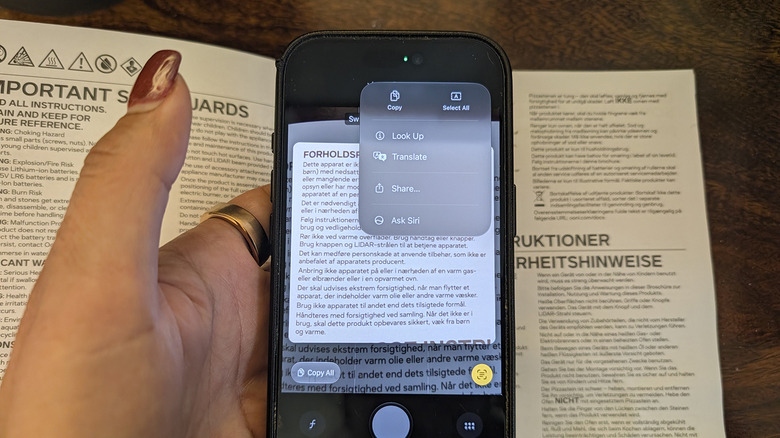
The feature is remarkably hardware-agnostic, supporting any iPhone from the XS line onwards. This accessibility has made it a staple for productivity, removing the need for third-party scanning apps for simple tasks. When the camera identifies a block of text, a small "Live Text" icon—a square containing three lines—appears in the bottom-right corner of the viewfinder. Tapping this icon allows the device to parse the image, enabling users to copy, translate, or look up specific strings of data.
Crucially, Live Text operates locally on the device’s Neural Engine. This ensures that privacy remains a priority; the text being processed does not necessarily need to be uploaded to a cloud server to be analyzed, making it a secure method for dealing with sensitive documents or private notes.
A Chronology of Apple’s Visual Evolution
The journey toward intelligent camera integration began long before the current era of generative AI.
- 2021 (iOS 15): Apple officially launched Live Text. At the time, it was marketed as a breakthrough in machine learning, allowing users to interact with text in real-time within the Camera app and the Photos app.
- 2022 (iOS 16): Apple expanded Live Text to include video, allowing users to pause a video and interact with the text on screen. This marked a significant step in the utility of the feature, as it moved beyond static images.
- 2024 (iOS 18.1): With the introduction of the iPhone 16 and 17 generations and the broader rollout of "Apple Intelligence," the company unveiled "Visual Intelligence." This served as the next evolution, moving the camera from a text-recognition tool to a full-blown contextual awareness engine.
- Present Day: The two features now coexist, with Live Text serving as the quick, organic helper for text, and Visual Intelligence acting as the advanced AI-powered assistant for complex real-world queries.
Supporting Data and Technical Functionality
The technical architecture behind these features is centered on the Apple A-series bionic chips. The Neural Engine, a specialized core within the processor, is designed to perform millions of operations per second, specifically for machine learning tasks.
How to Use Live Text Effectively
Using Live Text is a streamlined process designed for speed. To use it:
- Launch the Camera App: Position the frame so the text is centered.
- Wait for the Detection Frame: Your iPhone will automatically outline the detected text with a yellow box.
- The Grid Icon: Tap the small grid icon in the bottom right.
- Action Selection: Choose from "Copy," "Select All," "Translate," or "Look Up."
For travelers, the "Translate" function is perhaps the most potent. By pointing the camera at a menu in a foreign language, the iPhone can overlay the translation in real-time. If you do not wish to use these features, they can be disabled by navigating to Settings > Camera > Show Detected Text.
The Emergence of Visual Intelligence
While Live Text is a passive, text-focused tool, Visual Intelligence is proactive. Introduced alongside the Apple Intelligence suite in late 2024, it requires the advanced hardware of the iPhone 15 Pro, 16, or 17 series.
Visual Intelligence is effectively Apple’s answer to Google Lens. It does not just look for characters; it looks for meaning. When you point your camera at a restaurant, it doesn’t just read the name on the sign; it cross-references its database to provide hours of operation, user reviews, and reservation links.
How to Activate Visual Intelligence
Activation is integrated into the hardware buttons of newer iPhones:
- Camera Control Button: Long-pressing this specialized button immediately triggers the Visual Intelligence interface.
- Action Button: Users can map the Action Button to launch the feature instantly.
- Siri Integration: Via the Control Center or a direct Siri request, the feature can be pulled up to analyze whatever the viewfinder is currently pointing toward.
Official Stance and Privacy Implications
Apple has consistently positioned these features as "privacy-first" implementations of artificial intelligence. In their official documentation, Apple emphasizes that "On-Device Intelligence" is the primary driver for these tools.
"We believe that the most powerful AI is the kind that knows you, but doesn’t share your data with the world," a spokesperson noted during the Apple Intelligence keynote. By processing the vast majority of these visual queries on the device’s local silicon, Apple creates a competitive advantage over cloud-dependent models that require data to be sent to external servers for processing.
However, when a user opts to use the "Google Image Search" or "ChatGPT" integrations within the Visual Intelligence suite, they are operating within a hybrid model. Apple clearly denotes when the user is stepping outside the "private" on-device environment to tap into larger, cloud-based models. This transparency is a key element of Apple’s ongoing commitment to user trust.
Implications for Future Interaction
The implications of these technologies are profound, particularly for accessibility and productivity. For individuals with visual impairments, these tools provide a new way to navigate the world, offering audio descriptions or translations of their surroundings.
For the average professional, the shift represents a decline in the need for manual data entry. Business cards, whiteboard notes, and physical documents can be digitized and organized in seconds.
A New Way of Learning
Visual Intelligence changes how we learn about our environment. Pointing a phone at a landmark or a plant and immediately receiving an encyclopedic summary, or pointing at a restaurant menu and seeing health ratings and dietary restrictions, shifts the user from being a passive observer to an informed participant.
As Apple continues to refine these tools, we can expect "Computer Vision" to become even more granular. Future updates will likely include better handling of handwriting, real-time object manipulation (such as adjusting the price on a menu before saving it), and deeper integration with third-party applications.
Conclusion
The evolution from Live Text to Visual Intelligence marks a transition in mobile computing: our devices are no longer just repositories of information, but active participants in our physical environment. Whether it is a quick translation on a subway platform or a deep dive into the history of a building via Visual Intelligence, the iPhone has cemented its role as the ultimate interface between the human experience and the digital world. By keeping these tools intuitive, fast, and, where possible, strictly on-device, Apple has set a high bar for how AI-integrated hardware should function in our daily lives.

 Asro
Asro
 Ali Ikhwan