

As the countdown to WWDC26 enters its final stretch, anticipation for the next iteration of Apple’s mobile operating system—iOS 27—has reached a fever pitch. While reports suggest the event will be dominated by a revamped Siri and a deeper integration with Google’s AI models, there is a quieter, yet highly practical, area of Apple Intelligence that demands attention: the future of Visual Intelligence.
Since its introduction, Visual Intelligence has evolved from a niche Camera Control utility into a fundamental component of the iPhone user experience. With iOS 26, Apple successfully pivoted this technology toward productivity by integrating it into the screenshot workflow. As we look ahead to iOS 27, the natural progression for this feature set lies in a deeper, more context-aware integration with the Reminders app.
The Evolution of Visual Intelligence
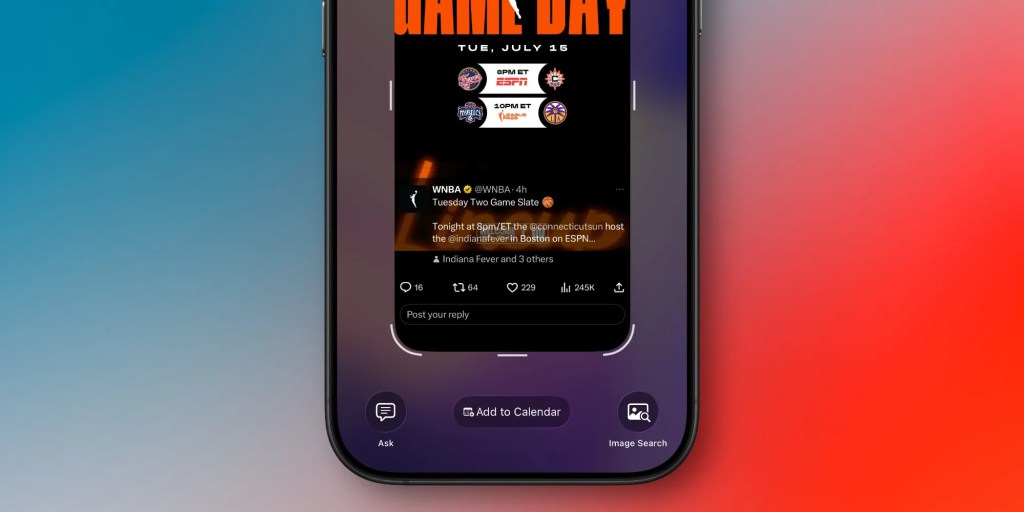
To understand where Apple Intelligence is heading, one must look at its rapid trajectory. Visual Intelligence debuted with a relatively limited scope, primarily serving as a contextual layer for the iPhone’s Camera Control hardware. However, the release of iOS 26 marked a significant turning point. Apple expanded the feature’s reach, allowing users to leverage AI analysis directly on their screenshots.
This expansion introduced three distinct pillars of functionality that have fundamentally changed how users interact with their screens:
- Calendar Integration: The ability to parse dates, times, and events from a captured image and instantly generate a calendar entry.
- Visual Search: An automated tool for identifying objects within a screenshot, facilitating shopping and research by surfacing similar items online.
- ChatGPT Contextualization: A direct bridge to ChatGPT that allows users to ask complex questions about the content of their screen, moving beyond simple metadata extraction.
These tools have turned the humble screenshot from a static file into a dynamic workspace. By automating the extraction of scheduling data, Apple has effectively turned the iPhone into a personal assistant that actively manages the user’s agenda rather than just recording it.

The Case for Reminders Integration
While the current suite of tools is impressive, there is a clear "missing link" in the productivity chain: the Reminders app. Currently, when a user encounters a task or a piece of information they need to act upon later, they are forced to manually transcribe it.
In iOS 27, Apple should prioritize an "Intelligent Capture" feature for Reminders. Imagine the utility: you are browsing an article or viewing an image of a grocery list and, with a simple screenshot and a prompt, the system creates a categorized task.
The "Universal Bookmark" Concept
The primary benefit of integrating Visual Intelligence with Reminders is the creation of a universal bookmarking system. In the current digital landscape, we are inundated with information—websites, text messages, and social media posts—that we intend to return to but often lose in the clutter of an endless camera roll.
By allowing users to drag a screenshot into the Reminders interface—or simply triggering it via a new "Create Reminder" action in the screenshot share sheet—the system could extract the core subject, add a link back to the original source, and set a due date if applicable. This would transform the screenshot from a temporary image into a persistent, actionable task.
Addressing the "Human Reminder" Problem
We all have those acquaintances who treat us like an external hard drive for their own obligations. When someone texts, "Can you remind me to pick up the dry cleaning on Tuesday?" it is often forgotten amidst the noise of a busy day.
If Apple Intelligence could parse that specific text bubble in a screenshot and automatically propose a reminder—complete with the context of who asked and what the task entails—the friction of personal task management would vanish. This is the ultimate promise of on-device AI: the ability to handle the "admin" of daily life without the user needing to manually input data.
The Technical Challenges Ahead
Implementing this level of contextual understanding is not a trivial task for Apple’s engineering teams. Unlike extracting a date for a calendar event, which follows a rigid format, understanding a request for a reminder requires a higher level of semantic reasoning.
The AI must be able to:
- Identify Intent: Distinguish between a statement ("I need to buy milk") and an instruction ("Remind me to buy milk").
- Resolve Ambiguity: Determine if a time or date mentioned in the text refers to the task itself or is merely incidental information.
- Privacy Preservation: Ensure that all these analyses occur on-device or via Apple’s Private Cloud Compute, maintaining the high standard of user privacy that has become a hallmark of the Apple brand.
Despite these hurdles, the foundation is already there. With the increased processing power of the latest A-series chips and the rumored advancements in the new Siri app, the hardware is more than capable of handling these complex intent-parsing tasks.
Chronology: The Road to WWDC26
The lead-up to this year’s Worldwide Developers Conference has been characterized by intense speculation. Here is how we reached this point:
- Late 2024: The initial rollout of Visual Intelligence via Camera Control introduced the concept of on-device object recognition to the general public.
- July 2025: Apple releases iOS 26, bringing the much-lauded screenshot-to-calendar and AI-chat features, which significantly increased the utility of the screenshot tool.
- Early 2026: User feedback cycles indicate a high demand for more granular productivity features, with "task creation" consistently topping the list of requested enhancements.
- May 2026: Leaks regarding the "Siri App" and the partnership with Google suggest that Apple is prepared to offer much more sophisticated, model-driven interactions in the upcoming OS.
- June 2026 (Upcoming): The official unveiling of iOS 27 at WWDC.
Implications for the Ecosystem
Should Apple move forward with deeper Reminders integration, the implications for the wider Apple ecosystem are profound. It would further solidify the "moat" around the iPhone; once a user’s tasks, calendar, and visual history are all seamlessly synced via Apple Intelligence, the cost of switching to a competing platform becomes significantly higher.
Furthermore, this integration would represent a maturation of the Apple Intelligence brand. It would signal a shift from "AI as a novelty" to "AI as a utility." By focusing on the mundane, repetitive tasks that clog our daily lives, Apple can prove that its AI strategy is grounded in genuine user needs rather than just technological capability.
Official Stance and Market Expectations
While Apple remains characteristically tight-lipped regarding specific features before the keynote, company leadership has repeatedly emphasized the goal of making Apple Intelligence "the most helpful assistant in the world."
Industry analysts suggest that Apple’s new partnership with Google—focused on deploying more robust, large-scale language models—will be the backbone of this effort. If these models are integrated into the system-wide screenshot tools, we could see a leap in performance that makes current iOS 26 capabilities look like a prototype.
Conclusion: A Vision for the Future
As we approach the WWDC26 keynote, the focus is rightfully on the "big ticket" items like the new Siri design and the Google-backed backend upgrades. However, the true measure of Apple Intelligence’s success will be found in the small, everyday interactions.

Expanding Visual Intelligence to include robust Reminders integration would be a masterclass in UX design. It would take a feature that is currently "nice to have" and turn it into a "can’t live without" utility. By turning the iPhone into a device that truly understands not just what we see, but what we need to do, Apple has the opportunity to redefine what it means to be a personal assistant in the age of AI.
What about you? While everyone is waiting for a better Siri, are you hoping for the small, incremental improvements to your daily workflow? Let us know in the comments below what you hope to see when iOS 27 finally hits our devices.












No comments yet. Be the first to join the conversation!