In the modern digital landscape, social media platforms have increasingly pivoted toward video-first consumption. Among these, X (formerly Twitter) has undergone significant structural changes, shifting from a text-heavy microblogging platform to one dominated by algorithmic video feeds. For many users, this shift has brought an unintended consequence: the automatic playback of content that can be, at best, distracting, and at worst, deeply distressing.
When major world events occur—particularly those involving conflict, violence, or tragedy—social media feeds are often inundated with raw, uncurated footage. For users who simply wish to check updates or maintain their social connections, being forced to view graphic video content as they scroll can be a jarring experience. While there is no "off switch" for the nature of content shared by users, there is a technical safeguard available: disabling the autoplay feature. By taking control of your data settings, you can ensure that videos only play when you explicitly choose to engage with them.
The Evolution of the X Feed: Why Autoplay is Everywhere
To understand why users are feeling overwhelmed, one must look at the recent evolution of X’s interface. Under the current ownership, the platform has aggressively pushed a "Video Tab" and integrated short-form, high-engagement video content directly into the "For You" timeline. The underlying philosophy is simple: keep the user engaged by reducing the friction between seeing a video and consuming it.
However, this friction-less design works against user autonomy. When a video starts playing the moment it enters the viewport, the user loses the ability to decide whether they are emotionally or mentally prepared to view the contents of that clip. This is particularly problematic for individuals who may suffer from post-traumatic stress or those simply trying to curate a more peaceful digital environment.
Step-by-Step: How to Disable Autoplay on X
If you find yourself constantly interrupted by unwanted videos, the following steps will allow you to reclaim your feed. These settings are persistent across your account, meaning once they are applied, they will sync across both your desktop and mobile devices.

Step 1: Navigating to "Settings and Privacy"
The control panel for your experience on X is hidden behind a few layers of menus.
- On Desktop: Locate the "More" button (represented by an ellipsis icon) in the bottom-left sidebar. Clicking this will open a secondary menu; select "Settings and privacy."
- On Mobile: Tap your profile icon in the top-left corner, then scroll down to the bottom of the drawer to find "Settings & Support," which contains the "Settings and privacy" option.
Step 2: Accessing Data and Accessibility Preferences
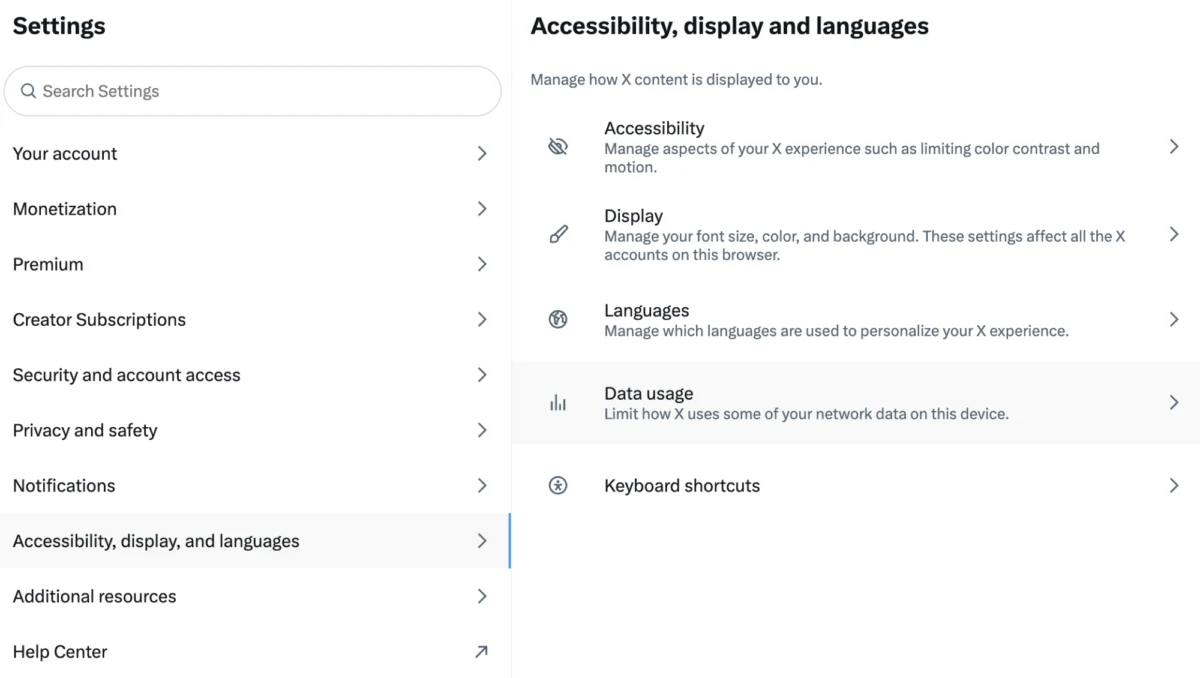
Once you have entered the settings menu, you need to find the specific section governing your content consumption habits. Look for the tab labeled "Accessibility, display, and languages." Within this menu, you will find several sub-categories. You are looking for the "Data usage" tab. This section is designed primarily to help users manage their cellular data consumption, but it serves as the master switch for the platform’s media playback behavior.
Step 3: Configuring the Autoplay Setting
Inside the "Data usage" menu, you will see a section specifically titled "Autoplay." By default, this is likely set to "On" (either for Wi-Fi only or for both cellular and Wi-Fi). To stop the automatic playback, click or tap on this option and select "Never."
By choosing "Never," you ensure that every video on your timeline will remain static—appearing as a thumbnail—until you manually click the play button. This puts the agency back in your hands, allowing you to preview the context of a tweet before committing to watching the media attached to it.
The Implications of Algorithmic Curation
The move toward an algorithmic, video-centric feed has significant implications for how news is consumed in the 21st century. Research in digital media consumption suggests that the "passive consumption" model—where the app chooses what you see—increases the likelihood of encountering "doomscrolling" traps.

When a user is exposed to violent or distressing imagery in an automated fashion, it triggers a physiological response before the conscious mind can process the content. This is known as "passive exposure," and experts argue it can lead to heightened anxiety and a feeling of loss of control over one’s personal digital environment. While disabling autoplay does not filter out the content itself—you may still see a disturbing thumbnail or a violent still image—it creates a psychological buffer that allows the user to look away or scroll past before the audio or movement begins.
Supporting Data: The Impact of Video on User Experience
Data from social media analytics firms suggests that video content garners significantly higher engagement rates than static text. Because platforms like X derive revenue from time spent on the app, the drive toward auto-playing video is a business imperative.
However, this business model often clashes with user sentiment. Surveys regarding platform satisfaction indicate that users who feel "in control" of their feeds are more likely to remain on the platform for longer periods without experiencing "platform fatigue." By providing the "Never" option, X acknowledges that its power-users value utility over the aggressive engagement tactics typically found in newer, more experimental social platforms.
Official Responses and Platform Responsibility
The leadership at X has frequently stated that their goal is to become the "everything app," a digital town square where real-time information is prioritized. While the company provides the tools to disable autoplay, it has faced criticism for not making these accessibility settings more prominent.
Advocacy groups focusing on digital safety often point out that "Settings and privacy" are buried deep within the menu architecture. For many, this is a barrier to entry that prevents the average user from customizing their experience. Critics argue that safety-centric settings, such as "Autoplay: Never" or advanced keyword filtering, should be surfaced during the onboarding process or highlighted when a user’s account is created.

A Note on Digital Wellbeing
Disabling autoplay is only one part of maintaining a healthy relationship with social media. While these technical steps can mitigate the immediate shock of unexpected content, they do not resolve the underlying issue of encountering harmful material.
If you find yourself frequently distressed by the content you encounter online, it is essential to remember that you have the right to curate your experience further. This includes:
- Muting Keywords: Use the "Muted words" setting in your privacy preferences to block specific terms, hashtags, or phrases that are associated with news events you find upsetting.
- Curating Follows: Regularly audit your "Following" list. If an account consistently shares content that negatively impacts your mental health, unfollow or mute them.
- Taking Breaks: No social media platform is worth your peace of mind. Taking intentional breaks from the app, especially during periods of global crisis, is a valid and necessary form of self-care.
Conclusion: Taking Control
In an era where we are constantly tethered to the digital pulse of the world, the ability to control how we consume information is a vital skill. X may be designed to keep you scrolling, but you are not obligated to consume everything it puts in front of you.
By taking the few minutes required to adjust your "Data usage" settings, you effectively reclaim a layer of agency. You decide when to look, when to play, and when to engage. While the internet will always be a space of unpredictable news, your experience of that space can—and should—be governed by your own terms.
Resources for Support
If you or someone you know has been affected by the content viewed online, please consider reaching out to the following organizations for support:
- Crisis Text Line: Provides free, 24/7 support for those in distress.
- 988 Lifeline: A national network of local crisis centers that provides free and confidential emotional support to people in suicidal crisis or emotional distress.
- Samaritans: A global resource for those who need someone to talk to.
- Find a Helpline: A directory that helps you find the right support service based on your location.
- Safer Internet Centre: If you encounter illegal or harmful content, you can use these resources to report the material to the appropriate authorities.