

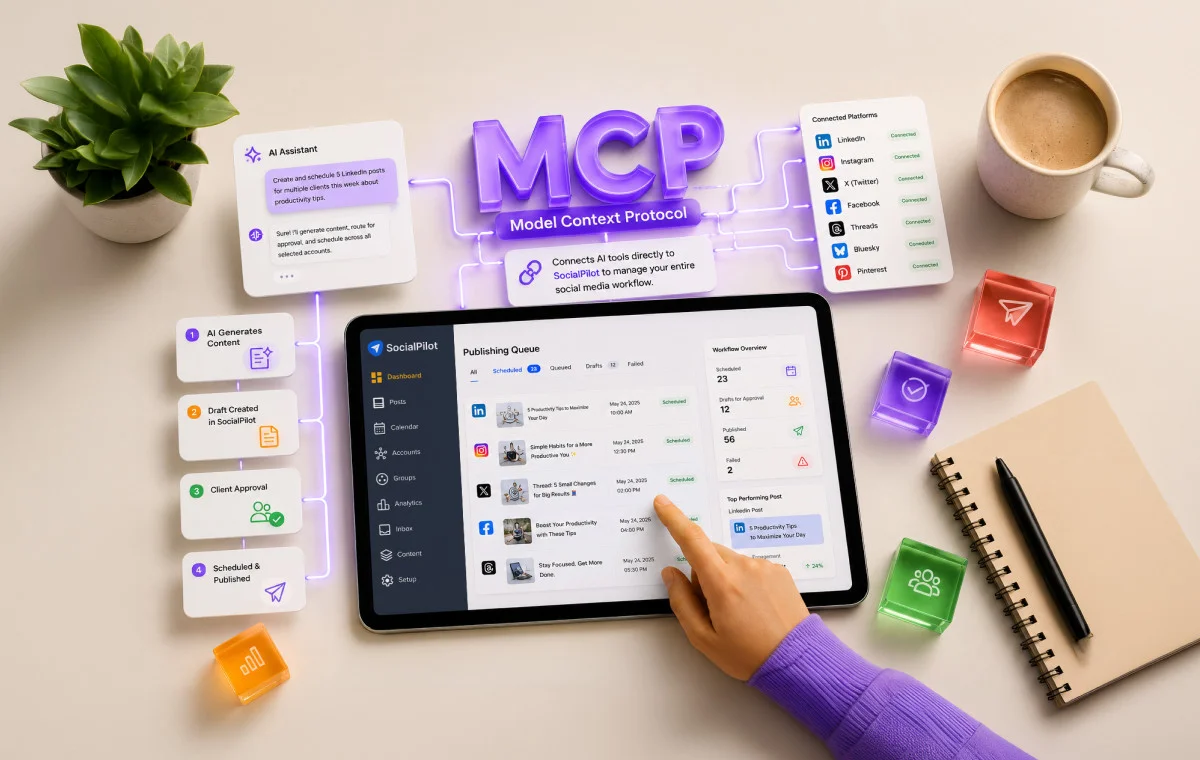
If you have spent any time in professional circles or AI-focused newsletters recently, you have likely encountered the acronym "MCP." It is the latest buzzword signaling a seismic shift in how we interact with digital tools. For social media managers and marketing agencies, this is not just another technical upgrade; it is the bridge between AI as a creative partner and AI as an autonomous operator.
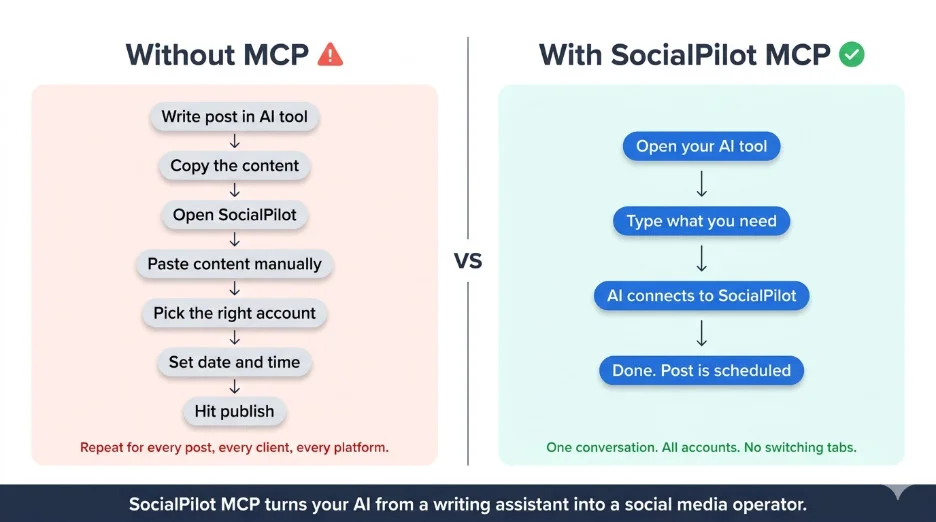
For years, the promise of AI in marketing has been hampered by a "copy-paste" reality. You generate high-quality content in Claude or ChatGPT, then manually move that content into a scheduling platform, navigate through multiple tabs, assign it to the correct client group, and finally hit publish. For an agency managing 40 or more client accounts, this is a productivity bottleneck of the highest order.
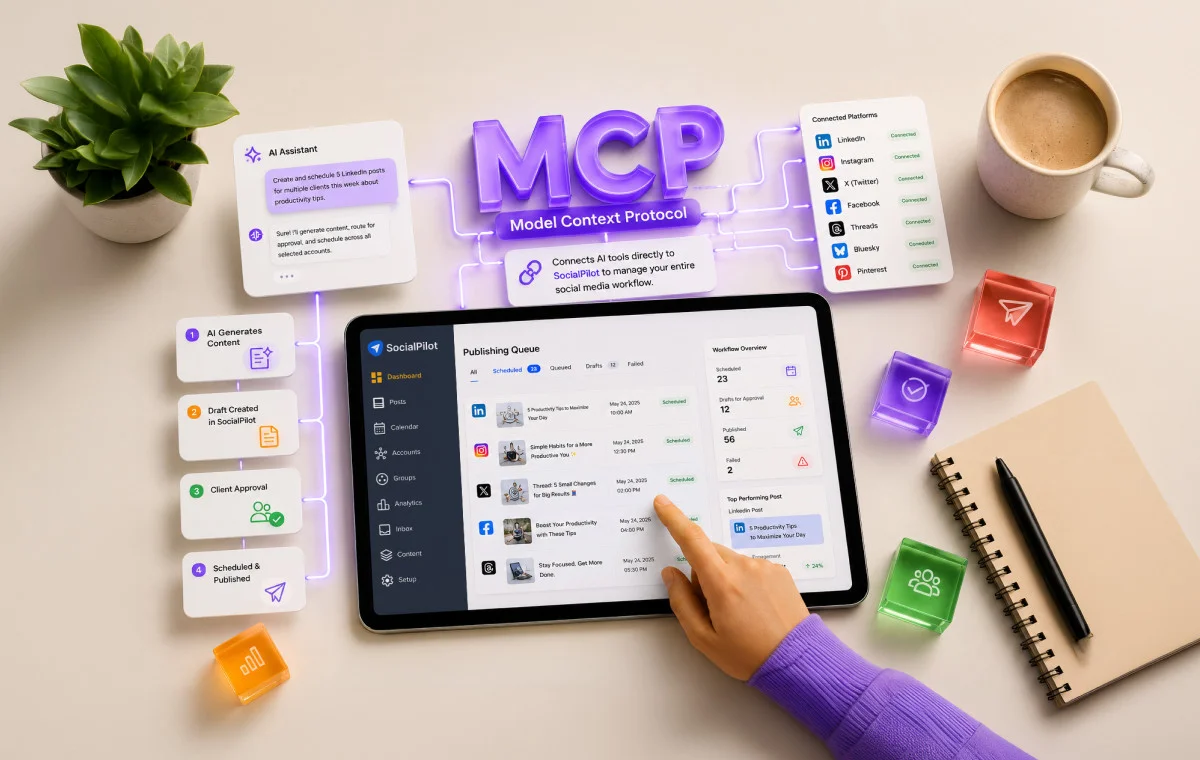
The Model Context Protocol (MCP) is the technology that finally breaks this cycle. By allowing AI models to connect directly to your social media scheduling platforms, it eliminates the need for manual intervention, turning your AI assistant into an active member of your operations team.
What Is MCP and Why Are Agencies Talking About It?
At its core, MCP stands for Model Context Protocol. Introduced by Anthropic in November 2024 as an open standard, it has quickly gained industry-wide momentum, with heavyweights like OpenAI and Google DeepMind adopting the framework.
To understand its significance, consider the evolution of the hardware industry. Before the universal adoption of USB-C, every device required a proprietary cable. If you wanted to charge your phone, laptop, and camera, you needed three different cords, each with unique power requirements and compatibility issues. The introduction of USB-C created a standardized language for hardware connectivity.
MCP does the same for software. Previously, every AI tool required a custom, time-intensive integration for every single application. This fragmentation meant that most professional tools remained "siloed"—unable to talk to one another without expensive, custom engineering. With MCP, a single standard allows tools like Claude, ChatGPT, Windsurf, Cursor, and even automation platforms like Zapier to "speak" the same language.
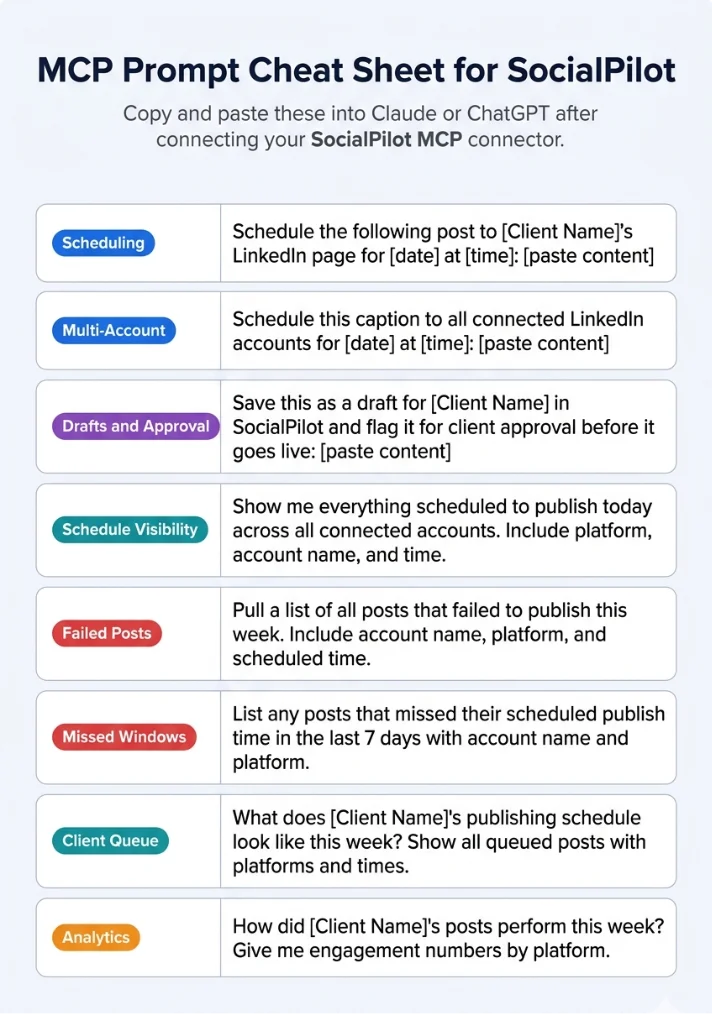
When you apply this to a platform like SocialPilot, the implication is profound: your AI model gains the ability to operate your social media dashboard directly. You are no longer just asking the AI to write a caption; you are asking it to manage an entire social media ecosystem.
Chronology: The Rapid Rise of Agentic Workflows
The journey to MCP began with the realization that Large Language Models (LLMs) were limited by their "context window" and their inability to take action in the real world.
- Pre-2024: AI was primarily a generative tool. It could suggest content, but it could not post it. The "human-in-the-loop" was a necessity for every single step of the workflow.
- November 2024: Anthropic officially launched the Model Context Protocol. By open-sourcing the standard, they provided a framework for developers to create connectors that allow AI to read and write data to external applications.
- Q1 2025 – Present: The ecosystem expanded rapidly. As platforms like SocialPilot launched first-party MCP connectors, the barrier to entry collapsed. What once required custom API development now takes minutes to set up, democratizing access to "agentic" workflows—systems where AI doesn’t just suggest, but executes.
Supporting Data: Why Efficiency Matters
For digital agencies, the math is simple. If an agency manager spends 15 minutes per day per client on manual scheduling, administrative tasks, and analytics reporting, a portfolio of 40 clients equates to 10 hours of non-billable, repetitive labor every single day.
Data from early adopters of the SocialPilot MCP connector suggests a dramatic reduction in "context switching." When the AI serves as the interface, the workflow transitions from:
- Researching trends in an AI tool.
- Drafting in a document.
- Logging into a dashboard.
- Uploading assets.
- Scheduling.
- Returning later to monitor.
…to a single, continuous conversation. The AI handles the "heavy lifting" of account navigation and draft creation, while the human focuses on high-level strategy and final approval.
The Operational Breakdown: What Can an MCP-Enabled AI Actually Do?
Once the SocialPilot MCP connector is configured, your AI assistant gains "operational awareness" of your business. This is not a superficial connection; it is a deep, functional integration.
Access to the Full Account Roster
The AI is aware of your entire client hierarchy. It knows which accounts belong to which client groups and which platforms are linked to which profiles. When you ask the AI to "draft a post for our lifestyle clients," it doesn’t need to ask for clarification; it already knows the roster.
Seamless Post Creation and Scheduling
SocialPilot’s implementation of MCP supports the full spectrum of social channels, including Facebook, X/Twitter, LinkedIn, Instagram, Pinterest, Threads, and Bluesky. You can provide a single prompt, and the AI will propagate that content across multiple platforms, adjusting the tone and format for each network automatically.
Intelligent Draft Management
One of the most critical aspects of agency work is the approval process. The AI does not just publish blindly. It creates drafts within SocialPilot, flags them for review, and assigns them to the correct client or team lead. This preserves the essential human oversight required in professional agency environments.
Real-Time Delivery Monitoring
Forget refreshing a dashboard to see if a post went live. You can ask your AI, "How did the posts for Client X perform today?" or "Did any posts fail?" and it will pull that status directly from the SocialPilot backend into your chat window.
Analytics on Demand
Performance reporting is often the most time-consuming part of an account manager’s week. With MCP, you can request specific data points—engagement rates, reach, or follower growth—and the AI will retrieve that data in real-time. No more exporting CSVs or manually building slides.
Official Perspective: What MCP Is Not
To avoid confusion, it is important to define the boundaries of this technology.
- It is not a replacement for human strategy. The AI is an operator, not a CMO. It executes the tasks you assign it based on the constraints you define.
- It is not an "autopilot" without guardrails. You maintain total control over the approval workflow.
- It is not a black box. Every action taken by the AI via the MCP connector is logged within your SocialPilot dashboard, ensuring full transparency.
In essence, MCP turns your AI from a passive chatbot into an active, functional assistant that understands your business constraints and operating procedures.
Who Actually Needs This?
While the technology is impressive, it isn’t for everyone. It is most impactful for:
- High-Volume Agencies: If you are managing dozens of accounts and spend hours every week on repetitive tasks, this is your primary tool for reclaiming your time.
- AI-Native Teams: If your team already uses tools like Claude or ChatGPT as their primary workspace, MCP is the natural evolution of your workflow. It allows you to stay in your "flow state" rather than jumping to a browser tab to manage scheduling.
- Content Approval Shops: If you have strict client approval processes, the automation of draft management and flagging is a game-changer for your operational speed.
You may not need MCP yet if you manage only one or two accounts, or if your content strategy is highly experimental and requires manual, minute-by-minute adjustments that don’t fit into a templated workflow.
Implications: The Future of Agency Work
The integration of MCP into platforms like SocialPilot signals a larger trend: the "App-Less" future. As AI models become capable of controlling our professional software, the need to navigate dozens of distinct interfaces will diminish.
For agencies, this creates a competitive advantage. Those who adopt MCP-driven workflows will be able to handle larger client loads with higher precision and lower overhead than their competitors. It allows the focus to shift from managing software to managing strategy.
A Quick Setup Guide (Method 1: Direct Sign-In)
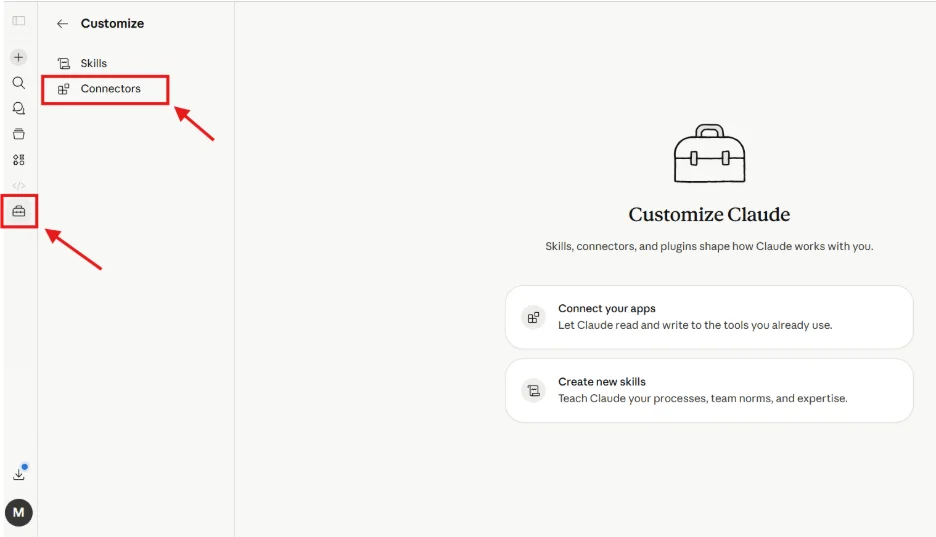
- Initialize: Open your AI tool (e.g., Claude), navigate to "Customize," and select "Connectors."
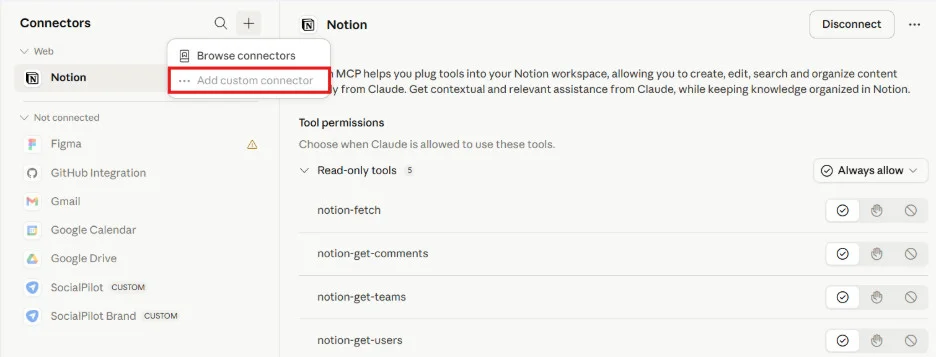
- Add Connector: Click the "+" icon and choose "Add Custom Connector."
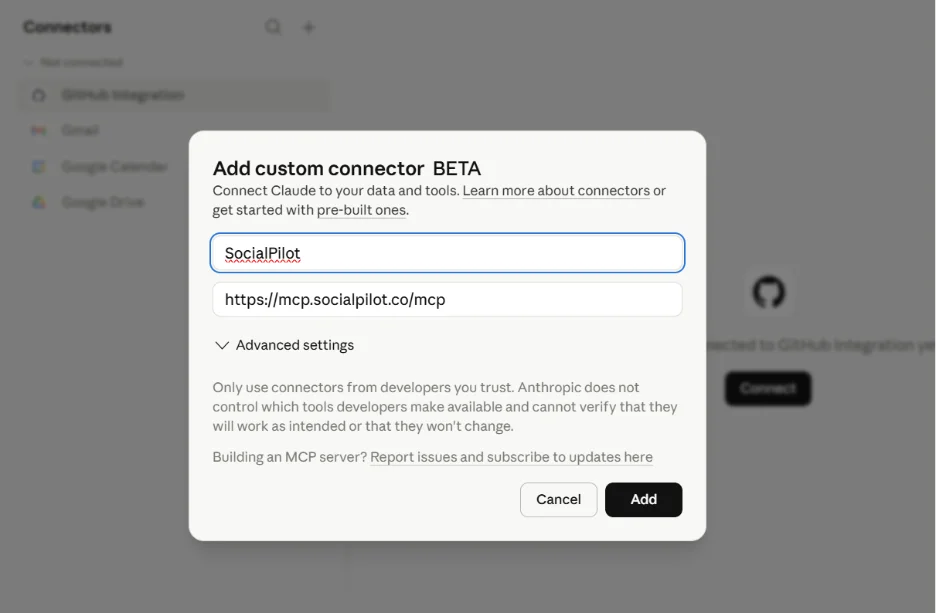
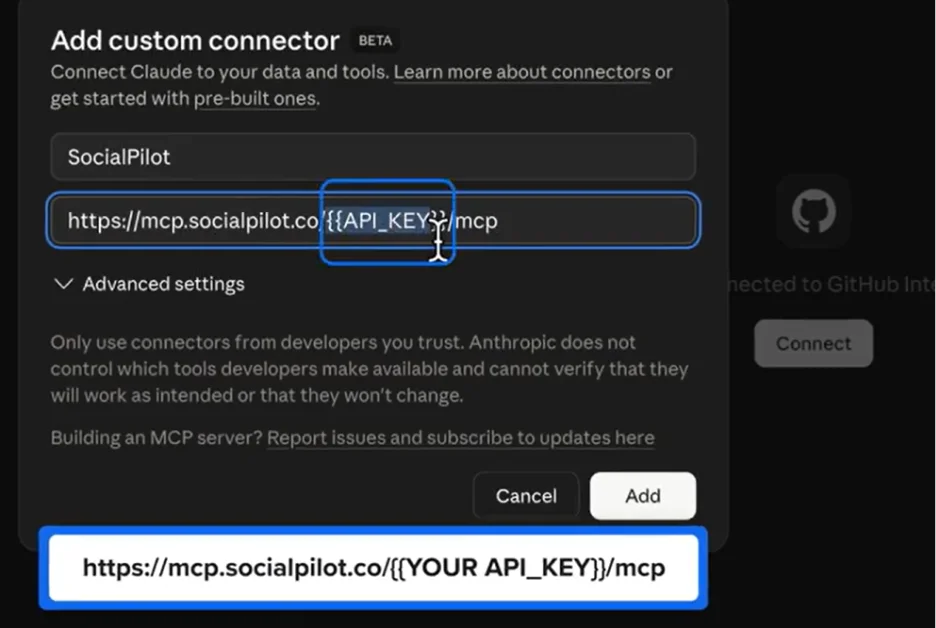
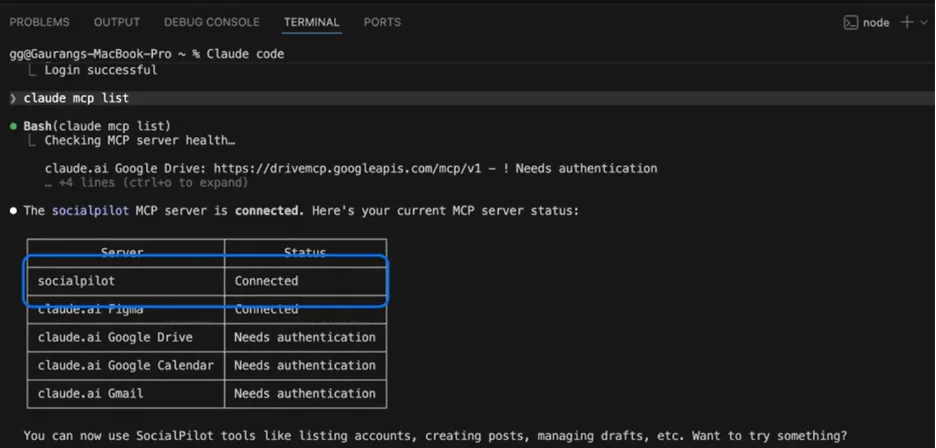
- Configure: Name it "SocialPilot" and paste the provided MCP server URL (https://mcp.socialpilot.co/mcp).
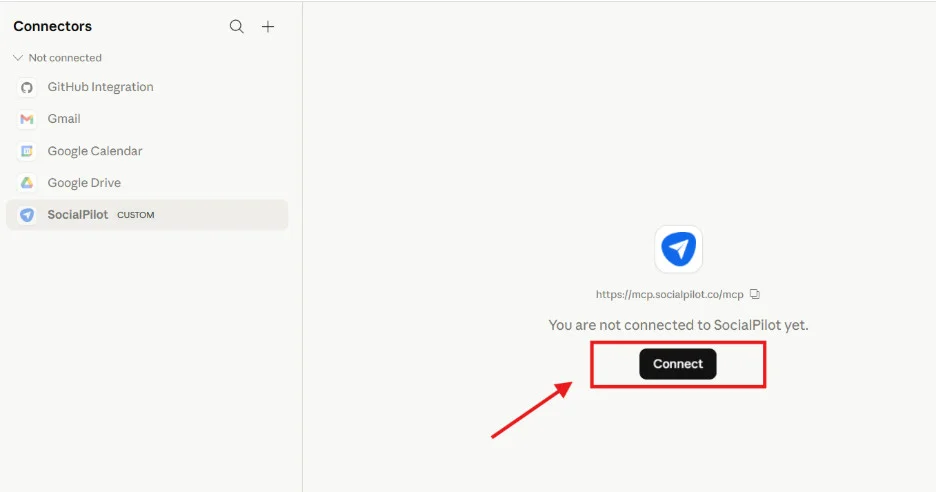
- Authorize: Once added, click "Connect" and complete the login process using your SocialPilot credentials.
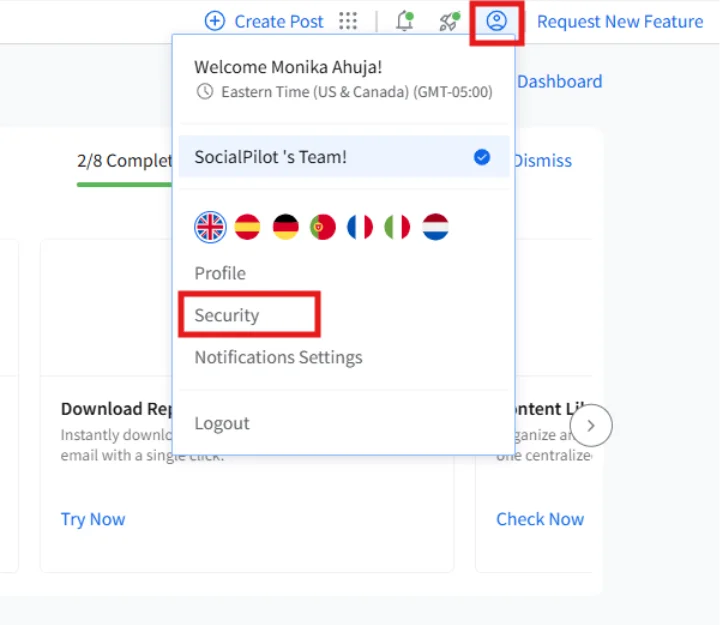
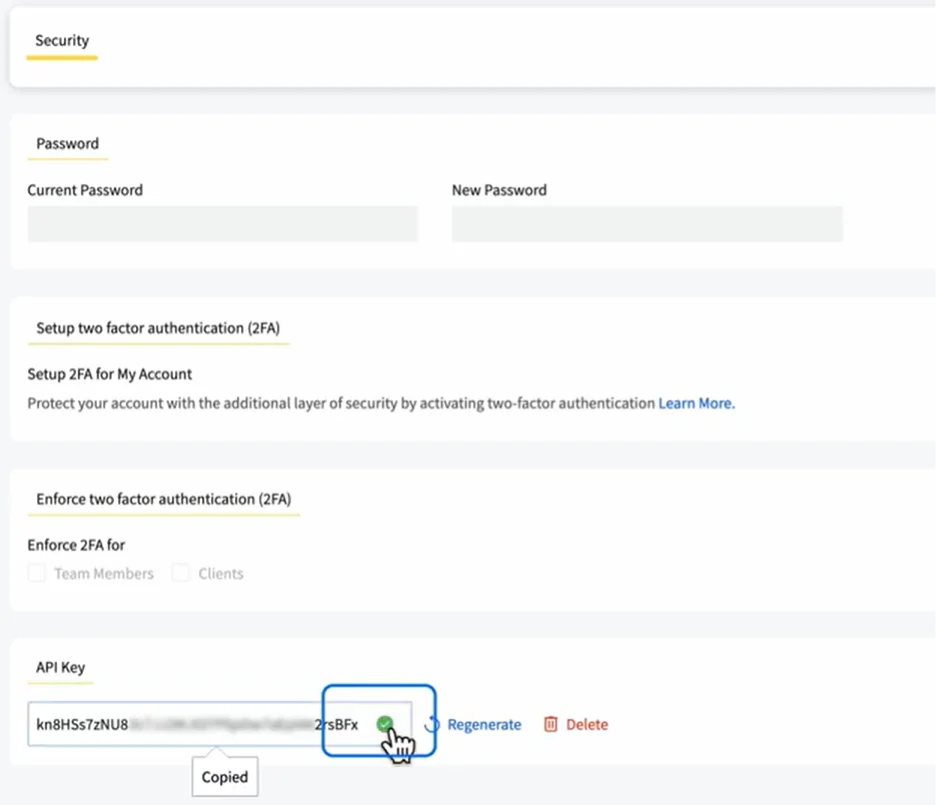
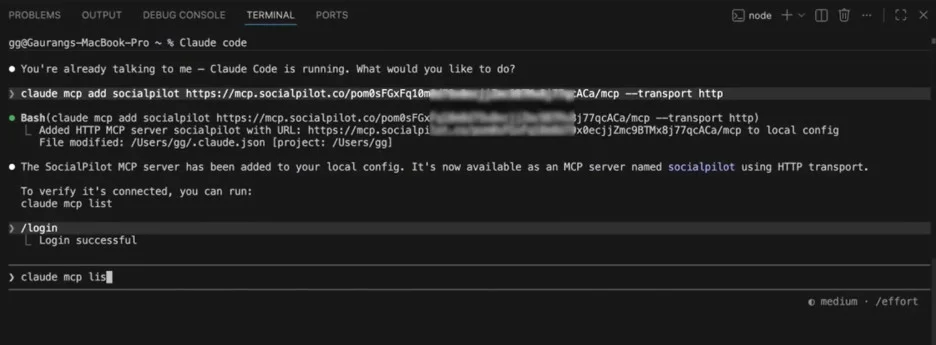
Once connected, your AI is ready to manage your accounts. Whether you use the browser-based sign-in for simplicity or the API-key-based approach for more complex, automated development environments, the setup is designed to be completed in less than five minutes.
Final Thoughts
SocialPilot’s first-party implementation of the Model Context Protocol represents a major milestone. By providing deeper access to account rosters, analytics, and draft states than third-party plugins could ever achieve, they have created a robust, professional-grade tool for the modern agency.
The question for your team is no longer "should we use AI?" but "how effectively can we integrate AI into our operations?" With MCP, the answer is finally clear: connect it, automate the routine, and focus on the creative.












No comments yet. Be the first to join the conversation!