Raul Delapena Setiawan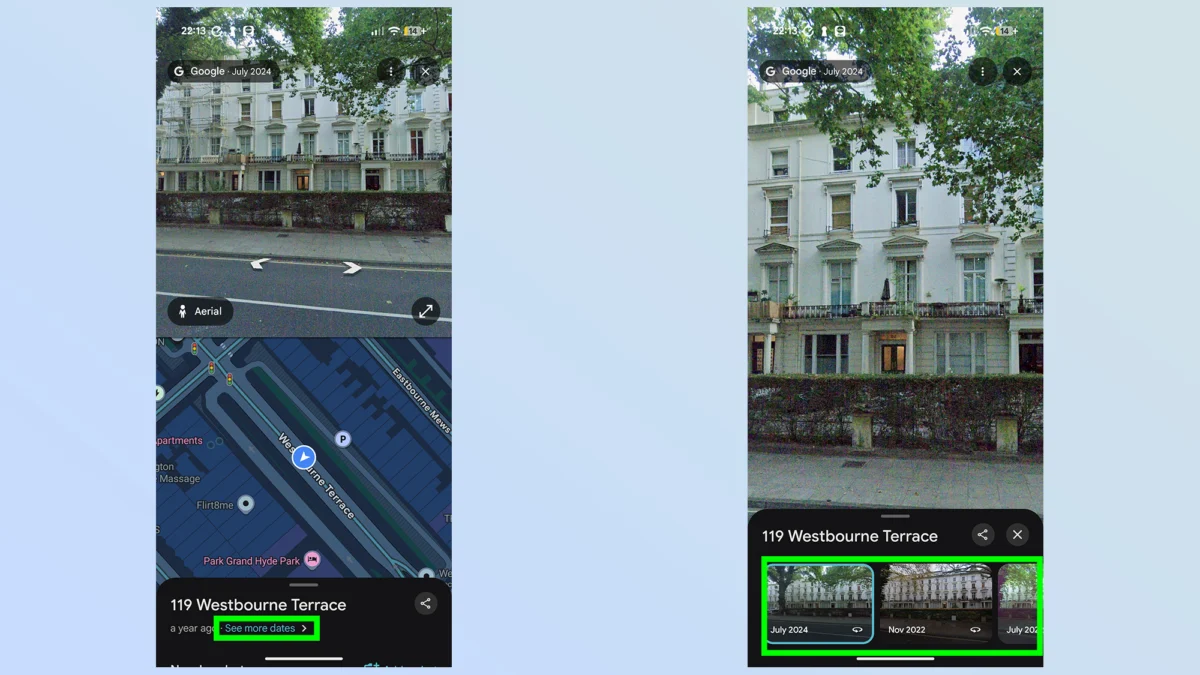
In the digital age, Google Maps has evolved from a simple A-to-B navigation tool into an essential utility for urban exploration, logistics, and global discovery. While millions of users rely on its real-time traffic data and turn-by-turn directions every day, a sophisticated archival feature remains tucked away, largely underutilized by the casual user. Google Street View’s "time travel" functionality offers an unprecedented look into the evolution of our physical world, allowing users to peel back the layers of history one captured frame at a time.
This feature, while not new, continues to be one of the most compelling aspects of the Google Maps ecosystem. It transforms the platform from a static map into a dynamic, historical archive of the global landscape, documenting the architectural, infrastructural, and environmental changes that have occurred since the inception of the Street View project in 2007.
The Evolution of Street View: From Novelty to Historical Archive
When Google first introduced Street View in 2007, it was a technical marvel—a way to see high-resolution, panoramic imagery of streets across the United States from the comfort of a desktop computer. As the fleet of camera-laden vehicles expanded globally, the database grew exponentially. However, as the cameras returned to the same locations over the years to update map data, Google realized it was inadvertently creating a chronological record of the world.

Rather than deleting older imagery to save server space, Google pivoted to a curation model, archiving these older captures. This transition effectively turned the Street View interface into a time machine. For researchers, historians, urban planners, and curious citizens, this provides a longitudinal view of how cities grow, how businesses cycle through storefronts, and how climate and natural disasters have reshaped our local environments.
Step-by-Step: How to Access the Time Machine
For those looking to explore this feature, the process is straightforward, though it requires specific steps to navigate correctly.
1. Launching the Map
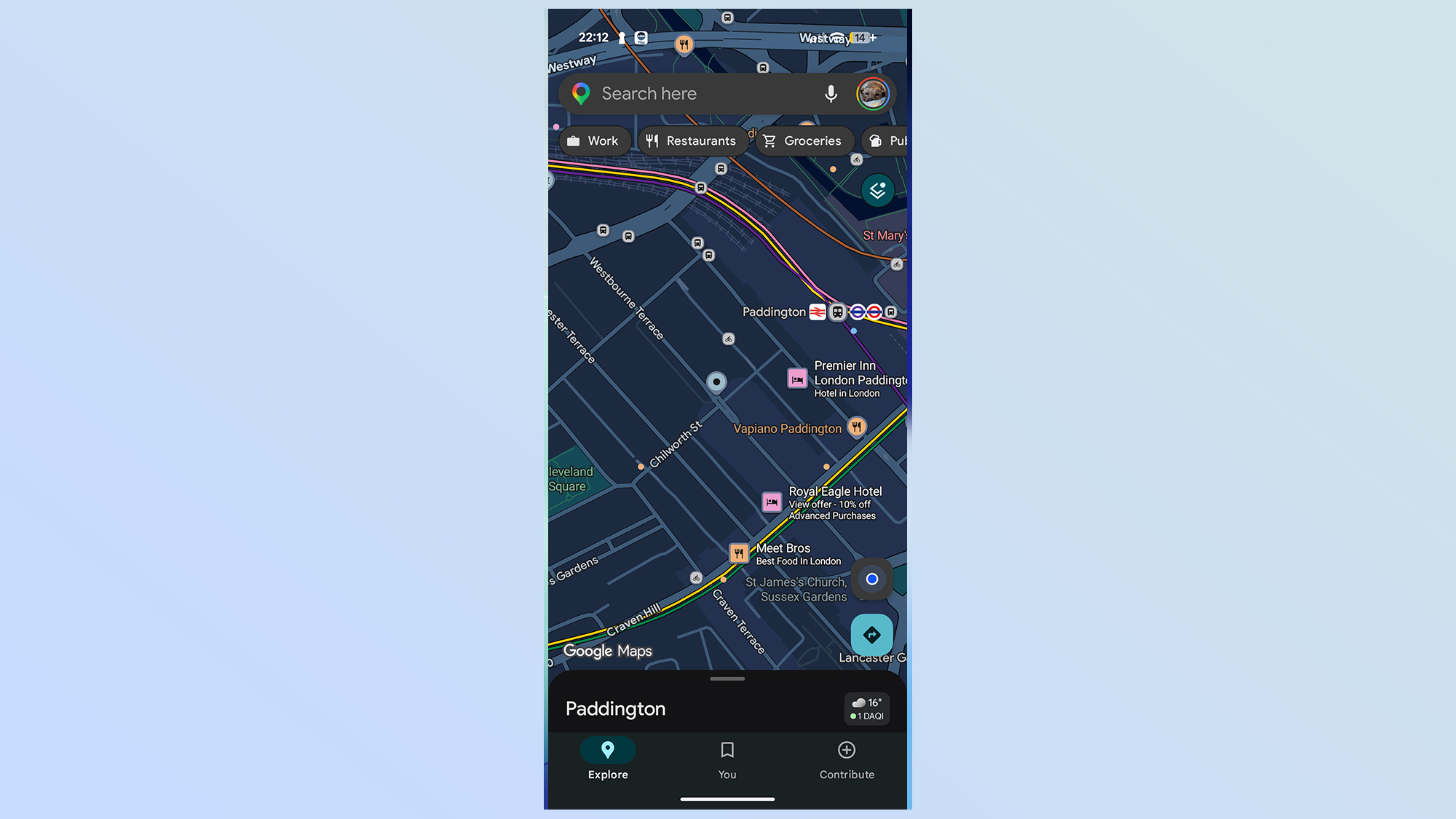
Begin by opening the Google Maps application on your smartphone or accessing the desktop browser version. Navigate to the specific location or address you wish to analyze.
2. Enabling the Layer
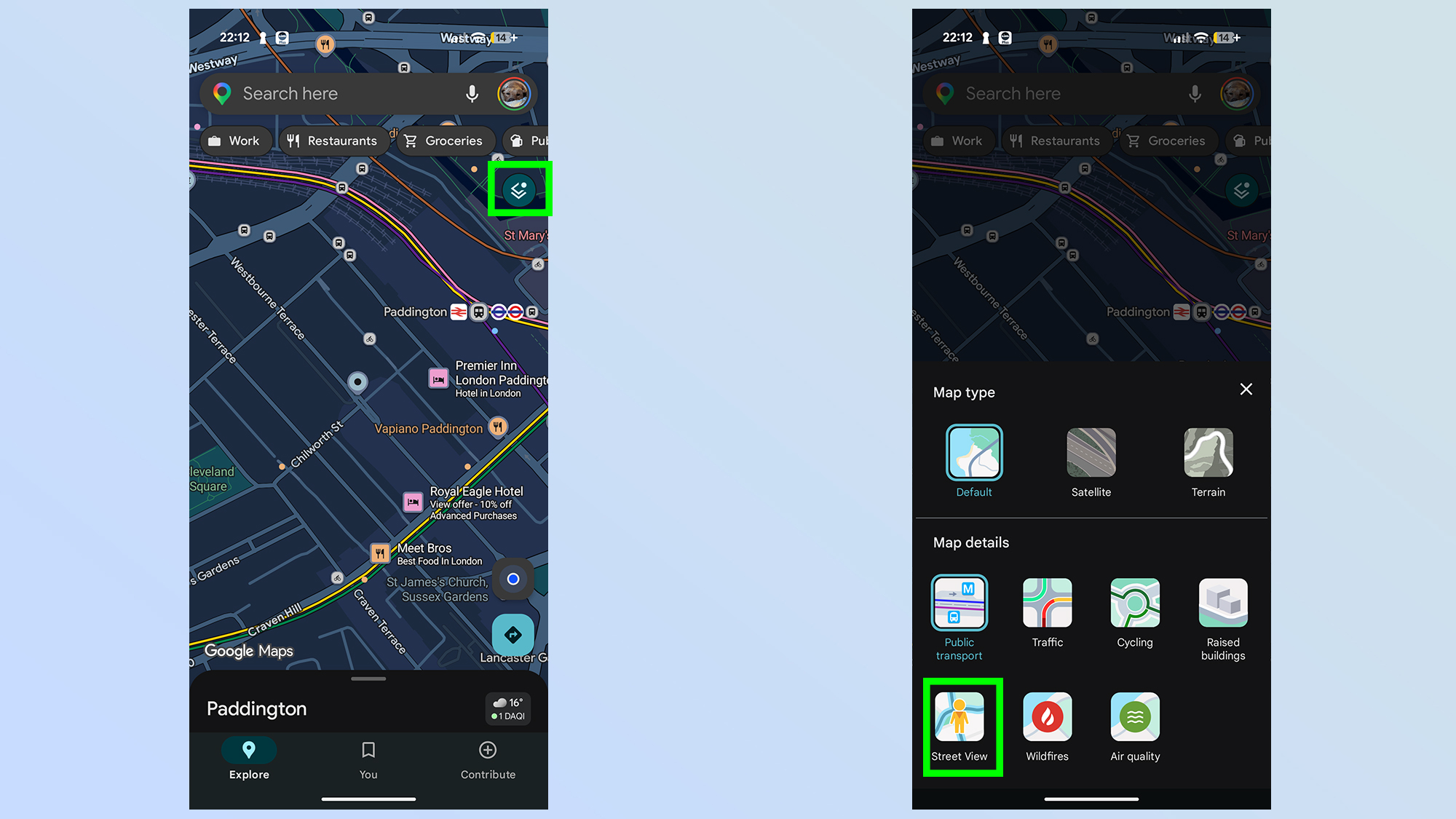
To initiate the historical viewing mode, you must first access the "Layers" menu—the icon resembling a stacked double-square typically located in the top-right corner of the interface. From the selection menu, toggle the "Street View" option. Once active, the map will be overlaid with a lattice of blue lines. These lines represent the paths traversed by Google’s fleet of vehicles. Areas marked in gray remain inaccessible to Street View, indicating they have not been captured by the platform’s mapping hardware.
3. Entering the Street View Portal
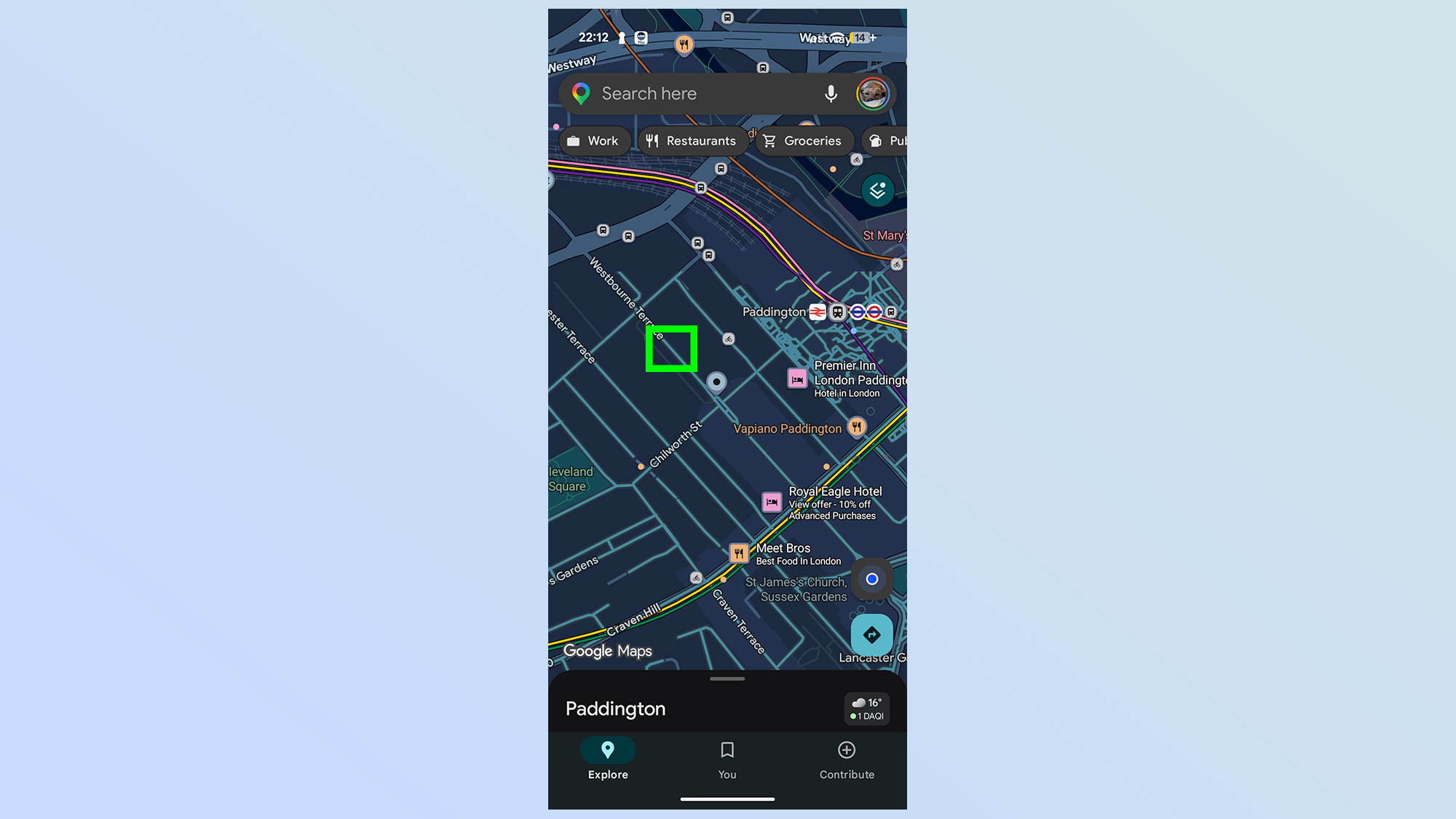
Select your desired location by tapping directly on a blue line. This will drop you into the 360-degree street-level view. At this stage, you are viewing the most recent imagery available.
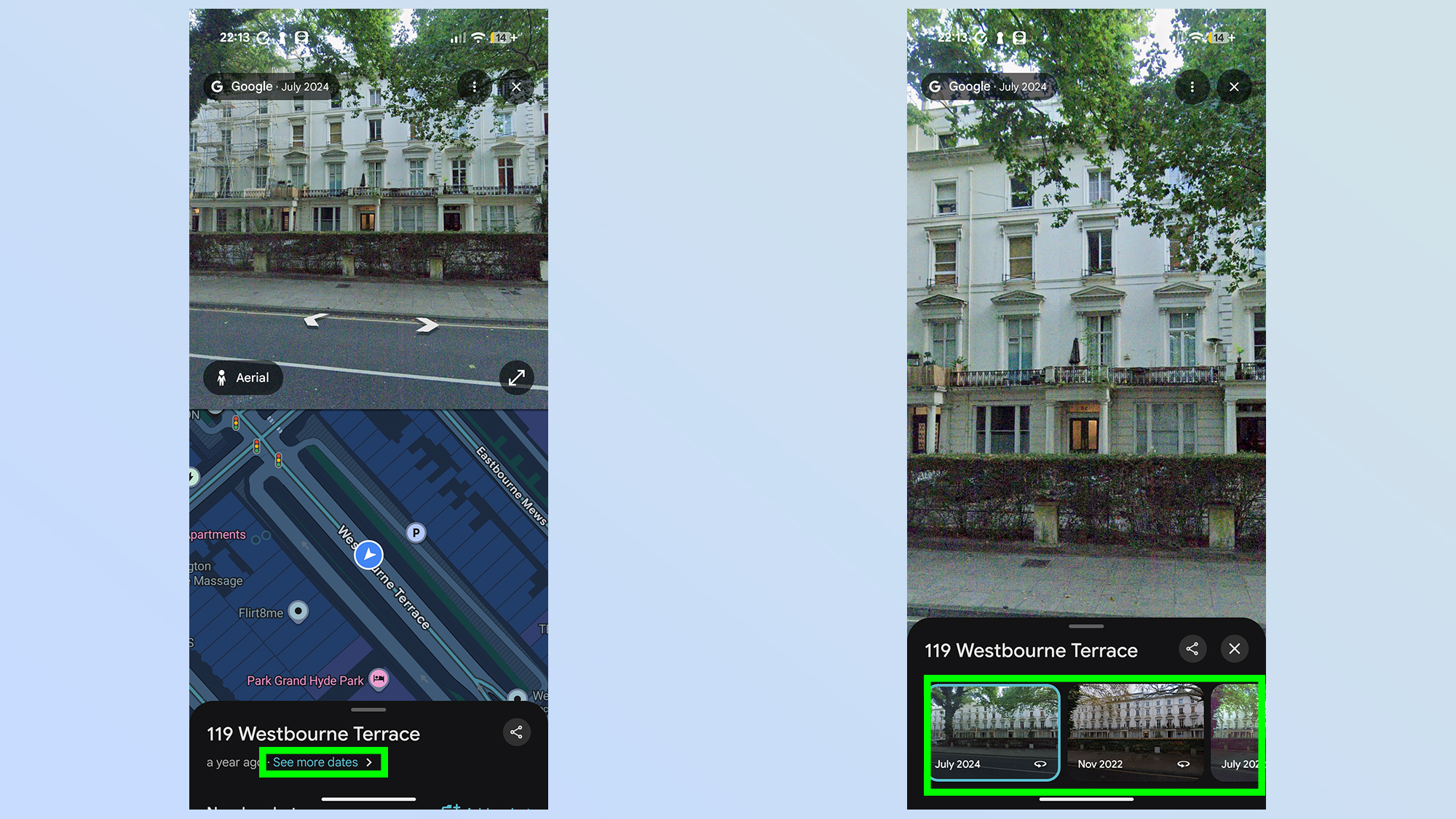
4. Activating the "See More Dates" Interface
Look to the bottom of your screen. If historical imagery is available for your selected location, a small box will appear displaying a link labeled "See more dates." Tapping this will expand a scrollable timeline gallery. This gallery lists the months and years of previous captures. You can slide through these dates to instantly jump to different periods in the past, observing the visual changes in the environment.
5. Navigating the Temporal Landscape
Once you select a past date, the interface will reload to display the view as it appeared at that time. You can move through the environment using standard navigation—tapping the screen or using on-screen arrows—to walk through that moment in history. It is important to note that if you navigate to a section of the street that lacks data for your selected time period, the application will automatically jump to the next closest available date, which may result in a significant leap forward or backward.
Supporting Data: Why This Feature Matters
The utility of this "time travel" feature extends far beyond mere curiosity. By allowing users to compare side-by-side snapshots of the same intersection across a decade or more, several key observations emerge:
- Urban Redevelopment: You can observe the rise of new skyscrapers, the demolition of historical landmarks, or the expansion of residential suburbs.
- Commercial Turnover: It serves as a visual record of economic shifts, showing the rise and fall of retail corridors and the transition of neighborhood demographics.
- Environmental Monitoring: The feature has been used by environmental scientists to observe the aftermath of natural disasters—such as wildfires, hurricanes, and floods—and the subsequent years of recovery and rebuilding.
- Infrastructure Growth: It provides a clear view of how transit systems, bridges, and highway networks have been expanded to accommodate increasing urban populations.
Official Stance and Privacy Considerations
Google’s approach to maintaining this historical archive is rooted in its broader mission to organize the world’s information. While the company has faced scrutiny over privacy and the collection of data, the archival nature of Street View is handled with the same privacy protections as current imagery. Faces and license plates are automatically blurred using sophisticated algorithms to ensure individual anonymity, regardless of which year the photo was taken.
Google has not provided an official API for large-scale historical analysis, keeping the feature primarily as a consumer-facing tool. However, the company maintains the archive as part of its commitment to digital preservation, ensuring that the "world as it was" remains accessible even as the "world as it is" changes.
Implications for Future Discovery
The implications of this feature are profound. As we look toward the future, the value of this historical dataset will only increase. We are creating a permanent visual record of the 21st century. What seems like a trivial curiosity today—looking at a street corner from 2012—will become a critical primary source for future historians studying the rapid transformation of the human environment.
For the casual user, it serves as a powerful reminder of the passage of time. Whether you are checking on the progress of your childhood home, tracking the construction of a local park, or simply exploring how your city has evolved, the "time travel" feature in Google Maps offers a unique perspective on our collective history.
It is a testament to the power of big data, not just for the sake of efficiency or navigation, but for the preservation of human experience. As Google continues to update its maps, this archive will grow, capturing the constant, subtle, and sometimes drastic shifts in the world around us. So, the next time you open Google Maps to find a coffee shop or check traffic, take a moment to look at the bottom of the screen. You might be surprised by what history is waiting to be uncovered just a few clicks away.


 Asro
Asro
 Rifan Muazin