

The landscape of web browsing has long been dominated by monolithic giants like Google Chrome and Microsoft Edge. However, the Norwegian-based Vivaldi browser has carved out a dedicated niche by catering to power users who demand granular control and extreme customizability. Today, with the release of Vivaldi 8.0, the company is making its boldest move yet. Promising the "largest design overhaul in its history," this major version update does not merely iterate on existing features; it fundamentally rethinks how a browser is structured.
By transitioning to a new "Unified Design" philosophy, Vivaldi 8.0 aims to dissolve the visual barriers that have historically separated browser UI elements from the web content itself. This article explores the technical, aesthetic, and strategic implications of this significant release.
The Core Transformation: Introducing "Unified Design"
For years, browser interfaces have been built upon a modular architecture where the toolbar, tab bar, sidebar, and status bar existed as distinct, compartmentalized layers. While functional, this approach often created visual clutter, particularly for users employing custom themes or high-resolution displays.
Vivaldi 8.0 shatters this paradigm. The new "Unified Design" treats the entire browser window as a single, coherent canvas. By removing the harsh delineations between these components, the interface feels fluid and integrated. The result is a clean, modern aesthetic where the browser’s chrome feels less like a cage for the website and more like an extension of the digital content being consumed.
Aesthetic Harmony and Technical Efficiency
The visual impact of this change is most noticeable when applying custom themes. Background images, gradients, and textures now bleed seamlessly across the entire browser surface—including the area behind the address bar and tab strip—creating a cohesive experience that mirrors the aesthetic depth seen in niche projects like the Zen Browser.
Beyond the cosmetic benefits, the shift to a unified codebase provides substantial technical advantages for the development team. By simplifying the underlying architecture and reducing the complexity of the UI components, Vivaldi is lowering the long-term maintenance burden. This optimization allows the developers to focus on feature velocity and stability, ensuring that future updates can be implemented with less risk of breaking the browser’s intricate customization ecosystem.
Chronology: The Evolution of a Browser
To understand the magnitude of version 8.0, one must look at the trajectory of Vivaldi since its inception.
- 2016 – The Foundation: Vivaldi launches its first stable version, built on the Chromium engine. It immediately differentiates itself by reintroducing features that other browsers had stripped away, such as advanced tab stacking and a powerful sidebar.
- 2018–2020 – The Era of Utility: The browser matures, introducing "Vivaldi Mail," an integrated calendar, and an RSS feed reader. These features turned the browser into a workspace rather than just a web viewer.
- 2022–2024 – Refinement: The focus shifts toward performance and cross-platform consistency. Vivaldi solidifies its presence on Linux, macOS, and Windows, while refining its mobile and tablet applications.
- 2025 – The Design Pivot: With version 8.0, Vivaldi signals that it is no longer just about "feature density." The company acknowledges that in a modern digital workspace, cognitive load matters. The design overhaul represents a maturity phase where the user experience is polished to match the feature set’s complexity.
Supporting Data: Features and User Customization
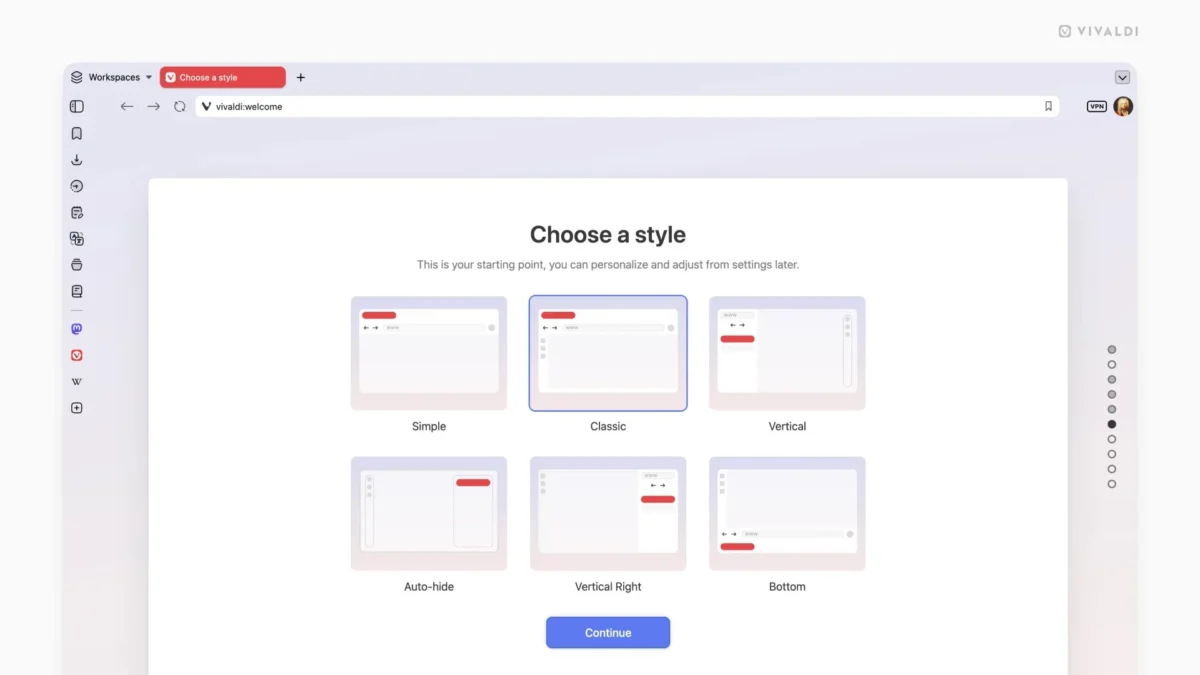
Vivaldi 8.0 is not just a visual skin; it is a feature-rich powerhouse. The transition to the new design includes a refreshed onboarding process that allows users to define their workspace immediately.
The Setup Wizard and New Themes
Upon the first launch of 8.0, users are greeted by an updated setup assistant. This guide is essential for managing the sheer volume of choices Vivaldi offers. Users can now select from a variety of new, professionally curated themes, including:
- Sunset Forest: A warm, high-contrast palette.
- Kawaii Clouds: A whimsical, soft-pastel design.
- Soria Moria: Inspired by Nordic folklore.
- Zen: A minimalist, distraction-free environment.
These themes are coupled with six pre-configured layout presets: "Simple," "Classic," "Vertical Left," "Vertical Right," "Auto-Hide," and "Bottom." These presets provide a starting point, allowing users to either enjoy a "plug-and-play" experience or use them as a foundation for deep, manual customization.
Under the Hood: The Changelog
The official changelog for Vivaldi 8.0 is extensive, boasting over 70 distinct improvements. Key technical highlights include:

- Backend Overhaul: The engine responsible for tab management has been completely rewritten to handle higher loads and provide smoother transitions when dragging or grouping tabs.
- Chromium Integration: Version 8.0 is built upon Chromium 148.0.7778.183, ensuring the latest web standards support and security patches.
- UI Performance: Animations, such as tab closing and panel opening, have been optimized for lower latency, making the UI feel snappier.
Official Perspectives: The Philosophy of "Vivaldi-ness"
In their official blog post, the Vivaldi team emphasized that the "Unified Design" is not just about making the browser look pretty; it is about "making the web your own."
Jon von Tetzchner, CEO of Vivaldi, has long maintained that browsers are the most important tools in a user’s digital life. "We don’t want to dictate how you use the web," he noted during the development phase. "We provide the bricks, and you build the house."
The team argues that by reducing the "visual noise" of the browser UI, they are actually increasing user productivity. When the browser is unified, the user’s attention is naturally drawn toward the center of the screen—the content—rather than the buttons and menus surrounding it. This philosophy is a direct response to the "minimalist" trends of Chrome and Safari, which often hide features to the point of frustration. Vivaldi 8.0 manages to be both minimalist in appearance and maximalist in utility.
Implications: Where Does Vivaldi Go from Here?
The release of Vivaldi 8.0 has significant implications for the browser market and for power users.
1. The Challenge to Mainstream Browsers
As Chrome continues to lean into Google’s advertising and tracking ecosystem, Vivaldi is positioning itself as the privacy-conscious, power-user alternative. The 8.0 update makes the browser significantly more approachable for the average user who might have previously found the interface too cluttered or daunting. If Vivaldi can maintain this "unified" balance, they could potentially capture a larger share of the professional and creative demographics who are looking for a browser that adapts to their specific workflows.
2. The Influence of Niche Trends
The explicit mention of the Zen Browser as an inspiration shows that Vivaldi is paying attention to the grassroots browser movement. This indicates a healthy ecosystem where developers are cross-pollinating ideas to improve the overall web experience. It is a sign of a mature software market where innovation is no longer coming from the top down, but from the community up.
3. Sustainability of the Ecosystem
By simplifying the UI code, Vivaldi is also future-proofing its development. Maintaining a custom, feature-heavy browser on top of the rapidly evolving Chromium project is a Herculean task. The "Unified Design" reduces the "technical debt" associated with maintaining different UI layers, which means the team can spend more time on user-requested features and less time on fixing UI layout bugs.
4. Accessibility and Platform Parity
Vivaldi 8.0 is available across Windows, macOS, and Linux. The company’s commitment to Linux users, including robust support for Flatpak and Snap packages, continues to be a standout feature. By ensuring that the new design language works flawlessly across these diverse platforms, Vivaldi maintains its reputation as a "browser for everyone," regardless of the underlying operating system.
Conclusion
Vivaldi 8.0 represents a pivotal moment in the browser’s history. By embracing a "Unified Design," the developers have successfully navigated the difficult balance between extreme customization and modern aesthetic appeal. For the power user, this version offers a more refined, responsive, and coherent workspace. For the casual user, it offers a refreshing alternative to the increasingly static interfaces of the major browsers.
With its massive changelog, commitment to performance, and a clear vision for the future of the browser-as-a-workspace, Vivaldi 8.0 is more than just a software update—it is a statement of intent. It proves that there is still room for radical, thoughtful innovation in a market that many believed had already settled into a permanent state of equilibrium. Whether you are a developer, a designer, or simply a power user who spends your entire life in a browser, version 8.0 is an update that warrants your immediate attention.










No comments yet. Be the first to join the conversation!