Nana Wu
At this year’s Worldwide Developers Conference (WWDC), Apple signaled a fundamental shift in how users interact with their devices. While the keynote was packed with ecosystem-wide announcements, the headline reveal was undoubtedly the arrival of iOS 27 and its centerpiece: a completely redesigned, standalone Siri application. For the first time in the assistant’s fifteen-year history, Siri is graduating from a background system service into a full-fledged, persistent interface, marking a new era for Apple Intelligence.
Main Facts: A New Home for the Digital Assistant
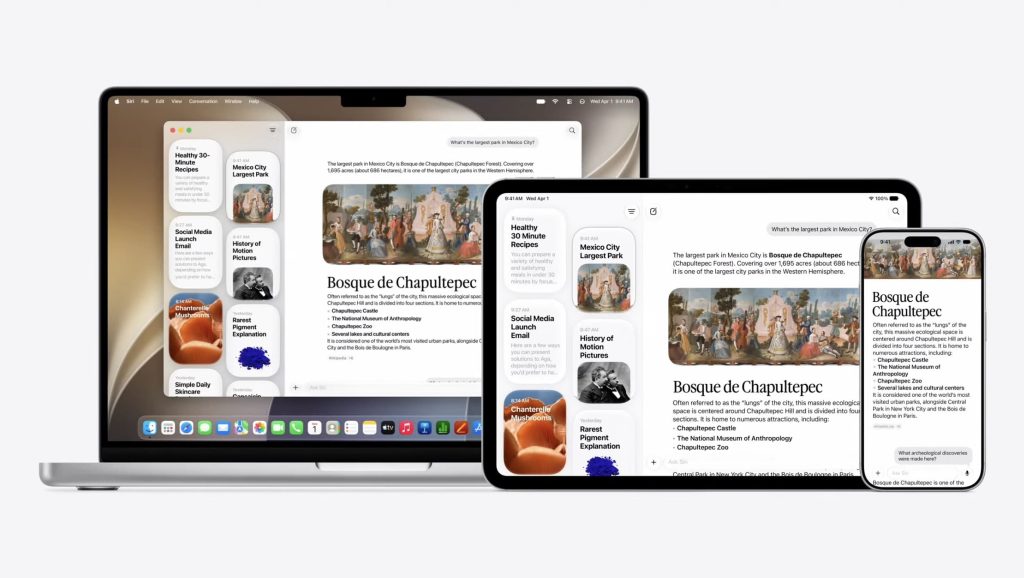
The transition of Siri into a dedicated application is more than just a cosmetic change; it is a structural overhaul of the user experience. Previously, Siri lived in the ephemeral periphery—a translucent bubble or a glowing ring that would vanish as soon as a request was completed. With the iOS 27 update, that ephemeral nature is being replaced by a persistent, chat-based interface.
The new Siri app acts as a central hub for all interactions, providing a scrollable history of your requests. This shift mirrors the conversational style of modern Large Language Models (LLMs), allowing users to treat their digital assistant as a true collaborator. The app will be pre-installed on every compatible device running the latest operating systems: iOS 27 for iPhone, iPadOS 27 for iPad, macOS 27 for Mac, visionOS 27 for Vision Pro, and watchOS 27 for Apple Watch. By leveraging iCloud, these conversations are now seamless; a query started on your iPhone can be picked up exactly where it left off on your Mac or Vision Pro.
A Chronological Evolution of Siri
To understand the magnitude of this update, one must look at the timeline of Apple’s digital assistant:

- 2011 (The Launch): Siri debuted on the iPhone 4S as a groundbreaking, albeit limited, voice assistant. It was a novelty, often struggling with natural language.
- 2015–2020 (Integration): Apple steadily expanded Siri’s reach, adding support for HomeKit, third-party app shortcuts, and deeper integration with iOS settings.
- 2024 (The Intelligence Pivot): With the introduction of Apple Intelligence in iOS 18, Siri began its transition toward on-device generative AI, gaining a better understanding of context and intent.
- 2026 (The Standalone App): iOS 27 marks the "Appification" of Siri. It is no longer just a listener; it is a workspace where files, photos, and deep contextual memory converge.
The Power of Contextual Intelligence
The most profound change beneath the hood of the new Siri app is its deep integration with "Apple Intelligence." In previous iterations, Siri was often "blind" to what was happening on the screen. Now, the assistant possesses the ability to analyze the current display, providing real-time assistance based on what the user is looking at.
Multimodal Input
The new interface allows for more than just voice or text input. Users can now drag and drop files, photos, and documents directly into the Siri chat window. If you upload a complex spreadsheet, Siri can summarize the data; if you upload a photo of a receipt, Siri can extract the relevant information and offer to draft an email to your accountant.
Cross-Device Continuity
Because the app is deeply synced via iCloud, the "personal context" remains consistent. If you have been discussing a specific project in an email thread on your MacBook, the Siri app on your iPhone will be aware of that context, allowing you to ask, "What was the deadline for that project we discussed?" while you are on the go.
Supporting Data and Hardware Constraints
While the software promises a revolution in productivity, it comes with strict hardware requirements. The standalone Siri app is designed to run heavily on local NPU (Neural Processing Unit) compute, necessitating the high-performance silicon found only in the most recent Apple devices.
Compatibility Matrix:
- iPhone: iPhone 15 Pro, 15 Pro Max, and all iPhone 16/17 series models.
- iPad: M-series iPads (M1, M2, M4).
- Mac: M-series Silicon (M1, M2, M3, M4).
- Vision Pro: M2/R1 configuration.
Apple has confirmed that the complexity of the new AI models—which provide the "broad world knowledge" and the ability to process on-screen context—is too demanding for older A-series chips. This limitation has sparked a mixed response from the user base, with many noting that the requirement for high-end hardware may alienate those holding onto older, albeit still functional, devices.
Official Responses and Strategic Vision
During the WWDC press briefing, Apple’s senior vice president of Software Engineering emphasized that the goal of the Siri app is to reduce "cognitive friction."
"We want the user to spend less time navigating through apps to find information and more time interacting with the information itself," the representative stated. "By creating a dedicated space for Siri, we are giving the user a place to ‘think’ with their device. It isn’t just about answering a query; it’s about maintaining a thread of logic that follows you throughout your day."
Industry analysts have praised the move as a necessary response to the growing dominance of OpenAI’s ChatGPT and Google’s Gemini. By keeping the interface within the Apple ecosystem and prioritizing privacy through on-device processing, Apple is attempting to differentiate itself as the "secure" AI choice for the privacy-conscious consumer.
Implications for the Future of iOS
The introduction of the Siri app suggests a long-term roadmap where the operating system itself becomes secondary to the assistant.
1. The Decline of App-Hopping
If Siri can interact with the contents of your screen and pull data from across your various apps, the need to manually open Mail, Calendar, or Notes may diminish. We are moving toward an "intent-based" computing model, where you tell the device what you want to achieve, and it navigates the app silos for you.
2. A New Paradigm for Privacy
Apple’s commitment to running these AI processes locally, or through their Private Cloud Compute, is a major pillar of this launch. The Siri app is designed to be the guardian of this personal context. Unlike other AI assistants that send everything to the cloud, the Siri app in iOS 27 aims to keep your personal emails, photos, and messages within the Apple secure enclave.

3. The "App Store" Disruption
If the Siri app becomes the primary way users interact with their data, third-party developers face a challenge: how do they ensure their apps are "visible" to Siri? Apple is expected to release new APIs that allow developers to "teach" their apps to talk to the new Siri interface, potentially changing the way we think about app discovery and interaction entirely.
Looking Ahead: A Changing Landscape
As we look toward the public release of iOS 27 later this year, the tech industry is watching closely. The move to a standalone Siri app is a bold bet that users want a unified, conversational interface over the traditional grid of icons.
Apple’s strategy, as evidenced by the introduction of previous apps like Image Playground and Games, has been to slowly introduce niche functionality before weaving it into the core experience. Now, they are doing the same with AI. The question remains whether the average user is ready to shift their workflow to a conversational assistant or if the "Siri app" will remain a power-user tool for the foreseeable future.
The integration of Apple Intelligence into a dedicated, searchable, and persistent Siri app is the most significant change to the iPhone experience in a decade. It transforms the device from a collection of static tools into an active, intelligent partner. Whether this marks the end of the traditional "app grid" as we know it is a question for the coming years, but for now, the future of the iPhone is looking increasingly conversational.

What are your thoughts on the new Siri app? Will this change your daily workflow, or do you prefer the traditional way of navigating your device? Join the conversation in the comments below.


 Asro
Asro
 Rifan Muazin