For years, the mobile gaming enthusiast community has played a constant game of cat and mouse with laptop manufacturers. While desktop GPUs are defined by their raw, unrestricted performance, mobile GPUs are strictly governed by "Total Graphics Power" (TGP) limits—thermal and electrical constraints imposed by OEMs to ensure the hardware doesn’t melt its chassis or exceed the cooling capacity of the cooling solution.
However, a new, highly experimental utility known as NvpwrControl has emerged, promising to shatter these artificial ceilings. By allowing users to increase the power limit of Nvidia’s latest RTX 50-series mobile GPUs by as much as 40 watts, this tool offers a tantalizing, albeit dangerous, path to "desktop-class" performance in a portable form factor.
Main Facts: What is NvpwrControl?
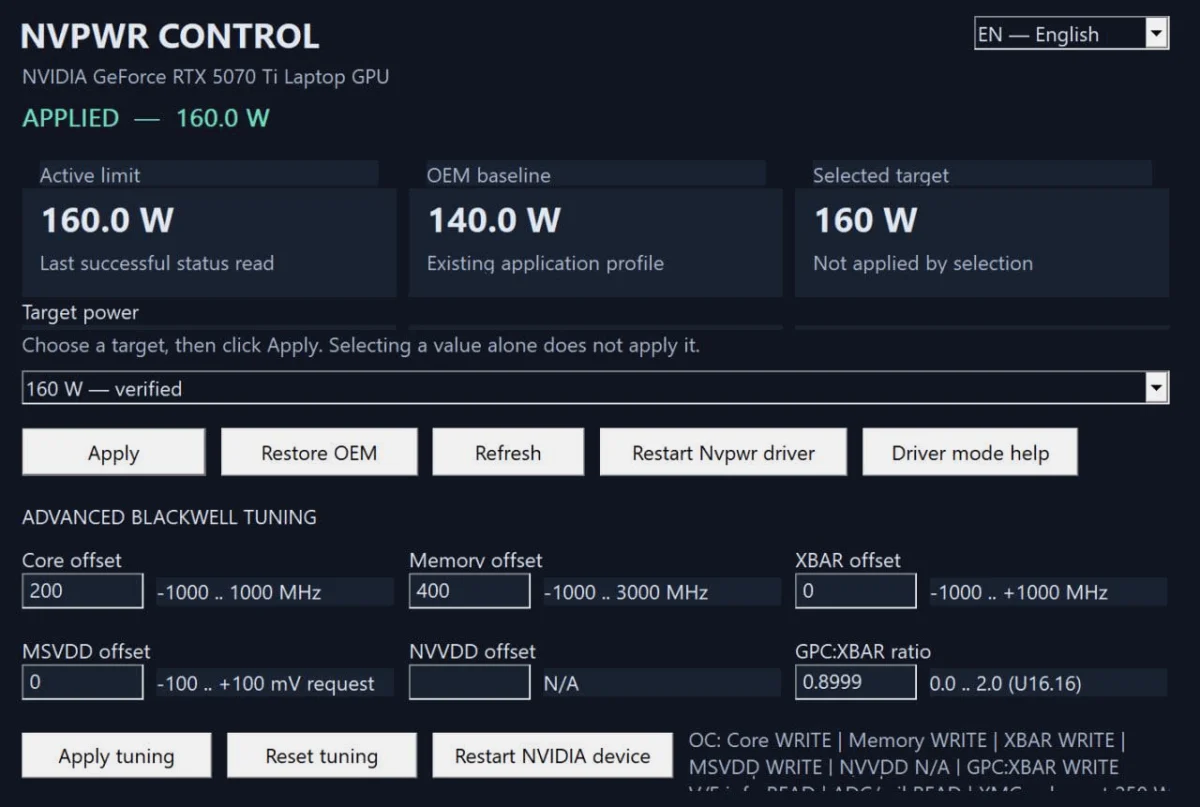
NvpwrControl is a third-party, community-developed software utility designed to interface directly with the power management firmware of specific Nvidia mobile GPUs. As first reported by VideoCardz, the tool targets the most recent RTX 50-series laptop architectures, specifically the RTX 5070 Ti and the flagship RTX 5090.
The premise is deceptively simple: modern laptop GPUs are often "power-bottlenecked." Even if the thermal headroom exists to push higher clock speeds, the GPU’s VBIOS (Video BIOS) enforces a strict wattage cap. NvpwrControl bypasses these hard-coded limits, allowing the GPU to draw more current from the system’s power delivery subsystem.
For the RTX 5070 Ti, this can mean pushing the GPU to 180W, while the high-end RTX 5090 can be elevated to a staggering 225W. While these numbers translate to significant frame-rate gains in GPU-bound scenarios, they represent a radical departure from the manufacturer’s design specifications. The developer has explicitly labeled the tool as "experimental," a polite way of warning users that they are operating well outside the boundaries of factory-tested stability.
The Chronology: From VBIOS Flashing to Real-Time Control
The history of GPU power-unlocking is a long and storied tradition, dating back to the early 2000s. In the past, users had to perform "VBIOS modding," which involved physically or digitally replacing the GPU’s BIOS with modified files. This was an incredibly dangerous process; a single failed flash could "brick" a laptop, rendering it useless unless the user possessed an external hardware programmer to rewrite the chip.
- The Era of VBIOS Modding (2010–2020): Enthusiasts used tools like NiBiTor or Maxwell II BIOS Tweaker. This required deep technical knowledge and a high tolerance for risk.
- The Shift to Software Intermediaries (2021–2024): With the introduction of more complex security signatures by Nvidia and laptop OEMs, traditional BIOS editing became nearly impossible. Developers shifted toward software-based "wrappers" that intercept communication between the OS and the GPU drivers.
- The NvpwrControl Launch (2025): The release of NvpwrControl on GitHub marks a turning point. Rather than requiring a permanent change to the hardware firmware, it provides a dynamic interface to adjust power limits on the fly. This suggests that the developer has identified a specific exploit or undocumented command interface within the Nvidia driver stack that allows for real-time TGP manipulation.
The tool’s arrival on GitHub, maintained under the repository LevinAi-arch/rtx-5070ti-laptop-160w-power-limit, has sparked a firestorm of discussion across forums like Reddit’s r/LaptopGaming and various enthusiast Discord servers, as users attempt to benchmark their machines against stock configurations.
Supporting Data: The Cost of Performance
To understand the implications of NvpwrControl, one must understand the relationship between power, voltage, and heat. Nvidia’s "Voltage-Frequency" (V/F) curve dictates that as you increase power (Watts), you gain frequency (Clock Speed), but you also increase heat generation exponentially.
Thermal Headroom
Most high-end gaming laptops are designed with a cooling system calibrated to handle a specific TDP (Thermal Design Power). For example, if a laptop is designed for a 150W GPU, the heat pipes, fan curves, and heatsinks are engineered for that specific thermal load. Injecting an extra 40 watts—a 26% increase in power draw—into a system not designed for it leads to three immediate consequences:
- Thermal Throttling: The GPU will reach its maximum thermal limit (usually 87°C–90°C) much faster, potentially negating the performance gains as the chip forces itself to downclock.
- Component Degradation: The Voltage Regulator Modules (VRMs) on the motherboard are likely not rated for the sustained current draw of a 225W GPU. Over-current conditions can lead to permanent component failure or "smoked" traces on the motherboard.
- Battery Drain: In many modern laptops, the system utilizes "Hybrid Power" features, drawing from both the AC adapter and the battery under heavy loads. Exceeding the wattage capacity of the power brick can cause the battery to discharge while plugged in, or worse, cause the system to shut down abruptly when the power draw exceeds the brick’s capacity.
Benchmarking Realities
Initial reports from early adopters suggest that the performance scaling is not linear. While 3DMark scores show a measurable uptick in the Graphics Score, the "1% low" frame times (the indicator of stuttering) often become erratic as the GPU hits the thermal wall. The performance-per-watt ratio plummets, making this a classic case of diminishing returns.
Official Responses and Industry Stance
The response from major OEMs (such as ASUS, MSI, Razer, and Lenovo) and Nvidia has been predictably silent, though historically, these companies maintain a strictly "no-tolerance" policy regarding power modification.
- Warranty Voidance: It is almost certain that using NvpwrControl voids the manufacturer’s warranty. Most laptop warranties explicitly state that any alteration to the device’s operating parameters—especially those involving power delivery—is considered user-inflicted damage.
- The Nvidia Perspective: Nvidia maintains strict control over its laptop GPU ecosystem through the "Max-Q" and "Max-P" branding strategies. By allowing OEMs to set their own power limits, Nvidia ensures that a thin-and-light laptop doesn’t end up with a GPU that burns a hole through the chassis. Tools like NvpwrControl are viewed as a direct threat to the safety and reliability standards that Nvidia markets to its partners.
- Security Patches: It is highly probable that future Nvidia driver updates will include "silent patches" specifically designed to block the hooks used by NvpwrControl. The history of overclocking software is littered with "cat and mouse" updates where driver-level security blocks third-party unauthorized tools.
Implications: The Future of Laptop Enthusiasts
The existence of NvpwrControl raises significant questions about the future of mobile gaming hardware.
The Consumer Rights Angle
Advocates for the "Right to Repair" and enthusiast autonomy argue that since the consumer purchased the hardware, they should have the right to operate it at whatever power level they choose, provided they accept the consequences. This tool is a digital expression of the "hot-rodding" culture that once defined PC gaming.
The Reliability Paradox
While it is exciting to squeeze more performance out of an expensive purchase, the long-term reliability of these machines is a major concern. A laptop motherboard is a densely packed, multi-layered PCB. When you increase the power limits, you aren’t just heating the GPU; you are heating the entire localized region of the motherboard. This can lead to solder joint fatigue over time, causing the laptop to fail months—or even years—earlier than it otherwise would have.
The "Experimental" Disclaimer
The developer’s inclusion of the "experimental" label is not just a legal shield; it is a technical reality. Users of NvpwrControl are effectively beta-testing their own hardware’s physical limits. There is no automated safety net here. If the VRM fails, there is no software recovery.
Conclusion: Proceed with Extreme Caution
For the average gamer, NvpwrControl is a curiosity that should be avoided. The risks—ranging from sudden system instability to catastrophic hardware failure—far outweigh the marginal gains in frame rates. For the professional overclocker or the hardware enthusiast with a spare machine and a desire to see what the silicon is truly capable of, it represents the ultimate tool of discovery.
However, it is vital to remember that a laptop is not a desktop. It is a highly optimized, power-constrained environment where balance is the key to longevity. By stripping away those constraints, users are not just "unlocking" performance; they are walking a fine line between a faster gaming experience and a very expensive paperweight. As the community continues to test this tool, the true cost of those extra 40 watts will inevitably be paid in longevity, stability, and the ultimate loss of manufacturer support. Use it, but do so with your eyes wide open.