

The mobile display landscape has long suffered from a persistent, invisible fragmentation: the "HDR inconsistency" problem. Users have grown accustomed to HDR content looking vastly different depending on the device in their hand—too bright on one, muddy or washed out on another. With the release of Android 17, Google is finally addressing this technical disparity head-on through a new, intelligent framework known as "Eclipsa Video."
This feature represents a fundamental shift in how the Android operating system handles high-dynamic-range (HDR) metadata, moving away from manual, hit-or-miss brightness adjustments toward a standardized, automated, and adaptive rendering engine.
The Core Facts: What is Eclipsa Video?
At its simplest, Eclipsa Video is a system-level rendering standard integrated into the core of Android 17. Its primary objective is to ensure that HDR video content is presented with visual fidelity that remains consistent across the massive spectrum of Android hardware, ranging from budget-tier devices with modest peak brightness to high-end flagship smartphones capable of intense, vibrant highlights.
Historically, HDR video playback relied on individual display drivers to interpret brightness and tone mapping. Because no two screens are calibrated identically, the same piece of media could look radically different across devices. Eclipsa Video introduces a centralized logic that dictates how a display should handle "HDR reference white"—the benchmark for what constitutes "normal" brightness. By standardizing this reference point, Android 17 ensures that while highlights pop, the surrounding UI elements, text, and non-HDR content remain legible and balanced.
The Chronology of HDR Evolution on Android
To understand why Eclipsa Video is such a milestone, one must look at the recent history of Google’s efforts to tame the chaotic nature of mobile HDR.
The Early Days of Manual Control
For years, HDR playback on Android was a "black box." Developers and hardware manufacturers had significant leeway in how they tuned their display panels. This resulted in what critics often called "blown-out" highlights, where the brightest parts of a video would lose all detail, becoming a flat, white glare.
Android 16 and the "Enhanced HDR" Bridge
In late 2025, with the release of the Android 16 QPR1 Beta 1, Google made a significant move by introducing an "Enhanced HDR brightness" slider. This was a direct response to user feedback, providing a manual override that allowed individuals to dial back the intensity of HDR highlights. While this provided a necessary "safety valve" for users, it was an imperfect solution. It forced the user to become their own colorist, manually adjusting settings every time they switched between a dark room and a bright outdoor environment, or between different types of video content.
The Android 17 Turning Point
The announcement of Eclipsa Video in 2026 marks the transition from manual intervention to automated intelligence. Rather than expecting the user to know the optimal brightness level for a specific scene, Eclipsa automates the process entirely. By moving this logic from a user-facing setting to a native, system-level standard, Google has effectively retired the need for constant manual tweaking, signaling a more mature phase in Android’s multimedia capabilities.
Supporting Data: Why "Headroom-Adaptive" Matters
The technical heavy lifting behind Eclipsa Video lies in its use of "headroom-adaptive" gain curves. To grasp the significance of this, one must understand the relationship between a display’s peak brightness and the metadata of the video file.
Understanding Gain Curves
In traditional video rendering, a static tone-mapping curve is applied. If a video file calls for a highlight at 1,000 nits but the phone screen can only output 600 nits, the system often "clips" the data, losing detail in the process.
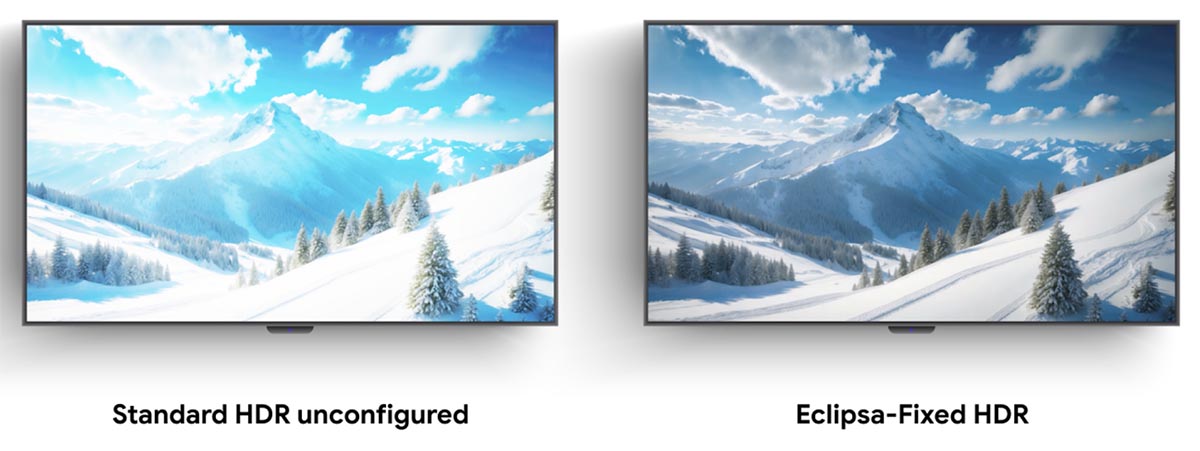
Eclipsa Video utilizes dynamic gain curves that adjust in real-time based on the specific capabilities of the hardware.
- For High-End Displays: The system allows the video to utilize the maximum peak brightness of the panel, preserving detail in the brightest whites without washing out the rest of the image.
- For Mid-Range/Entry Displays: The algorithm compresses the dynamic range intelligently. It prioritizes the most important visual information so that even on a display with lower peak brightness, the image retains its intended "mood" and contrast, rather than looking dull or grey.
Frame-by-Frame Precision
Beyond the general brightness, Eclipsa utilizes frame-by-frame instruction sets. This allows the system to analyze the specific content of a scene. If a frame is mostly dark with one bright light source, the gain curve shifts to preserve the shadow detail. If a frame is bright overall, the system pulls back on the global gain to prevent eye strain. This granularity ensures that the viewing experience is not just "bright," but "accurate."
Official Perspectives and Industry Implications
Google’s developer documentation emphasizes that Eclipsa is designed to work as a transparent layer between the video source and the display driver. By providing a standardized benchmark, Google is effectively inviting display manufacturers to focus on color accuracy rather than competing on aggressive, often inaccurate, "vivid" presets.
Industry analysts suggest that Eclipsa Video will have a ripple effect on how streaming platforms deliver content to Android devices. If Netflix, YouTube, or Disney+ know that the Android OS has a consistent, reliable standard for tone-mapping, they can optimize their HDR streams with greater confidence, knowing the end-user will see the content as it was graded in the studio.
Broader Implications: A Better Mobile Experience
The implications of Eclipsa Video extend far beyond just "better-looking movies."
1. Reduced Eye Strain
One of the most overlooked aspects of mobile HDR is the physical discomfort caused by sudden flashes of extreme brightness. By regulating the HDR output based on ambient light and display capabilities, Eclipsa contributes to a more comfortable, long-term viewing experience, particularly for those who watch long-form content on their mobile devices.
2. Consistency for Content Creators
For creators, the current state of Android display fragmentation is a nightmare. A video that looks perfectly color-graded on a high-end OLED phone might look like a muted, low-contrast mess on a budget tablet. Eclipsa provides a baseline expectation for creators, narrowing the gap between the monitor they use to edit and the screen the audience uses to view the final product.
3. Battery Efficiency
While Eclipsa is primarily focused on visual quality, its intelligent handling of brightness levels also offers a path to better power management. By avoiding unnecessary "over-driving" of the display panel to achieve unrealistic brightness levels, the system can preserve battery life during extended video playback sessions.
4. Accessibility and Readability
A common complaint with early HDR implementations was that the video would become so bright that the system UI—clock, notification icons, and progress bars—would disappear into the glare. Eclipsa’s focus on maintaining "HDR reference white" ensures that system elements remain distinct. This is a critical usability improvement, ensuring that users aren’t fighting their own device just to pause a video or check a notification.
Conclusion
With the release of Android 17, Google has moved to solve one of the most frustrating aspects of mobile media consumption. Eclipsa Video is not just a flashy new feature; it is an essential piece of infrastructure that brings order to the fragmented world of mobile display technology.
By prioritizing automated, frame-by-frame, and headroom-adaptive rendering, Google has ensured that HDR is no longer a "luck of the draw" experience based on the device you own. Instead, it is becoming a standardized, consistent, and beautiful medium for all. As more devices update to Android 17, the mobile viewing experience will finally begin to catch up to the standards set by high-end home cinema, making our smartphones truly capable of professional-grade media playback.











