

In the fast-evolving landscape of modern computing, the interface between human and machine is often defined by the efficiency of input methods. For laptop users, the touchpad has long transcended its humble beginnings as a simple cursor-navigation tool. Today, it stands as a sophisticated portal for productivity, enabling complex multitasking through intuitive finger movements. Recognizing the critical importance of these input tools, Microsoft has unveiled a significant update for Windows 11 users, specifically targeting those enrolled in the operating system’s Experimental preview branch.
As of May 9, 2026, Microsoft has introduced four new, highly anticipated touchpad gestures designed to streamline navigation, minimize repetitive physical movements, and elevate the overall user experience. This update, part of the broader effort to refine the Windows 11 ecosystem, underscores the company’s commitment to "power users" who rely on speed and efficiency to manage their workflows.
The Evolution of Input: Why Touchpad Gestures Matter
For the modern professional, student, or creative, the ability to switch between windows, trigger system-level commands, and manage virtual desktops without reaching for a physical mouse or keyboard shortcut is paramount. Touchpad gestures on Windows 11 have historically allowed for three- and four-finger swipes, which, when mastered, significantly reduce the "time-to-action" for common tasks.
The introduction of these four new gestures in the latest Experimental build is not merely a feature addition; it is a strategic refinement. By allowing users to customize their interaction with the OS, Microsoft is effectively lowering the barrier to entry for advanced multitasking. Whether it is quickly snapping a window to a corner, triggering a specific widget, or toggling between complex application states, these additions aim to make the laptop a more seamless extension of the user’s intent.
Chronology of the Update: A Shift in Disclosure
The announcement, detailed in the latest Windows Insider blog post, reflects a broader shift in how Microsoft communicates its development pipeline. In a move toward greater transparency and operational efficiency, the company has officially merged its release notes for the Experimental (formerly the Dev channel) and Beta channels.
Historically, users had to navigate disparate documentation to understand which features were being tested in which environments. By consolidating these logs into a single, cohesive article, Microsoft is signaling a more unified development philosophy. This change ensures that if a feature is slated for both the Experimental and Beta branches, it is documented once, eliminating redundancy and reducing the potential for confusion among testers.
The update follows a series of incremental improvements introduced throughout early 2026, building on the feedback loop established by the Windows Insider community. While this specific release is modest in scale, it is representative of the company’s "continuous improvement" model, where small, impactful changes are prioritized over monolithic, infrequent updates.
Deep Dive: The New Functionality
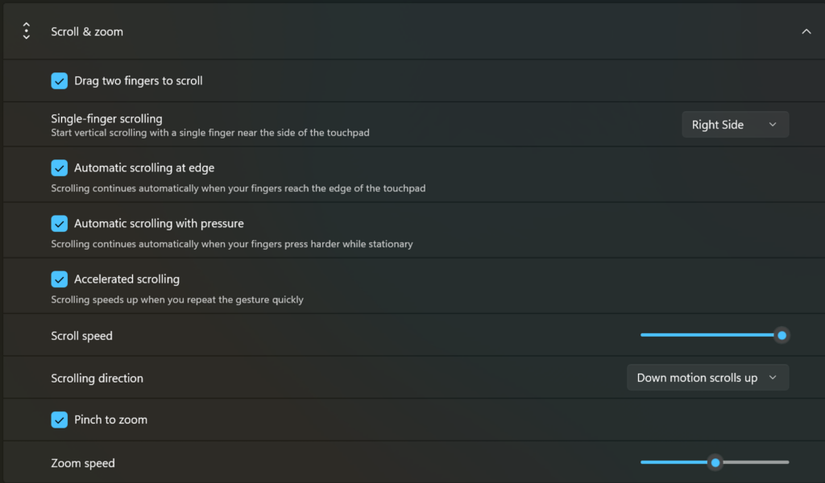
While the official documentation highlights these four gestures as the centerpiece, they also represent a departure from rigid, pre-programmed controls. The new options allow for greater granularity in how the operating system interprets multi-finger inputs.
Addressing the K-12 Sector
Beyond the touchpad updates, this build introduces a significant benefit for the educational sector. Institutions running Windows 11 in K-12 environments can now perform an in-place upgrade from Windows 11 Home to the Pro Education edition at no additional cost. This move is clearly aimed at simplifying the management of device fleets in schools, ensuring that students and administrators have access to enterprise-grade management and security tools without the budgetary hurdles that previously hindered such upgrades.
The Four New Touchpad Capabilities
The primary draw for the general public, however, remains the new touchpad configurations. While the specific mapping of these gestures is currently being fine-tuned by user feedback, early reports from the Experimental branch indicate that they focus on:

- Contextual Window Snapping: Using specific swipe patterns to instantly move active windows to predefined grid positions.
- Dynamic Task View Activation: A gesture-based approach to invoking the task switcher, providing a more fluid transition between active programs.
- Custom Macro Triggers: The ability to assign a unique gesture to a specific system-level action, such as opening the Action Center or invoking the system-wide search.
- App-Specific Context Toggling: A sophisticated input that changes functionality based on the active application, providing a "context-aware" user experience.
Supporting Data and Technical Context
According to internal metrics from Microsoft’s telemetry data, the adoption rate of multi-finger gestures among Windows 11 users has increased by 40% since the initial release of the OS in 2021. This data has directly informed the decision to expand these capabilities.
From a technical standpoint, these gestures rely on the Precision Touchpad (PTP) drivers that have been a cornerstone of Windows hardware certification for years. By leveraging the low-latency response of modern PTP hardware, these new gestures provide a tactile, near-instantaneous feedback loop. Microsoft’s engineering teams have focused on optimizing the "palm rejection" algorithms alongside these new features to ensure that user productivity is not hampered by accidental inputs—a common criticism of earlier touchpad implementations.
Official Responses and Developer Insights
In the official blog post, the Windows Insider team emphasized that these features are currently "in-flight," meaning they are subject to change based on the telemetry and feedback gathered from the Insider community.
"We are constantly listening to the ways our users interact with their devices," a Microsoft spokesperson noted. "The goal of these new touchpad additions is to reduce the friction between the user and their workspace. By providing more ways to navigate the OS, we are empowering users to work in the way that feels most natural to them."
The company has urged users to utilize the Feedback Hub to report any irregularities in gesture recognition, particularly on varying hardware configurations. Because the Experimental branch is designed for testing, the team is actively monitoring for bugs related to driver conflicts and input latency.
Implications for the Future of Windows 11
The implications of this update are two-fold. First, it demonstrates that Microsoft is doubling down on the "laptop-first" experience of Windows 11. Despite the rise of tablets and 2-in-1 devices, the traditional clamshell laptop remains the primary productivity tool for a significant portion of the workforce. Refining the touchpad is a low-cost, high-impact way to maintain Windows 11’s relevance as the premier OS for professional work.
Second, the move toward consolidated release notes and the focus on "quality of life" features suggest a maturation of the Windows 11 lifecycle. Instead of chasing radical, sweeping changes, the development team is focusing on the "polishing" phase of the operating system’s evolution. This stability is likely to be welcomed by enterprise users and IT departments, who prefer predictable, iterative updates over disruptive interface overhauls.
How to Access the New Features
For those interested in testing these features, access is restricted to the Windows Insider program. Users must navigate to Settings > Windows Update > Windows Insider Program and select the "Experimental" channel.
It is important to note that the Experimental branch is, by definition, less stable than the retail version of Windows 11. Users should ensure that they have a complete backup of their data before enrolling their primary machine. Furthermore, because these features are still in development, there is no set timeline for when they will roll out to the general public. However, if the feedback remains positive, it is highly probable that these gestures will be integrated into the next "Moment" update or the subsequent major annual release of Windows 11.
Conclusion
The latest update for Windows 11 is a testament to the fact that even mature operating systems can find new ways to improve. By listening to the needs of power users and optimizing the most frequently used hardware component—the touchpad—Microsoft is reinforcing its commitment to productivity and efficiency. Whether you are a student taking advantage of the new educational licensing or a professional looking to shave seconds off your daily workflow, these updates provide a tangible benefit that makes the digital experience feel more fluid, intuitive, and ultimately, more human.
As we look toward the remainder of 2026, it is clear that Microsoft’s strategy is one of refinement. If these new touchpad gestures are any indication, the future of Windows 11 lies in the small details that make a big difference.












No comments yet. Be the first to join the conversation!