Evan Lee Salim
In a move that signals a renewed focus on visual polish and user customization, WhatsApp is officially reintroducing message animations to its iOS application. The feature, currently surfacing in the latest TestFlight beta (version 26.24.10.70), marks a departure from the static interface that has defined the messaging platform’s recent history on Apple devices. By integrating these animations alongside a new, dedicated control toggle, Meta is addressing long-standing requests for a more fluid, high-end chat experience while simultaneously prioritizing accessibility and performance preferences.
Main Facts: What is Changing?
The core of this update is the restoration of visual feedback when messages arrive in a chat thread. Previously, WhatsApp had stripped away these subtle motions, causing new message bubbles to simply "pop" into existence. While functional, the lack of animation resulted in a jarring, static user experience that felt out of step with the fluid UI design language prevalent in modern iOS applications.
According to technical reports from WABetaInfo, the new animation is significantly more refined than its predecessor. Rather than an abrupt appearance, the message bubble now employs a sophisticated "fade-in and scale-up" effect. This subtle transition provides a sense of depth and continuity to the conversation, making the act of reading a stream of incoming messages feel more natural and less like a sudden intrusion on the screen.
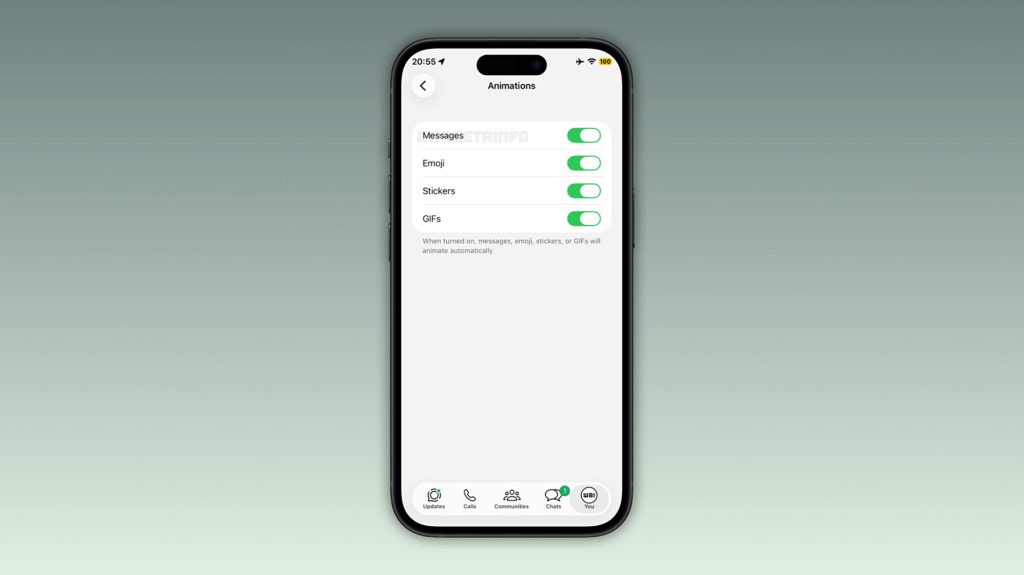
Crucially, WhatsApp is not forcing this design choice upon its user base. Following a similar rollout in the Android beta environment just one week prior, the iOS implementation includes a granular control menu. Users can navigate to Settings > Chats > Animations to toggle the feature on or off. This menu also serves as a hub for managing other visual effects, including:

- Emoji animations
- Sticker movements
- GIF playback
By consolidating these controls, WhatsApp is providing users with the agency to balance visual delight with battery efficiency and screen movement preferences.
Chronology: A History of WhatsApp’s UI Evolution
The path to this feature release is reflective of Meta’s iterative approach to software development. WhatsApp has long been criticized for its "utilitarian-first" design philosophy, which often prioritized speed and cross-platform consistency over the platform-specific "delight" factors found in competitors like Telegram or iMessage.
The Era of Static Minimalism
For several years, WhatsApp maintained a strictly static interface. The reasoning was primarily performance-driven: by minimizing GPU-intensive animations, the application ensured smooth operation on older, budget-tier Android handsets and low-power iOS devices. During this phase, the company focused its engineering resources on security, encryption, and infrastructure stability.
The Removal of Legacy Effects
In previous iterations of the app, minor animations were present but were eventually removed during a major "clean-up" update. This change was met with mixed reviews; while power users appreciated the increased speed, others felt the interface had become sterile and cold.
The Beta Resurgence (2025–2026)
In late 2025 and throughout 2026, user feedback data began to show a shift in preference. As hardware capabilities increased, users began demanding more "premium" UI interactions.
- Late 2025: WhatsApp begins internal testing of "motion-enhanced" messaging.
- June 2026: The feature enters the public beta cycle for Android.
- November 2026 (Current): The feature arrives on the iOS TestFlight platform, confirming a unified vision for visual parity across both major mobile operating systems.
Supporting Data: Why Motion Matters in UI/UX
The reintroduction of animations is not merely an aesthetic choice; it is grounded in established principles of User Interface (UI) and User Experience (UX) design. Motion, when used correctly, serves several cognitive functions:
- Contextual Continuity: Animations help the human eye track changes on a screen. When a message fades in and scales up, the user’s peripheral vision is better equipped to detect the "newness" of the information, reducing the cognitive load required to identify the most recent activity in a thread.
- Affordance and Feedback: Digital interfaces act as proxies for physical objects. In the physical world, things do not spontaneously appear; they move into view. By mimicking this behavior, WhatsApp creates a more intuitive environment that feels responsive to the user’s presence.
- Accessibility and "Motion Sickness": It is important to note that excessive motion can cause discomfort for users with vestibular disorders. This is precisely why the inclusion of a "kill switch" in the settings menu is a hallmark of responsible software engineering. By providing the option to disable these features, WhatsApp adheres to modern inclusivity standards that prioritize user comfort over forced design trends.
Official Responses and Developer Strategy
While Meta has not issued a formal, widespread press release regarding these specific animations, the release notes accompanying the TestFlight update emphasize "stability and performance improvements" alongside "new visual refinements."
Industry analysts suggest this move is part of a broader strategy to modernize WhatsApp’s codebase. By moving toward a more modular design—where specific UI elements like animations can be toggled via server-side flags or localized settings—the WhatsApp development team is gaining greater flexibility. This allows them to A/B test features with specific user cohorts, gathering telemetry data on battery drain and user engagement before a global rollout.
The choice to bring the feature to iOS via TestFlight indicates that the feature is in the final stages of the "polish" cycle. During this period, engineers monitor for frame-rate drops and memory leaks to ensure that the "fade and scale" effect does not compromise the app’s legendary responsiveness.
Implications: What This Means for the Future
The return of animations to WhatsApp carries several implications for the future of the platform:
1. Closing the Feature Gap
For years, iMessage has been the benchmark for visual messaging, featuring "bubble effects," "screen effects," and "invisible ink." While WhatsApp is not yet introducing such complex effects, the reintroduction of basic message animations is a foundational step toward closing the competitive gap. It signals that WhatsApp is no longer content with being just a "utility" and is willing to invest in the "experience" of communication.
2. A Shift Toward Customization
The inclusion of the Settings > Chats > Animations menu is perhaps the most significant takeaway. It implies that WhatsApp is moving away from a "one size fits all" design. We may see this menu expand in the future to include options for font weights, custom bubble colors, or even distinct sound profiles for different contacts. This shift allows the app to grow in complexity without alienating users who prefer the classic, minimalist look.

3. Performance as a Variable
By making these animations optional, WhatsApp is effectively acknowledging that "premium" features carry a cost. For users on older iPhone models (such as the iPhone 11 or earlier), the battery impact of rendering consistent animations might be noticeable. Providing the choice to turn them off ensures that the app remains inclusive to a global user base that spans the latest flagship hardware and decade-old devices.
4. Anticipating the Public Launch
With testing now underway across both iOS and Android, the wait for a public release is likely entering its final weeks. Typically, features that reach the TestFlight beta stage for iOS have already cleared the major hurdles of stability testing. Users can expect to see these animations roll out to the stable App Store version of WhatsApp in a future update, likely timed to coincide with a broader visual refresh of the app’s notification and chat management systems.
Conclusion
The decision to bring back message animations on iOS is a testament to the evolving nature of digital communication. While the "fade-in and scale-up" effect may seem like a minor cosmetic change, it represents a significant pivot in WhatsApp’s design strategy. By prioritizing user choice and integrating modern, fluid interactions, the platform is reinforcing its commitment to staying relevant in an increasingly crowded and competitive messaging market.
As we look toward the public rollout, the true success of this feature will not be measured by the beauty of the animation itself, but by how seamlessly it integrates into the daily lives of billions of users. Whether you choose to enable these animations for a more dynamic experience or disable them to maintain a classic, static interface, the agency now rests in your hands—a win for both the designers at Meta and the users who rely on the platform every day.

 Ammar Sabilarrohman
 Jia Lissa