Azzam Bilal Chamdy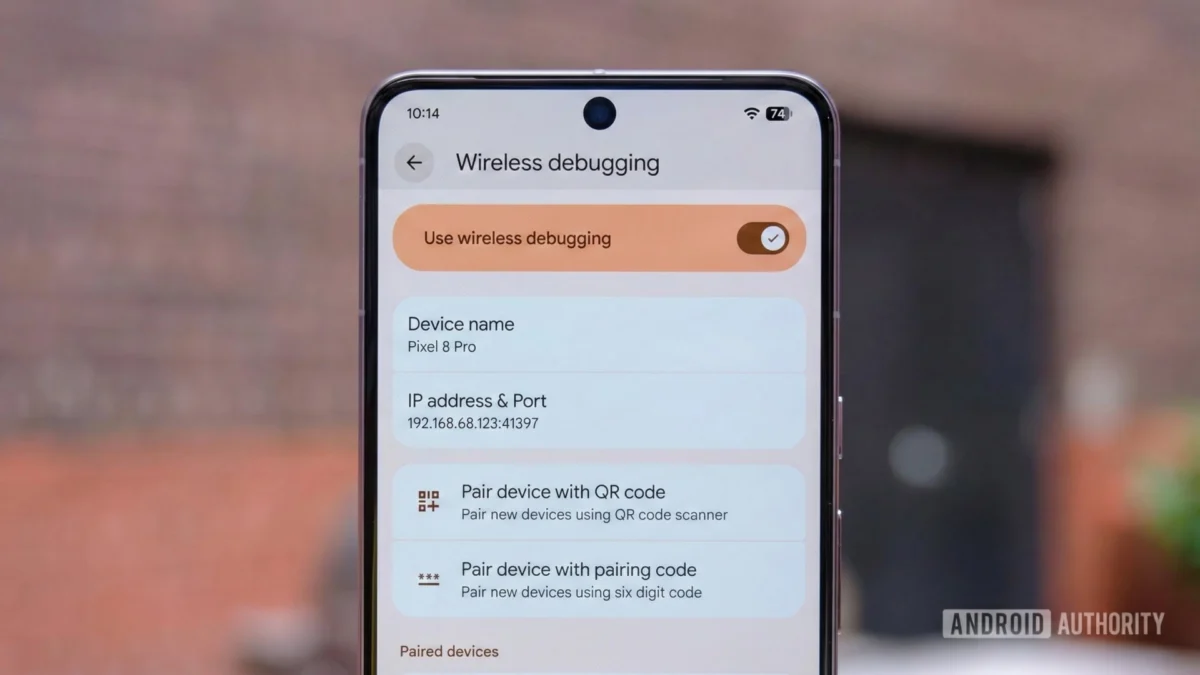
For the legions of Android developers, enthusiasts, and power users who spend their days buried in terminal windows and logcat streams, the Android Debug Bridge (ADB) is more than just a utility—it is the lifeline connecting their development environment to their hardware. For years, the ability to execute commands, push APKs, and debug applications wirelessly has been a "nice-to-have" feature, often discarded in favor of the rock-solid reliability of a physical USB cable.
However, with the arrival of Android 17, Google is finally addressing the deep-seated technical debt that has plagued wireless debugging since its inception. Enter "ADB Wi-Fi 2.0"—a ground-up rewrite of the wireless debugging stack designed to transform a temperamental convenience into a professional-grade standard.
Main Facts: What is ADB Wi-Fi 2.0?
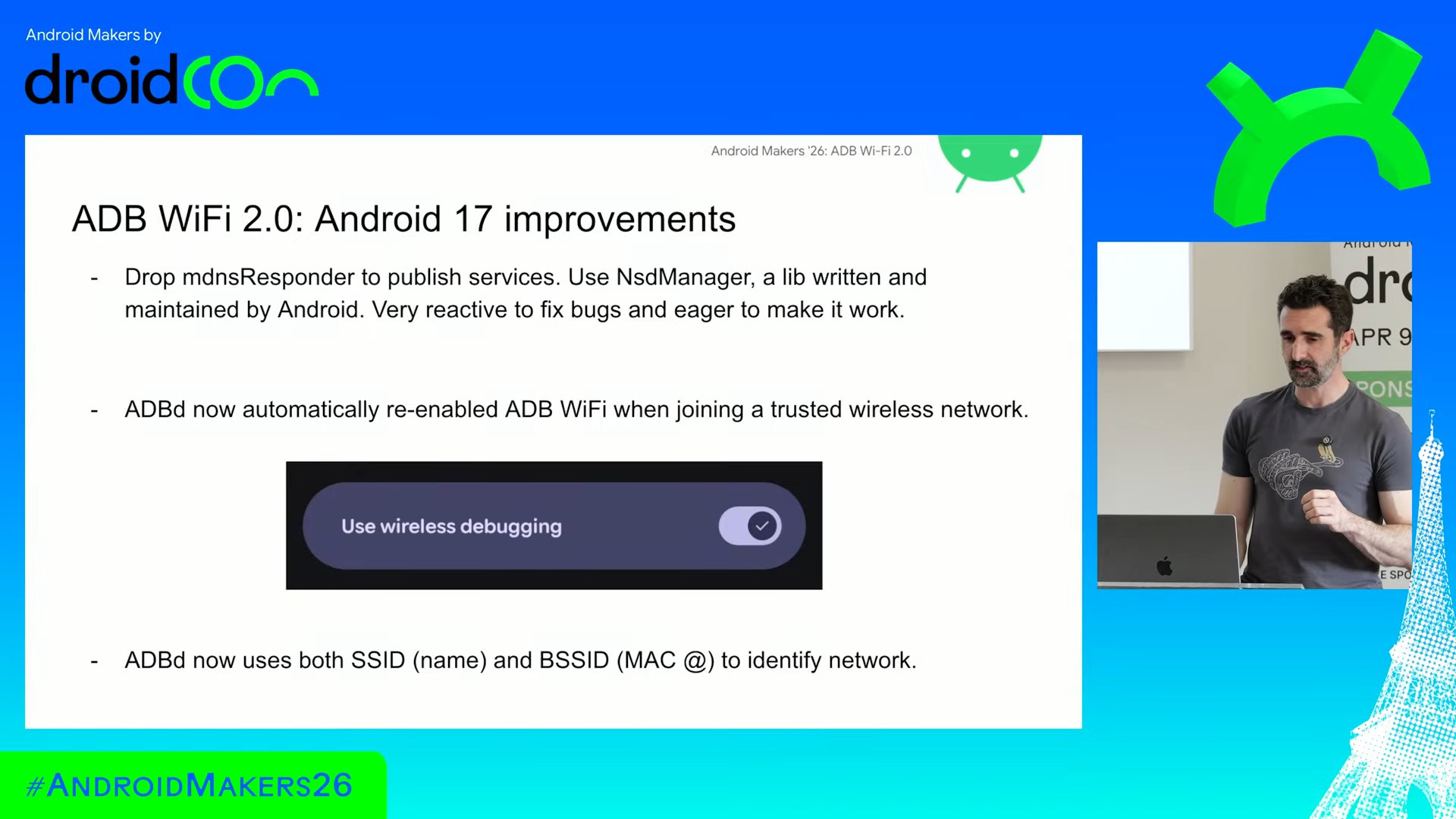
At its core, ADB Wi-Fi 2.0 is not merely an incremental update; it is a fundamental architectural shift. The previous iteration of wireless ADB, introduced in Android 11, relied heavily on bulky, third-party libraries that were never truly optimized for the volatile nature of mobile-to-PC networking.
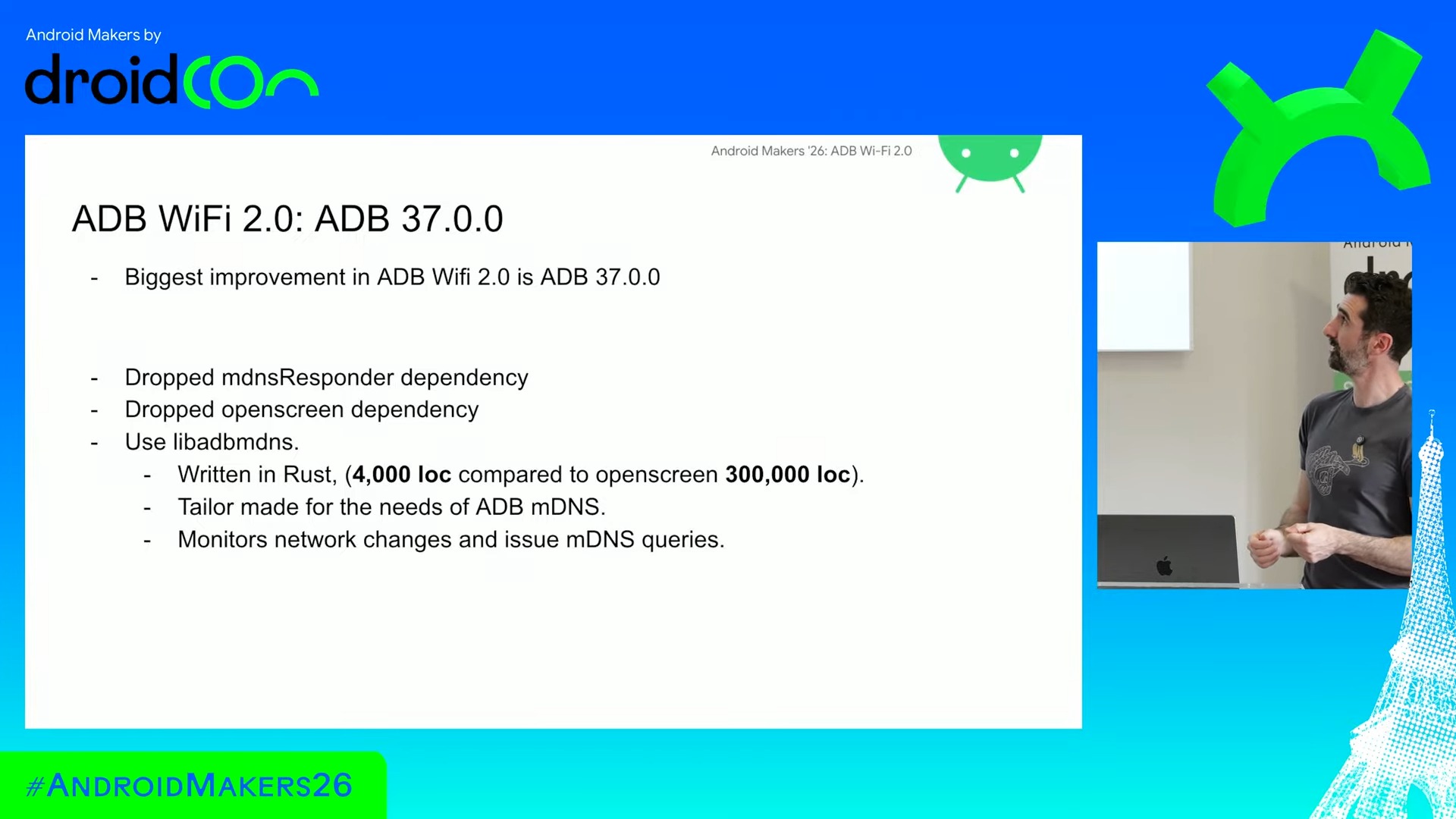
The new system ditches these dependencies, moving toward a bespoke, lightweight solution written in Rust. This transition marks a significant departure from Google’s reliance on external codebases like Apple’s mDNSResponder or the Chrome-based Open Screen library. By opting for a custom, purpose-built Rust library, Google has managed to cut out the "bloat," creating a system that is significantly more resilient to the interruptions of daily life—such as closing a laptop lid, walking between Wi-Fi access points, or encountering network latency.
For the end user, this means the end of the "pairing loop." No longer will a momentary drop in Wi-Fi signal or a brief sleep-wake cycle on your workstation result in the immediate severance of your ADB connection. The system is now designed to be "always-on" in a way that respects both network stability and power consumption.
A Chronology of Wireless Debugging
To understand why this update is so vital, one must look at the historical trajectory of Android development tools.
The Wired Era (2008–2020)
For the first decade of Android, developers were tethered to their machines via USB. While reliable, this created physical limitations—USB port wear-and-tear, cable breakage, and the simple inconvenience of having a phone physically anchored to a desk.
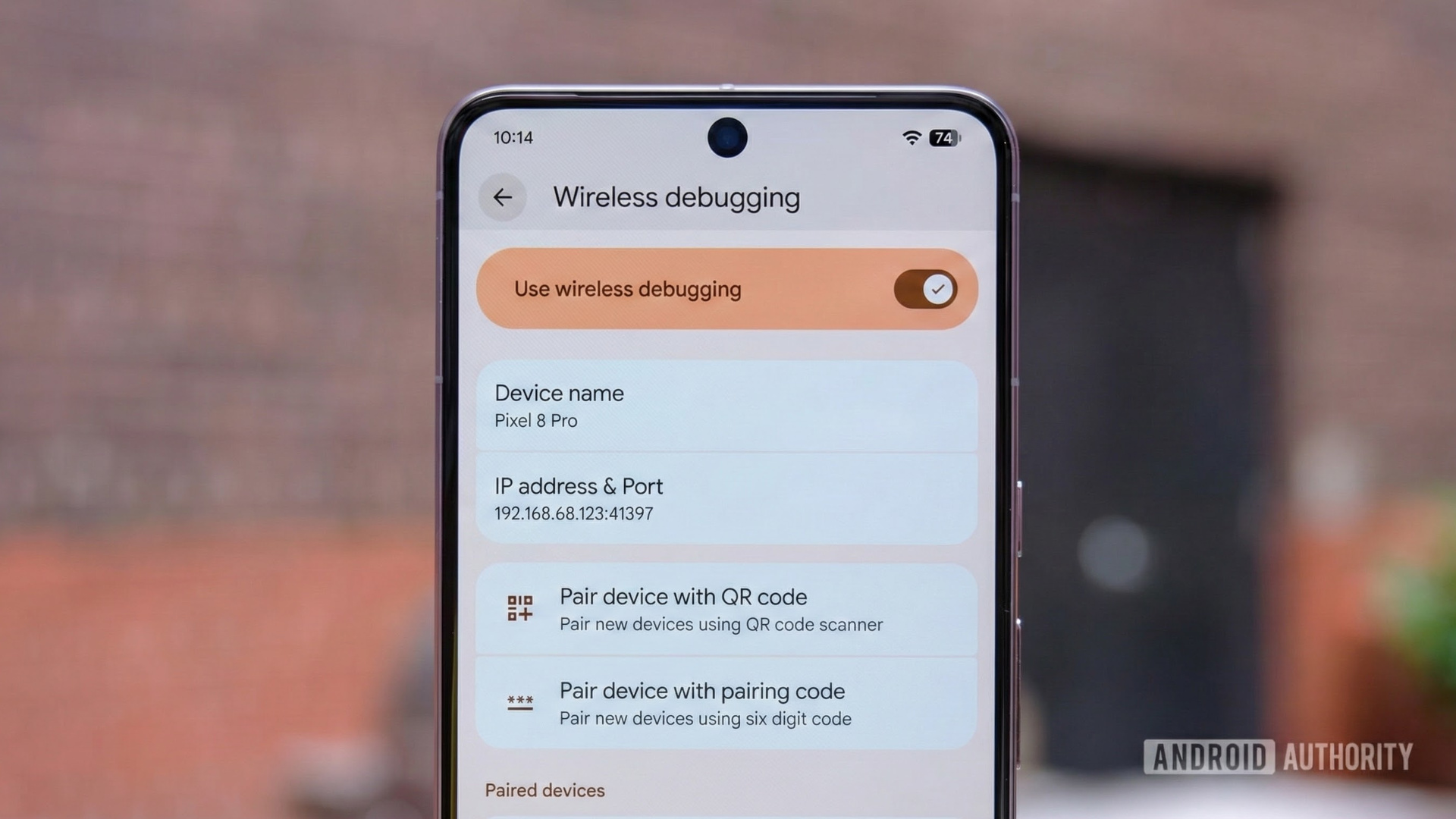
The "First Draft" (Android 11, 2020)
Google introduced official Wireless Debugging in Android 11. It was a milestone, allowing developers to pair devices via QR codes or pairing codes. However, it was built on "borrowed" technology. Because Google leveraged the Open Screen library (originally designed for Chromecast streaming), the system inherited behaviors that were ill-suited for development. Chromecast tech expects a relatively static environment; when that environment becomes a mobile developer’s constantly shifting network, the system fails.
The Transition (Android 14–16)
During the intervening years, developers frequently complained about the "auto-reconnect" failures. Google began experimenting with Canary builds, acknowledging that the underlying stack needed a total overhaul. Community feedback, amplified by figures like Mishaal Rahman, pushed this issue to the forefront of the Android team’s roadmap.
The Modern Standard (Android 17, 2026)
With the launch of Android 17, ADB Wi-Fi 2.0 becomes the default, signaling that wireless development is finally ready for prime time.
Supporting Data: Why the Old Way Failed
During a recent deep-dive session at the Android Makers conference, Fabien Sanglard, Google’s ADB tech lead, provided a rare, transparent look at the "technical debt" that necessitated this change.
Sanglard famously compared the reliance on third-party libraries to using a "credit card"—you get the immediate benefit of a feature, but you pay for it later with interest in the form of maintenance headaches and instability.
- The mDNSResponder Problem: Using Apple’s library for macOS provided immediate cross-platform discovery, but it was a "black box" that the Android team couldn’t optimize for specific mobile use cases.
- The Chrome/Open Screen Issue: This was the primary culprit for connection drops. It was built for casting media, not for maintaining a persistent, high-bandwidth bidirectional stream for debugging. When a laptop lid closed, the library interpreted this as a fatal network loss rather than a temporary suspension.
- The Rust Advantage: The new 4,000-line Rust library is a masterclass in efficiency. Because Rust is memory-safe and highly performant, it allows the ADB daemon to monitor network state changes in real-time without hogging system resources.
Furthermore, the intelligence behind the "trusted network" detection has been upgraded. By using a dual-check system involving both the SSID (the network name) and the BSSID (the unique hardware MAC address of the router), the system avoids the common pitfall of "spoofed" or overlapping network names in large office environments.
Official Responses and Developer Impact
Google’s messaging around Android 17 is clear: "Developer productivity is a first-class citizen."
The integration with Android Studio has been completely overhauled. Previously, the pairing dialog was a source of frustration—if the network configuration blocked the discovery protocol, the dialog would spin indefinitely, leaving the developer to wonder if the issue was their phone, their router, or their PC.
The new UI is diagnostic-first. It now populates a list of devices based on active, verified discovery, and it provides meaningful error messages if a connection fails. This shift from "blind discovery" to "verified connectivity" reflects a more professional approach to the toolset.
While the framework-level improvements in ADB Wi-Fi 2.0 are native to Android 17, Google has ensured that the "host-side" improvements (the PC-based ADB server) are backward compatible. By updating to the latest version of ADB (37.0.0) and the newest Android Studio, developers working on legacy devices running Android 13 or 14 will notice improved stability, even if they don’t get the full, seamless auto-reconnect features of the latest OS.
Implications: A New Era for App Development
What does this mean for the future of mobile development? The implications are three-fold:
1. The Death of the Physical Port
With wireless charging and now seamless wireless debugging, the physical USB-C port on smartphones is increasingly becoming a legacy feature for data transfer. While necessary for fast-charging and external peripherals, the "development port" is effectively becoming virtualized.
2. Streamlined Test Farms
For companies that maintain "device farms"—racks of phones used for automated testing—the implications are massive. Managing hundreds of USB cables is a logistical nightmare. A robust, stable wireless ADB stack allows for cleaner, more organized testing environments where devices can be swapped, moved, or updated without manually re-cabling the entire rack.
3. Increased Security Awareness
The new system is also more secure. Because the connection process is more tightly integrated into the OS’s native NsdManager (Network Service Discovery), the handshake process between the PC and the phone is more resilient to man-in-the-middle attacks that were theoretically possible with the looser, older implementation.
4. Faster Iteration Cycles
For the individual developer, the time saved by not having to unplug, re-plug, and re-authorize a device every time they walk to a meeting is non-trivial. It lowers the "friction of entry" for testing, which encourages more frequent testing throughout the development lifecycle. In the world of software engineering, reduced friction directly correlates to higher code quality.
Conclusion: The Quiet Revolution
It is rare that an "under-the-hood" change generates as much excitement as a new UI feature or a camera upgrade, but for the professionals who build the apps that power the world, ADB Wi-Fi 2.0 is a game-changer.
Google’s decision to abandon the "bloat" of third-party libraries in favor of a lean, custom Rust implementation is a testament to the company’s commitment to refining the Android development experience. By focusing on stability, reliability, and architectural cleanliness, Google has ensured that the next generation of Android apps will be built on a platform that is finally as agile as the developers themselves.
As we move forward into the era of Android 17, the days of hunting for a spare USB-C cable or frantically debugging a dropped Wi-Fi connection seem destined to become a distant memory. For the Android ecosystem, the future is wireless, and thanks to ADB 2.0, it is finally stable.

 Ali Ikhwan
 Rifan Muazin