

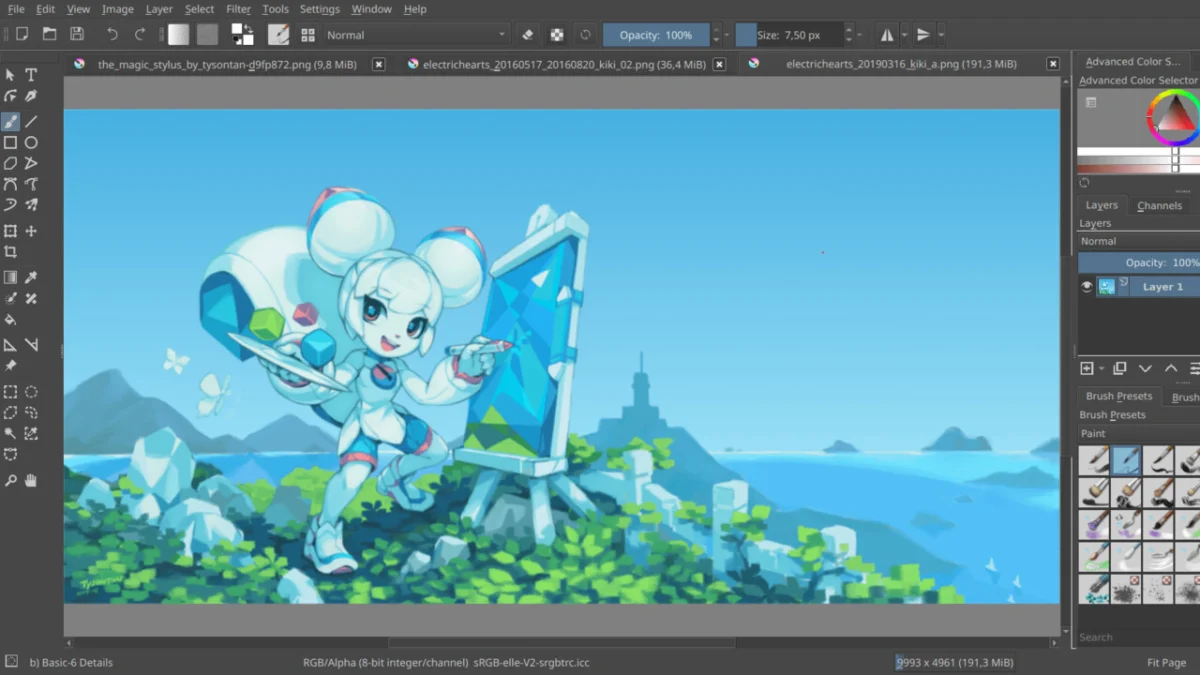
The Krita Foundation, the driving force behind the world’s most popular open-source digital painting suite, has released two significant updates: Krita 5.3.2 and Krita 6.0.2. These updates serve a dual purpose, addressing the immediate stability needs of professional artists relying on the long-term stable branch while simultaneously advancing the experimental, Qt6-based architecture that represents the future of the software.
By pushing updates for both branches, the development team demonstrates a sophisticated release management strategy that prioritizes cross-platform reliability—spanning Windows, macOS, Linux, and Android—without stifling the rapid innovation inherent in the transition to modern framework standards.
The Strategic Importance of Dual-Branch Development
The release of Krita 5.3.2 and 6.0.2 highlights a pivotal moment in the project’s history. Krita 5.x remains the bedrock for professionals who require a rock-solid, predictable environment for production workflows. Conversely, Krita 6.x is the laboratory where the transition to Qt6 is being stress-tested.
This dual-track strategy is not merely an administrative choice but a necessity for a tool that serves both hobbyists and high-end animation studios. While 5.3.2 focuses on refining the existing feature set and eliminating "quality of life" friction, 6.0.2 addresses the complexities of a modern underlying framework that offers better performance and hardware support but presents unique stability challenges during its infancy.
Chronology of Improvements: A Technical Breakdown
The development cycle leading up to these releases has been heavily focused on user feedback regarding text manipulation and tool interactions. Below is a detailed look at the core fixes implemented across both versions.
Refining the Text Engine
One of the most significant pain points identified in recent community feedback involved the text-handling capabilities. Krita’s text tool, a critical component for comic book artists and graphic designers, has undergone a series of critical refinements:
- Qt6 Compatibility: Users on the 6.0.x branch reported erratic behavior regarding font selection. The developers have successfully resolved these rendering conflicts, ensuring that font lists now populate accurately and render without the visual artifacts previously associated with Qt6 integration.
- Dropdown UI Enhancements: The font selection menu, often criticized for its clunky navigation, has been redesigned for better responsiveness.
- Selection and Editing Logic: Previously, users struggled to select text on standard layers, a bug that frequently led to lost work. Both 5.3.2 and 6.0.2 implement a robust fix that ensures consistent interaction.
- Formatting Controls: To speed up workflow, new, intuitive buttons for Bold and Italic toggles have been introduced. A long-standing bug where the italic toggle would fail to update the preview has also been successfully patched.
Animation and Workflow Reliability
Beyond text, the update addresses critical issues in animation production. Krita has implemented a more rigorous validation check for the export process. When exporting frames, the application now performs a secondary check on the export status of each individual file. If QFile::copy encounters an error—often due to directory permission issues or disk space constraints—the application now issues a descriptive error message rather than failing silently.
Additionally, the "Selection" docker, which would occasionally vanish during active toggling of visibility, has been stabilized. This ensures that users can manage complex mask selections without the UI disappearing mid-workflow.
Supporting Data: The Android Optimization Crisis
Perhaps the most impactful update in this release cycle concerns the Android ecosystem. Historically, Krita on Android has struggled with resource-intensive startup sequences. Because Krita is a desktop-grade application ported to mobile, it requires a significant amount of data initialization upon launch.
On many Android devices, the operating system’s "Application Not Responding" (ANR) monitor would trigger during this initialization, forcing the app to close before it ever finished loading. The development team has overhauled this by moving resource initialization to a background thread. By decoupling resource loading from the main UI thread, the application now remains responsive during startup, effectively eliminating one of the most frequent crash reports from the mobile user base.
Official Stance and Development Philosophy
In the official release notes, the Krita Foundation emphasizes a clear distinction between the two versions. Krita 5.3.2 is explicitly recommended for "productive use." For studios and individual artists who cannot afford downtime or potential software regressions, the 5.x branch remains the standard.
The 6.x branch, meanwhile, is treated as a "bleeding edge" environment. The shift from Qt5 to Qt6 is a massive architectural undertaking that involves rewriting how Krita interacts with hardware-accelerated graphics, tablet input APIs, and color management systems. The developers have been transparent that 6.x is intended for users who want to contribute to the testing phase or who require the latest performance optimizations at the cost of potential stability issues.
Implications for the Digital Art Industry
The release of these updates has several long-term implications for the digital art community:
1. The Professionalization of Open Source
By maintaining a strict separation between stable and experimental branches, Krita is proving that open-source software can compete with industry titans like Adobe Photoshop. The disciplined approach to bug tracking—specifically the detail-oriented fixes in the text tool—shows a deep respect for the professional creative pipeline.
2. The Move to Modern Frameworks
The transition to Qt6 is not just about keeping up with trends; it is about future-proofing Krita. Qt6 provides better support for High-DPI displays, improved Wayland integration on Linux, and more efficient GPU usage. By pushing 6.0.2, the team is gathering the telemetry and bug reports necessary to ensure that when 6.x eventually becomes the default, it will be as reliable as its predecessor.
3. Cross-Platform Parity
Krita’s commitment to Android is noteworthy. As tablets become more powerful, many artists are moving away from traditional desktop setups. By solving the startup latency issue, Krita is positioning itself to be a primary tool for mobile illustration, challenging the dominance of iPad-exclusive apps like Procreate.
Conclusion and Call to Action
The release of Krita 5.3.2 and 6.0.2 is a testament to the health and vitality of the Krita project. For most users, the update to 5.3.2 is a mandatory step to ensure a smoother, more reliable creative experience. For those on the development track, 6.0.2 offers a glimpse into the high-performance future of the software.
Artists are encouraged to consult the full official release notes to review the complete changelog. Users can download the latest installers directly from the official Krita website or through reputable distribution mirrors.
As the project continues to evolve, the feedback from the community remains the most critical asset. Whether you are using the software for professional animation or personal illustration, reporting bugs and participating in the Krita community forums ensures that the tools you rely on continue to improve. The future of open-source digital art is not just about features; it is about the quiet, consistent work of refinement—and with these releases, Krita has once again delivered exactly that.









No comments yet. Be the first to join the conversation!