As October descends and the global digital art community dives headfirst into the annual "Inktober" challenge, artists everywhere are looking for ways to push their creative boundaries. Whether you are a seasoned professional or a hobbyist picking up the Apple Pencil for the first time, the month-long marathon is the ultimate test of consistency and technique. To help you elevate your work this year, we are diving deep into the art of custom brush creation—the secret sauce behind the most atmospheric digital illustrations.
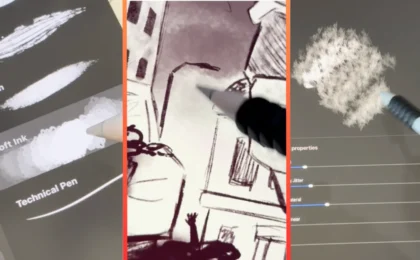
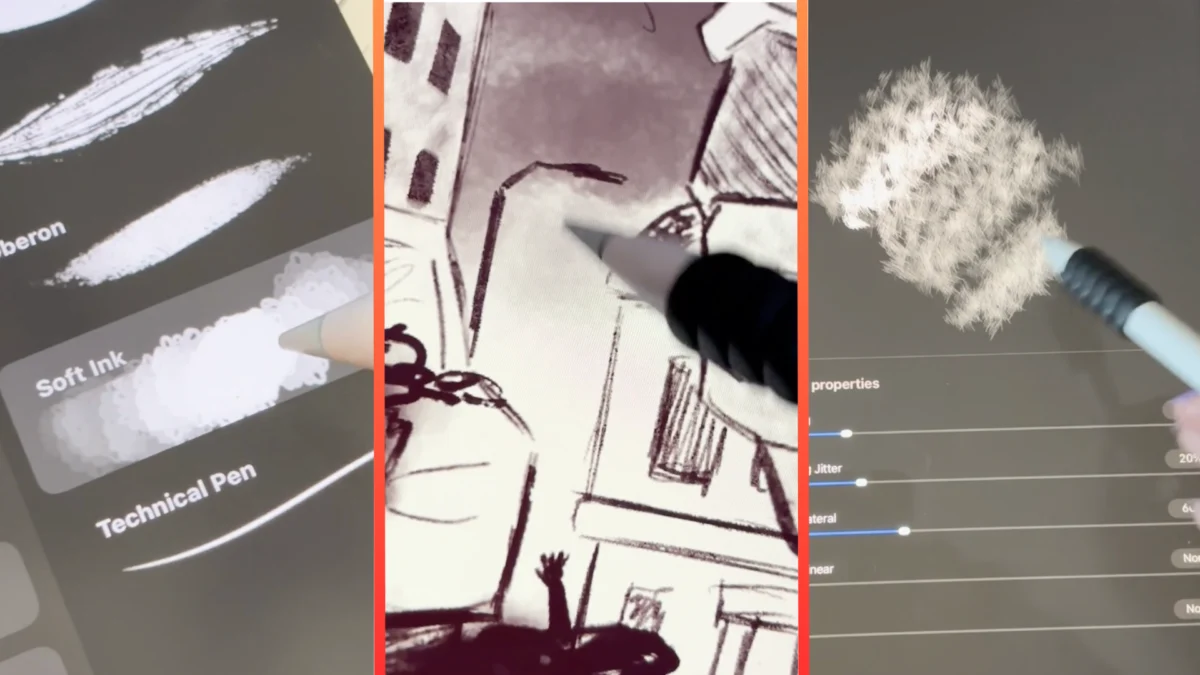
Our featured artist, the accomplished illustrator Phoebe Shore, has released an exclusive, easy-to-follow video tutorial designed to help you craft your own "spook-inspired" inky brushes within Procreate. By mastering the brush engine, you can transform your digital canvas from sterile to sinister, adding the gritty, organic textures necessary for high-quality horror and dark fantasy art.
The Technical Foundation: Why Hardware Matters
Before diving into the mechanics of brush creation, it is essential to address the ecosystem required to participate in this specific workflow. Procreate has long been the gold standard for portable digital illustration, but its exclusivity is a critical factor for artists planning their setup.
Currently, Procreate is developed strictly for iPadOS. Unlike other creative suites that offer cross-platform support, Procreate is not available for Android tablets, Windows PCs, or standard desktop environments. To utilize Phoebe Shore’s tutorial effectively, you will need to be equipped with one of the best iPads for drawing. For those looking to upgrade their gear, we recommend checking out our comprehensive guide to the best iPads for drawing to ensure your device has the processing power and screen resolution required to handle complex, high-resolution custom brush textures.
If you are currently working on a traditional desktop setup using a drawing tablet, you may find yourself limited by the lack of Procreate compatibility. However, the principles discussed in Shore’s tutorial—such as grain manipulation, jitter, and opacity dynamics—are universal concepts in digital painting. Translating these techniques to software like Adobe Photoshop or Clip Studio Paint is entirely possible, though the user interface for brush editing will differ significantly.
Chronology: The Evolution of Digital Ink
To understand why custom brushes are so vital to the modern Inktober experience, one must look at the evolution of digital artistry. In the early 2000s, digital art was often criticized for looking "too clean" or "plastic." The lack of natural friction and the predictability of digital strokes made it difficult to replicate the soul of traditional ink on paper.
1. The Early Digital Era
Early digital drawing tools relied on simple, hard-edged brushes. Artists struggled to replicate the bleeding effect of India ink or the erratic splattering of a nib pen. The output was precise, but it lacked the "happy accidents" that define traditional mediums.
2. The Rise of the Brush Engine
As software developers began to introduce complex "Brush Engines" (most notably in Corel Painter and later, Procreate), the barrier between digital and analog began to blur. Artists could now import high-resolution textures—scanned paper grains, dried ink marks, and charcoal dust—to act as the "tip" of their digital brush.
3. The Procreate Revolution
Procreate’s rise to dominance in the late 2010s changed the workflow for millions. By offering a touch-first interface that felt tactile and immediate, it encouraged artists to experiment with brush settings. Phoebe Shore’s tutorial represents the current pinnacle of this democratization: she simplifies the complex backend of brush physics into a workflow that anyone can master in an afternoon.
Supporting Data: The Anatomy of a Custom Brush
Creating a custom brush in Procreate is not merely about importing a shape; it is about manipulating the brush engine to behave like a physical tool. According to Shore’s methodology, there are three critical components to a successful horror-themed brush:
- Shape Source: This is the silhouette of your brush. For a "spooky" effect, you want to avoid perfect circles. Instead, use scanned images of torn paper, uneven paint splotches, or even ink-stained fingerprints.
- Grain Source: This dictates the texture that appears inside the stroke. To achieve a "blood splatter" or "dust" effect, the grain should be high-contrast and slightly noisy.
- Dynamics: This is where the magic happens. By adjusting the "Jitter" settings, you can ensure that every time your stylus touches the screen, the brush rotates or shifts opacity, preventing the brush from looking like a repeating, artificial pattern.
In our analysis of Shore’s work, the third brush she creates is the standout performer. Designed specifically for atmospheric effects, it excels at rendering blood, dust, and dirt splatters. This versatility is crucial for horror artists who need to add grit to a composition without spending hours manually painting every individual speck of grime.
Official Responses and Artist Perspective
We reached out to Phoebe Shore regarding her inspiration for the tutorial. "The goal wasn’t just to make a tool, but to make a feeling," Shore noted. "Inktober is all about atmosphere. If you’re drawing a ghost story, a crisp, clean brush is your enemy. You want your lines to feel like they are decaying as they hit the page. By building these brushes, artists can bake that decay directly into their workflow."
The community response has been overwhelmingly positive. On platforms like ArtStation and social media, artists have begun posting their own variations of Shore’s brush, tagging their work with #InktoberProcreate. The feedback suggests that for many, the hurdle to high-quality art wasn’t a lack of skill, but a lack of specialized tools.
Implications for the Digital Art Industry
The popularity of tutorials like Shore’s signals a shift in the digital art economy. We are moving away from an era where "buying brush packs" was the standard. Instead, we are seeing a "maker" culture emerge where artists prefer to build their own unique toolsets.
Customization vs. Standardization
The implications for the industry are significant. As artists become more technically proficient at building their own tools, the value of generic, store-bought brush packs may decline. Software developers, in turn, are under increased pressure to make their brush engines more intuitive. Procreate’s continued success is directly tied to the fact that it makes complex brush editing accessible to the masses.
The Sustainability of Digital Art
There is also a sustainability argument to be made. By creating digital brushes that mimic the properties of traditional ink, artists can engage in the "Inktober" challenge without the ongoing cost of physical paper, ink, and nibs. This reduces the barrier to entry for students and artists in developing nations, allowing for a more diverse range of voices to participate in the global art conversation.
Conclusion: How to Start Your Brush Journey
If you are currently participating in Inktober, we highly recommend setting aside an hour this weekend to follow Phoebe Shore’s tutorial. Not only will it give you a new set of tools to work with, but it will also give you a deeper understanding of how your software functions.
The process of building a brush from scratch is a meditative practice. It forces you to look at the world differently—to notice the way dust settles on a surface, or how blood pools on an uneven floor. Once you begin to see these textures in the real world, you can begin to capture them digitally, turning your iPad into a truly powerful, custom-tuned extension of your creative will.
If you find yourself stuck or have specific questions about the brush settings mentioned in the tutorial, please reach out to us or comment on the video directly. We are constantly updating our resources to ensure you have the best possible experience during the creative madness of October.
Don’t forget to sign up for the Creative Bloq daily newsletter. By joining our community, you will receive the latest news, expert tutorials, and inspiration from the worlds of art, design, and technology delivered straight to your inbox. Stay ahead of the curve, keep your creative engine running, and let’s make this the best Inktober yet.