Lina Hope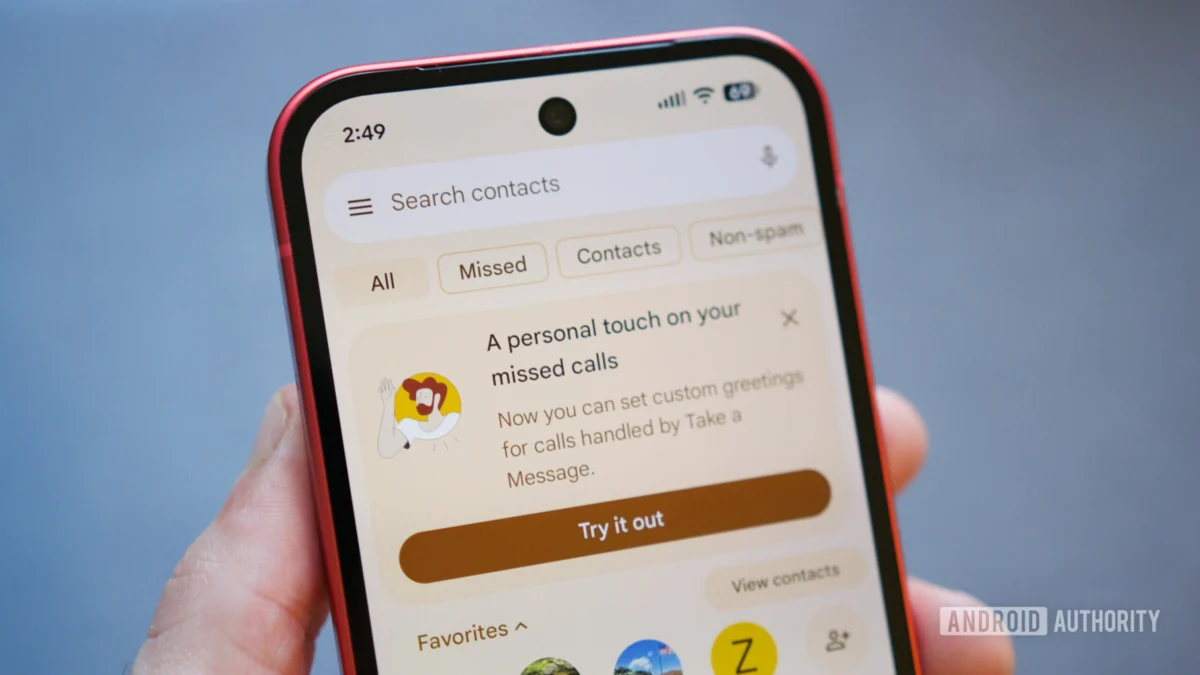
In an era where robocalls and unwanted telemarketing disruptions have become a daily nuisance, Google’s Pixel series has long positioned itself as the gold standard for call management. Today, that reputation is bolstered as Google officially rolls out a highly anticipated feature for its “Take a Message” call-screening capability. Originally teased in beta testing earlier this spring, users can now record and utilize custom outgoing voicemail greetings, allowing for a more professional and personalized experience when the Pixel’s AI intercepts an incoming call.
This update represents a significant shift from the rigid, automated responses that characterized earlier iterations of the feature, providing Pixel owners with the autonomy to dictate exactly how their callers are greeted when they are unavailable.
The Evolution of Pixel Call Screening
The “Take a Message” feature is a subset of Google’s broader Call Screen suite, which leverages the power of on-device machine learning to handle incoming calls. When a user chooses to screen a call, the Google Assistant answers on their behalf, transcribing the conversation in real-time so the user can decide whether to pick up, send a quick reply, or disconnect.
For years, this interaction was defined by a generic, synthesized Google voice. While efficient, it lacked the warmth or clarity of a personal greeting. Recognizing this limitation, Google began exploring the integration of user-recorded audio. In April 2026, eagle-eyed users participating in the Phone app’s beta program first spotted code strings and UI elements hinting at a "custom greeting" functionality.
Following months of rigorous testing and optimization, Google has transitioned this capability from the unstable beta environment to the stable production channel. This rollout confirms that the company is committed to evolving its AI-driven communication tools to feel less like a robotic gatekeeper and more like a true personal assistant.
How to Configure Your Custom Greeting
The rollout is currently reaching users in specific regions, including the United States, Canada, the United Kingdom, Ireland, and Australia. To access the new functionality, users must ensure their Google Phone app is updated to the latest version via the Google Play Store.
Step-by-Step Setup
Once updated, the integration is intuitive. Upon opening the Phone app, users will likely be greeted by a pop-up prompt inviting them to configure their new custom greeting. For those who dismiss the prompt or wish to manage their messages later, the process is straightforward:
- Access Settings: Open the Phone app and tap the three-dot menu icon in the top right corner.
- Navigate to Call Screen: Select "Settings," followed by "Spam and Call Screen," and finally, "Call Screen."
- Manage Greetings: Locate the "Take a Message" section. Here, you will find a "Manage greetings" option.
- Record and Save: You can record multiple variations of a greeting. Once recorded, the app allows you to preview your audio, rename your clips, and tap the three-dot menu on any specific recording to "Set as default."
The system currently allows for a standard greeting—the default Google-generated message—or any number of personal recordings. By enabling this, your Pixel will play your recorded voice to callers, bridging the gap between automated efficiency and personal connection.
Implications: The Future of Personalized AI
The introduction of custom greetings is not merely a cosmetic update; it carries significant implications for the future of mobile communication. By allowing users to customize the voice that represents them, Google is acknowledging the importance of brand identity and personal privacy in digital interactions.
The Human-AI Hybrid
The primary friction point for AI call screening has always been the "uncanny valley" effect—where the caller feels confused or alienated by a robotic voice. By allowing a user to record their own message, Google successfully blends the convenience of AI with the familiarity of a human voice. The AI takes over the transcriptions and the "heavy lifting" of the call, but the initial contact remains distinctly human.
The Potential for Contact-Specific Greetings
While the current rollout allows for a universal custom greeting, industry analysts and developers have noted that the foundation for even more sophisticated features is already present in the app’s architecture. Earlier reports from the beta phase suggested that Google may eventually allow users to set specific greetings for specific contacts.
Imagine a scenario where a professional contact hears a polished, formal greeting, while family members hear a warmer, more casual message. This level of granularity would transform the Pixel from a simple screening tool into a sophisticated communication manager, allowing users to categorize their social and professional spheres through automated logic.
Technical Requirements and Geographic Availability
Not every user with an Android device will have immediate access to this feature. Google has tied this update specifically to the Pixel hardware ecosystem, requiring a Pixel 6 or newer device. This restriction is largely due to the specific requirements of the on-device Tensor processing units, which handle the audio processing and transcription tasks necessary to run the call-screening service effectively.
Furthermore, the regional limitation to the US, UK, Canada, Ireland, and Australia reflects the complexity of navigating international telecommunications regulations and language processing nuances. As Google continues to refine its speech-to-text and text-to-speech models, it is expected that the company will gradually expand this feature to additional languages and territories.
Industry Response and User Reception
Early reception from the tech community has been largely positive. Pixel enthusiasts have long requested the ability to personalize their call-screening experience. On forums and social media, users have praised the simplicity of the interface, noting that the ability to save multiple greetings is particularly useful for those who balance different professional and personal roles.
However, some privacy advocates have raised questions regarding the storage and processing of these voice recordings. Google has reiterated that the voice data for these greetings is managed through the Phone app’s existing security framework, ensuring that recordings remain stored locally on the device or within the user’s secure Google account, rather than being used for external data harvesting.
The Broader Impact on Telecommunications
Google’s continued refinement of Call Screen is placing significant pressure on other smartphone manufacturers. As the baseline for "smart" phone features continues to rise, the expectation for high-quality, AI-integrated call management is becoming standard. Samsung, Xiaomi, and others are currently racing to develop comparable solutions, but Google’s head start in natural language processing and its deep integration with the Android ecosystem give it a substantial competitive advantage.
By turning a nuisance—the unwanted phone call—into an opportunity for personal expression and AI-driven productivity, Google is successfully maintaining its lead in the smartphone market. For the average user, the "Take a Message" feature is no longer just a way to avoid spam; it is a way to reclaim their time without sacrificing their personal touch.
Looking Ahead
As we look toward the remainder of 2026, it is clear that the integration of generative AI into mobile telephony is only in its infancy. With the rollout of custom greetings, Google has successfully navigated the balance between technological sophistication and user-centric design.
The next frontier for this technology will likely involve deeper AI integration, such as the ability for the Assistant to answer questions about the user’s schedule or provide context-aware responses based on the caller’s identity. For now, however, the ability to record one’s own voice to handle the incoming tide of calls provides a much-needed sense of control in an increasingly noisy digital world.
Pixel users are encouraged to explore the new settings menu, experiment with their recordings, and embrace a more personalized way of managing their time. As Google continues to iterate on this feature, the line between the physical phone call and the digital assistant will continue to blur, ultimately resulting in a more efficient, less intrusive, and significantly more human mobile experience.

 Jia Lissa
 Asro
Asro