Basiran
In a significant shift for the Windows ecosystem, Microsoft is currently testing a comprehensive "refresh" for Windows 11 that fundamentally alters the user experience. By granting users granular control over the Start menu and Taskbar, the company is effectively rolling back some of the more restrictive design choices that characterized the operating system’s initial launch. These changes, currently residing within the Windows Insider Program, represent a broader strategy to reconcile modern design aesthetics with the functional autonomy long demanded by power users.
The Core Transformation: A New Level of Customization
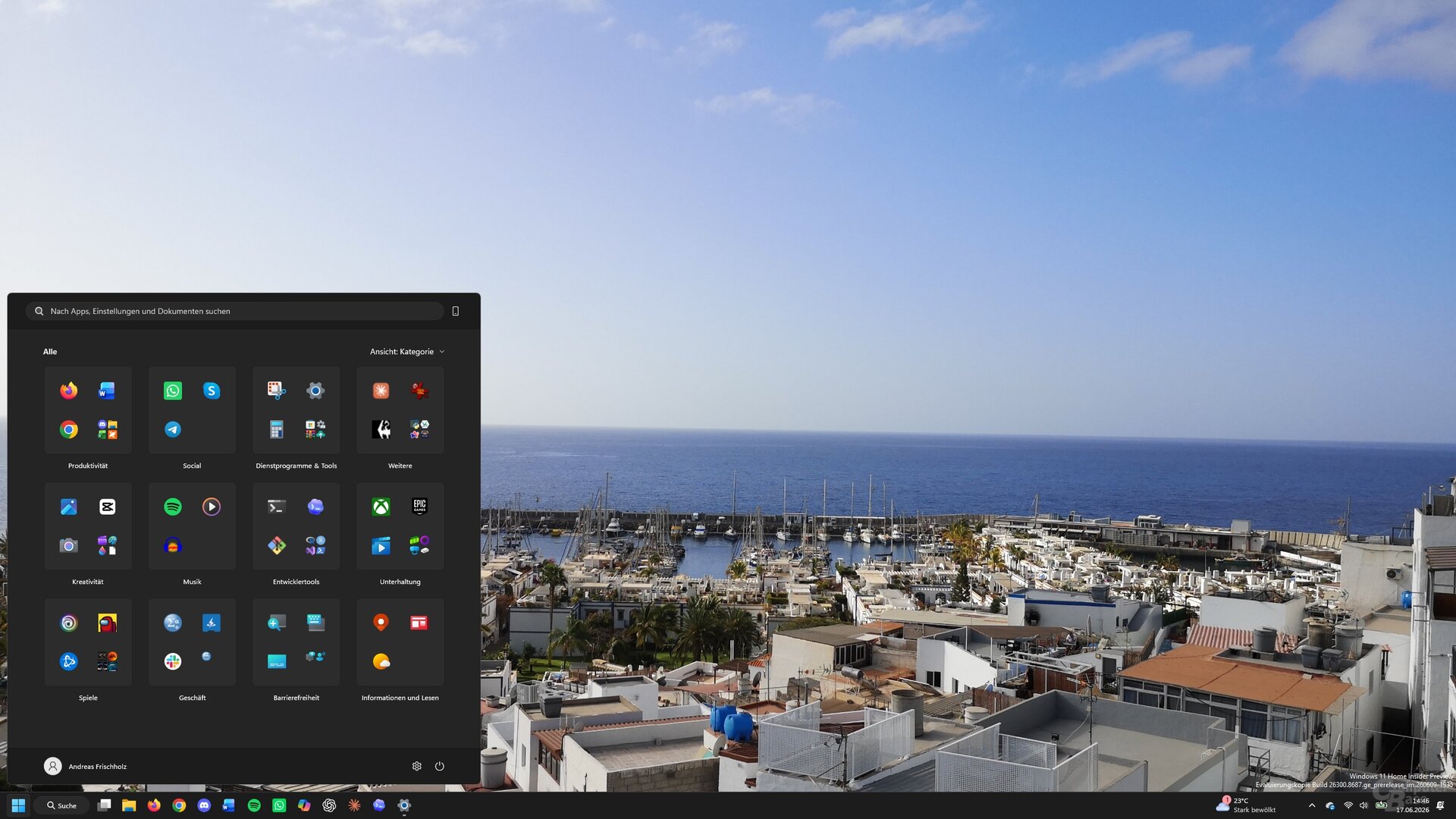
The latest Windows 11 Insider Experimental Preview (Build 26300.8493), released in April 2026, introduces a level of UI flexibility that was previously unthinkable within the default Windows environment. At the heart of this update is a re-engineered Start menu, which can now be stripped down to its bare essentials—or even rendered completely empty.
For years, the Start menu has served as a static hub of recommendations, pinned applications, and system-defined search results. The new update allows users to navigate to the "Personalization" section within the Settings app, where a new "Start" sub-menu offers toggle switches for every individual segment of the interface. By disabling these segments, users can effectively declutter their workspace, moving away from Microsoft’s prescriptive UI toward a minimalist, highly personalized workflow.

Chronology of the Windows 11 UI Shift
The journey to this point has been a volatile one for both Microsoft and its user base. Since its inception, Windows 11 has faced criticism for removing legacy features that users relied upon for productivity.
- Late 2021: Windows 11 launches with a centered Start menu and a locked, non-movable Taskbar, sparking immediate backlash from users accustomed to placing the taskbar on the side or top of their displays.
- Autumn 2025: Microsoft acknowledges user feedback by introducing a major overhaul to the Start menu, allowing for basic reorganization. This update first appeared in an optional October release but was limited in scope.
- April 2026: The current Insider build (26300.8493) surfaces, revealing "hidden" code that unlocks advanced configuration settings for both the Start menu and the Taskbar.
- Present Day: Enthusiast communities, fueled by data miners like the X-user "phantomofearth," are actively using tools like ViVeTool to test these features, while the general public awaits a stable, official rollout.
Technical Implementation: Unlocking the "Hidden" Experience
Because these features are still in the experimental stage, they are not yet enabled by default. Enthusiasts who wish to experience these changes must utilize the Windows Insider Program or leverage third-party tools such as ViVeTool.
The process involves using Windows command-line utilities to toggle "feature IDs"—internal markers in the Windows code that enable specific UI elements. By opening the command prompt as an administrator and navigating to the ViVeTool directory, users can execute the command vivetool /enable /id:xxxxxx.

While this provides early access, it is not without risk. During internal testing, editors noted that aggressive use of these feature flags occasionally led to system instability, such as the Start menu failing to trigger upon interaction. Such errors, however, are typically reversible by disabling the specific ID, highlighting the volatile nature of modifying an operating system’s internal configuration.
Taskbar Freedom: Returning to Legacy Flexibility
Perhaps the most anticipated change is the restoration of Taskbar positioning. Windows 11 famously restricted the Taskbar to the bottom of the screen, a design decision that hindered multi-monitor setups and professional workflows requiring extra vertical screen real estate.
The new update effectively reverses this, allowing the Taskbar to be pinned to the left, right, or top of the screen. When paired with the new, customizable Start menu, this offers a "classic" Windows feel that many users have been attempting to replicate through third-party software for years. Beyond position, the ability to resize the taskbar permanently—a feature that had been significantly restricted—further enhances the usability of the desktop environment.

Implications for the Windows Ecosystem
The implications of this update go beyond mere visual preference. This move signifies a pivotal shift in Microsoft’s product philosophy.
1. The Death of the "One-Size-Fits-All" Design
By allowing users to toggle off "Recommendations," "Pinned Apps," and even individual content blocks, Microsoft is admitting that the "best" desktop experience is subjective. This is a direct response to the enterprise and power-user demographic that felt alienated by the initial, rigid design of Windows 11.
2. A Tighter Feedback Loop
The reliance on the Insider program and the tacit acceptance of tools like ViVeTool demonstrate a new, more transparent relationship between the OS developer and the enthusiast community. By observing how users enable these hidden features, Microsoft is gathering valuable telemetry on which "hidden" functions are most requested, effectively using the community to stress-test their future design roadmap.
3. Reducing the "Bloatware" Perception
Many users viewed the "Recommendations" and "Suggested Apps" sections of the Start menu as unnecessary bloat. By giving users the power to remove these elements entirely, Microsoft is addressing one of the most common criticisms leveled at the OS since 2021. This move towards a cleaner, more performant UI may help improve sentiment among professional users who prioritize speed and focus over integrated advertising or content suggestions.
Official Stance and Future Outlook
While Microsoft has remained tight-lipped regarding a specific release date for these features, the presence of the code in the latest Insider build is a strong indicator of a pending, wider release.
Company representatives have previously noted that they are "listening to the community" regarding Taskbar and Start menu feedback. While they have not officially endorsed the use of ViVeTool—and consistently warn that modifying feature IDs can cause system instability—the fact that the code for these features exists suggests that Microsoft intends to eventually support these configurations natively.

Conclusion: A More Mature Windows
As Windows 11 matures, it is moving away from the "simplified" vision of its debut and toward a more robust, user-centric platform. By returning control to the user—whether through the ability to move the Taskbar, minimize the Start menu, or remove system-suggested content—Microsoft is proving that it can evolve its design language without sacrificing the utility that has defined Windows for decades.
For now, the general public must wait for these features to migrate from the experimental branch to the stable channel. However, the trajectory is clear: the future of Windows 11 is one where the user, not the developer, decides how the interface should look and behave. This shift toward modularity and customization is a welcome evolution that promises to make Windows 11 a more capable and less intrusive operating system for everyone.

 Nana Muazin
 Raul Delapena Setiawan