Pevita Pearce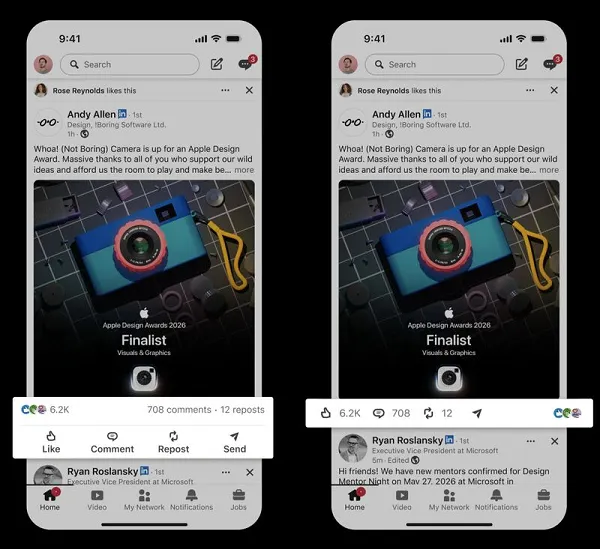
LinkedIn, the world’s preeminent professional networking platform, is undergoing a series of subtle but significant interface adjustments designed to modernize the user experience. In a move that aligns the platform more closely with the expressive capabilities of mainstream social media, LinkedIn has officially rolled out native GIF support within its comment sections. Alongside this visual update, the company has introduced a refined layout for post action buttons, aimed at creating a cleaner, more efficient browsing experience.
These updates, while incremental in nature, represent a broader shift in LinkedIn’s strategy: moving away from a static, strictly formal environment toward a more dynamic and interactive professional ecosystem.
The Core Update: Native GIF Support in Comments
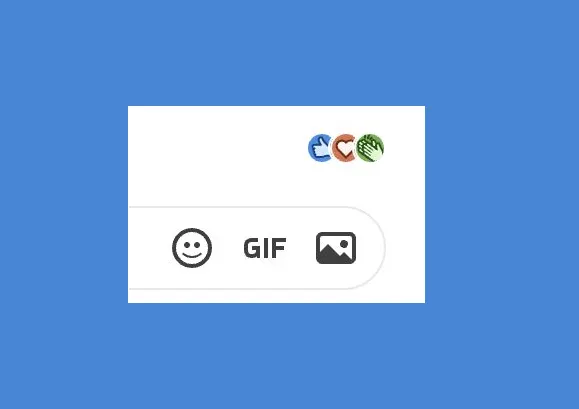
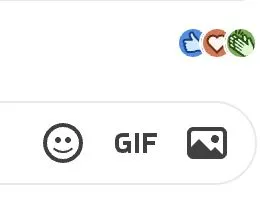
The most eye-catching change is the integration of a dedicated GIF button within the LinkedIn reply dialog box. This functionality allows users to search for and insert moving images directly into comment threads without the need for manual file conversion or external hosting links.
The Mechanics of the Change
Previously, users wishing to share a GIF in a LinkedIn comment were met with significant friction. Because LinkedIn’s architecture primarily favored standard image files or video embeds, animated GIFs often failed to render correctly unless they were first converted into MP4 video formats. This technical barrier effectively relegated GIFs to private messages or highly specific, high-effort posts.
With the new update—confirmed by Hari Srinivasan, LinkedIn’s Chief Product Officer—the process is now seamless. The GIF integration functions similarly to other social platforms, featuring a searchable library that allows for quick selection and deployment. For professional users, this means that expressing agreement, celebration, or nuanced humor in a comment section is now as simple as a few clicks.
Chronology of the Development
The path to this update has been a gradual process of platform evolution.
- Early Messaging Support: LinkedIn first introduced GIF support within its Direct Messaging (DM) feature years ago, acknowledging the role of non-verbal communication in professional rapport-building.
- Ad-Based Integration: Marketers have long had the ability to utilize GIFs within single-image ad units, proving that the platform was technically capable of supporting the format, albeit in a restricted capacity.
- The "Workaround" Era: For several years, power users and creators who wanted to utilize motion in the main feed were forced to convert their animations into MP4 files. This requirement created a clear divide between casual users and those with the technical know-how to navigate the platform’s limitations.
- The Official Launch: In the current quarter, LinkedIn began the rollout of the GIF feature to its mobile app and desktop interface, following a period of internal testing and refinement.
Supporting Data and User Sentiment
The reception of this update has been polarized, reflecting the unique demographic diversity of LinkedIn’s user base.
The "Unc" Factor
While younger professionals—often termed "digital natives"—have embraced the GIF as a standard tool for digital communication, some segments of the LinkedIn population view the addition with skepticism. In digital culture, the GIF is sometimes categorized by Gen Z as "unc" (a slang term for outdated or "uncle-like" behavior). There is a palpable concern among traditionalists that an influx of GIFs may diminish the perceived "professionalism" of the platform.
Professional Engagement Metrics
Conversely, data from other social ecosystems suggests that interactive elements drive higher engagement. By lowering the barrier to entry for comments, LinkedIn is likely betting that users will spend more time in the feed. When users feel empowered to react in real-time with visual cues, they are statistically more likely to participate in discussions rather than simply "lurking."
For LinkedIn, which has spent years trying to move beyond its reputation as a "job board" and into a "content creator platform," these metrics are vital. The more interactive the feed, the higher the dwell time, and the more valuable the platform becomes for advertisers and premium subscribers.
Official Perspectives and Strategic Direction
The move is part of a larger push by LinkedIn’s leadership team to streamline the "post-action" loop. As noted by Rishi J. of the LinkedIn product team, the platform is currently undergoing a comprehensive UI audit.
The rationale is clear: by consolidating action buttons (Like, Comment, Repost, Send) into a single, linearized row, the platform reduces cognitive load. In the previous iteration, users were often presented with stacked or cluttered icons that varied based on the device and the specific content type. The new, streamlined design ensures that the user experience is consistent across mobile and desktop environments.

This focus on UI consistency is not merely aesthetic. In a global market where mobile-first consumption is the dominant trend, LinkedIn must ensure that its features perform with equal fluidity on a 6-inch smartphone screen as they do on a high-resolution desktop monitor.
Implications for Professionals and Marketers
What do these changes mean for the average LinkedIn user, and more importantly, for those using the platform for brand building?
1. The Death of the "Static" Professionalism
The days of the strictly formal LinkedIn feed are waning. The inclusion of native GIF support signals that the platform encourages a "humanized" professional presence. Professionals should view this as an opportunity to inject personality into their networking. However, a word of caution: context is key. While a celebratory GIF might be appropriate for a promotion announcement, it may undermine a serious discussion on corporate policy or industry crises.
2. Marketing and Content Strategy
For content creators and marketers, the implications are more strategic. The ability to use GIFs in the main feed—without the hurdle of MP4 conversion—means that short-form, high-impact visual storytelling is now easier than ever. Brands that can master the art of the "professional GIF" may see a boost in engagement on their announcements.
3. Streamlined Engagement
The UI update, while seemingly minor, will likely lead to a higher click-through rate on engagement buttons. By simplifying the interaction layer, LinkedIn is reducing the "friction to engage." When a user can easily find the comment button, the likelihood of them leaving a thoughtful response increases.
The Future of LinkedIn’s Interface
The introduction of these features poses a fundamental question: Is LinkedIn becoming too much like its competitors?
Some analysts argue that by mimicking the features of X (formerly Twitter) or Facebook, LinkedIn risks losing its unique identity as a career-focused network. Others, however, contend that the "professional" nature of the platform is defined by the users, not the tools. If professionals are communicating via GIFs in their Slack channels and emails, it is only natural that their networking platform should facilitate that same language.
A Balancing Act
LinkedIn is currently walking a tightrope. It must continue to attract the next generation of workers who are accustomed to rich, interactive media, while simultaneously maintaining the trust and respect of C-suite executives and recruiters who rely on the platform for high-stakes business operations.
These latest updates—the GIF integration and the streamlined UI—are, in essence, a recognition that the platform must evolve to stay relevant. By prioritizing ease of use and visual expression, LinkedIn is signaling that it is prepared to grow alongside its user base.
Conclusion
The latest updates to LinkedIn may appear minor to the casual observer, but they are indicative of a platform in transition. By embracing native GIF support, LinkedIn is acknowledging that modern professional communication is as much about emotional nuance and visual engagement as it is about text-based networking.
As the platform continues to refine its UI, the focus will undoubtedly remain on increasing user retention and engagement. Whether these changes lead to a more "wriggling" or animated feed that distracts from professional discourse, or simply a more vibrant and connected community, remains to be seen. What is certain, however, is that LinkedIn is no longer content to stand still. For users and marketers alike, the directive is clear: embrace the tools, adapt to the new interface, and find the balance between the professional and the personal.
As we look toward the future of digital networking, it is clear that LinkedIn is aiming to be not just a place to find a job, but a place to build a digital presence that feels current, responsive, and, above all, human. Whether through a perfectly timed GIF or a streamlined comment interface, the evolution of LinkedIn is a testament to the fact that even the most established professional platforms must continue to innovate to keep pace with the changing nature of the digital world.


 Evan Lee Salim
 Iffa Jayyana