

For the modern remote worker, the digital workspace is a fragmented landscape. Navigating between Zoom, Google Meet, Microsoft Teams, and Slack often feels like a game of “shortcut roulette.” One application’s mute toggle is another’s “raise hand” command, and trying to recall specific hotkeys during a high-stakes presentation is a recipe for professional frustration.
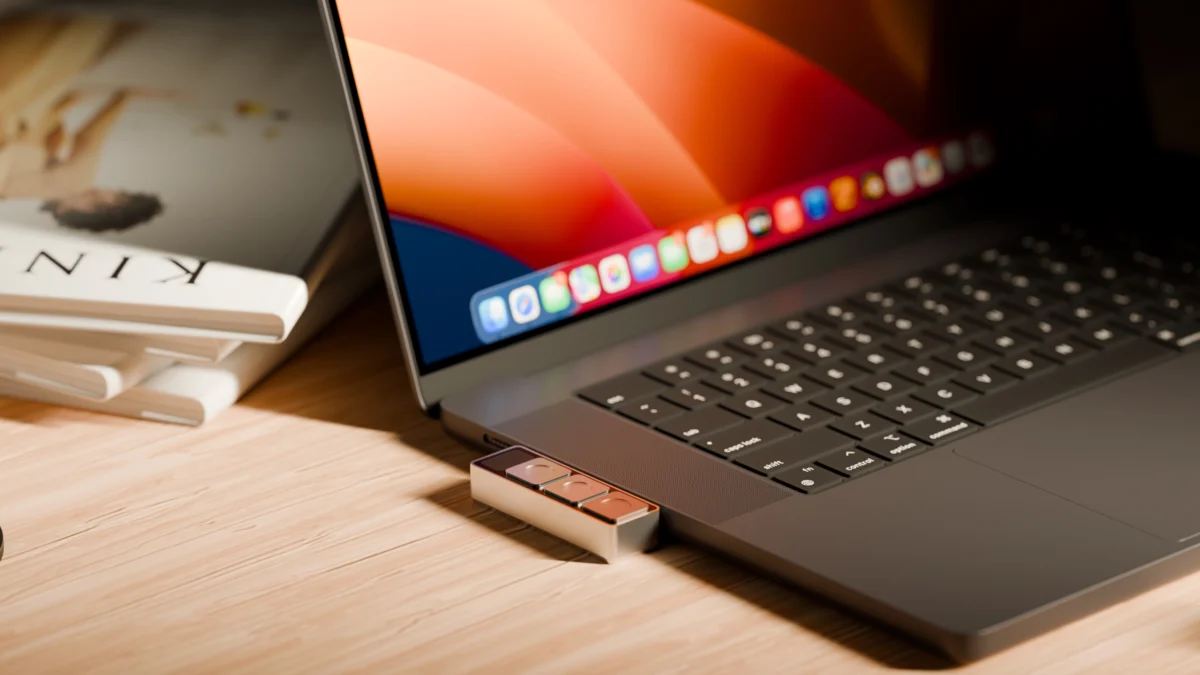
Enter Dune, a diminutive, hardware-based solution from the startup Project Mirage. About the size of a stick of gum, this three-key aluminum keypad aims to provide a universal, physical interface for the software chaos that defines the modern laptop experience. By plugging directly into a MacBook’s USB-C port, Dune promises to reclaim the efficiency lost to menu diving and keyboard acrobatics.
The Core Concept: Hardware for a Software-Defined World
At its heart, Dune is a context-aware bridge between the user and their operating system. Priced at $119 (with a $149 MSRP), the device is machined from aluminum to sit flush against the side of a MacBook, creating a seamless, integrated aesthetic. Unlike macro pads that require bulky desktop space, Dune is designed to be an extension of the laptop chassis itself.
The device functions as a dynamic input peripheral. When a user switches apps, the functionality of the three keys shifts automatically. In a conferencing suite, the buttons might act as mute, camera toggle, and window-focus triggers. In a productivity suite like Google Sheets or Microsoft Excel, they might transform into copy, paste, and undo functions. For developers, the utility expands further, allowing for complex actions like merging pull requests in GitHub or closing tasks in VS Code.
Key Technical Specifications
- Dimensions: Approximately the size of a stick of gum.
- Connectivity: Direct USB-C integration (no battery or charging required).
- Compatibility: Currently supports MacBook M2 Air or later and M1 Pro or later models running macOS 15 Sequoia or newer.
- Power: Bus-powered, drawing energy directly from the MacBook.
Chronology of the Project Mirage Development
Project Mirage began with a singular, common frustration: the lack of a standardized hardware interface for common software tasks. The development team focused on the "flush-fit" design philosophy, ensuring that the hardware felt like a native component of the Apple ecosystem rather than a third-party accessory.
- Phase One: Prototyping. The startup focused on the tactile experience, aiming for a build that could attach firmly to the MacBook’s profile.
- Phase Two: Software Integration. The team developed a companion app that allows for granular configuration, moving beyond static mapping to dynamic, context-aware profiles.
- Phase Three: AI Synergy. Recognizing that manual setup can be cumbersome, Project Mirage integrated Claude Desktop. This move shifted the paradigm from "manual mapping" to "natural language configuration."
- Phase Four: Market Entry. The product launched with a focus on the Apple M-series hardware, targeting the high-end professional and creative user base.
Supporting Data: Efficiency and AI Integration
The true differentiator for Dune is not just the hardware, but the ecosystem behind it. The companion app allows users to create system-wide or app-specific macros. However, the standout feature is the integration with AI agents.
Users can describe the desired functionality in plain English—for example, "Create a button that summarizes the website I am currently looking at"—and the Claude-powered engine writes the necessary script and assigns it to a key.
Case Studies in Efficiency
- The Researcher’s Workflow: One user configured a key to instantly pull up a company’s financial brief, competitor analysis, and potential interview questions while browsing their website. This transforms a multi-step research process into a single tap.
- The Content Creator’s Workflow: A simple script was designed to convert images to JPEG format with a single press, streamlining the process of uploading media to WordPress or social platforms.
While initial setup requires some debugging—often involving a dialogue with the Claude API—the ability to offload complex scripting to an LLM significantly lowers the barrier to entry for non-technical users.
The Marketplace Potential: A New Software Ecosystem
Project Mirage is banking on a "marketplace" model for long-term growth. By allowing users to share their custom "skills," the startup is positioning Dune as more than just a piece of hardware. It is essentially a "thin front end" for a community-driven library of automations.

If the marketplace scales, it could transform into the "App Store for Physical Inputs." Each new skill added by the community increases the utility of the hardware, creating a network effect that rewards both the developer and the consumer.
However, the current iteration is not without its limitations. Testers have noted that there is currently no "sandbox" mode to preview a skill before committing it to a physical key. This means users may accidentally overwrite functional shortcuts with buggy scripts, highlighting a need for a more robust testing environment within the companion software.
Implications: The Future of Peripheral Input
The release of Dune poses an interesting question about the evolution of the laptop interface. For decades, the keyboard and trackpad have been the primary means of input. Dune suggests a shift toward modular, specialized hardware that caters to specific workflows.
The Competition
- MuteMe: A device focused specifically on audio control. It is effective but limited in scope compared to Dune’s multi-app, macro-based functionality.
- Stream Deck: A market leader in broadcast-focused macros. While more powerful in terms of visual feedback (via LCD keys), Stream Deck is bulky and often requires a dedicated desk footprint.
Dune occupies a "middle ground" of portability and versatility. Its primary strength lies in its unobtrusive design and its reliance on AI to bridge the gap between complex software and simple hardware.
Necessary Improvements
To achieve mass-market success, Project Mirage must address two critical areas:
- Tactile Resistance: Early reports suggest the keys are overly sensitive. In a professional setting, accidental input—like unmuting oneself during a quiet moment—is a significant pain point. Increasing the physical resistance or implementing a software-based "double-tap" verification could resolve this.
- Expanded Ecosystem: The startup must move from being a facilitator of user-made skills to a proactive provider of professional-grade presets. The more "out-of-the-box" value a user finds, the less likely they are to view the device as a novelty and the more likely they are to view it as an essential tool.
Final Thoughts: A Pro-Grade Productivity Tool
Dune represents an intriguing shift in how we interact with our digital tools. By reducing the cognitive load associated with navigating complex software, it offers a tangible boost to productivity for those who live in their web browsers and communication apps.
At a $149 price point, it is not an impulse purchase; it is an investment in workflow optimization. For investors, software developers, and remote professionals who spend their days toggling between windows and apps, the ability to offload these tasks to a physical button is undeniably compelling.
As the team at Project Mirage continues to refine the software and expand the skill marketplace, the value proposition will likely grow. The device is a testament to the fact that even in an era of touchscreens and AI, there is still a powerful, visceral satisfaction in the click of a physical button. Whether or not it becomes the standard for the modern MacBook user will depend on the company’s ability to refine the hardware sensitivity and continue to leverage AI to make the "impossible" configurations feel effortless.
Disclaimer: This article contains affiliate links. Purchases made through these links may result in a commission for the publisher, which supports our ongoing independent coverage of consumer technology.











