For as long as smartphones have been capable of high-definition video recording, users have faced a persistent, low-grade frustration: the "screenshot compromise." We have all been there—capturing a precious, fleeting moment on video because we didn’t want to miss the action, only to realize later that we wanted a still image to share on social media or print.
The traditional workaround involved scrubbing through the timeline, pausing at the exact millisecond, and triggering a system-wide screenshot. This process was, at best, clunky. You were left with the video’s UI elements—progress bars, play buttons, and intrusive notification banners—cluttering your image. Worse, you were forced to crop, edit, and settle for a lower-resolution PNG file that occupied an unnecessarily large amount of storage space.
With the release of iOS 27, Apple has finally addressed this technological bottleneck. A quiet, yet transformative feature, "Save Video Frame as Photo," has arrived, fundamentally changing how we bridge the gap between motion and still photography.
The Core Innovation: Moving Beyond the Screenshot
The new "Save Video Frame as Photo" functionality is not merely a shortcut; it is a sophisticated image extraction tool. Unlike a screenshot, which essentially takes a "photograph of the display" (capturing pixel-for-pixel what is on the screen, including UI artifacts), this native feature interfaces directly with the video file’s metadata to pull the raw, high-fidelity frame.
When you capture a frame using this new method, you are extracting a clean, unadulterated image. Apple’s system automatically strips away the video player’s interface, ensuring the final result is a pristine capture of the scene itself. For power users and casual vacation-goers alike, this represents a shift from "hacking" a workaround to utilizing a professional-grade extraction utility.
Chronology: The Evolution of a Long-Awaited Fix
The journey toward this feature has been a slow one. In the early days of the iPhone, video capture was secondary to still photography. As sensor technology improved—moving from 1080p to 4K and beyond—the desire to pull high-quality stills from video grew proportionally.
- The Era of Compromise (2010–2020): Users relied on manual screenshots, often dealing with blurry motion trails and unwanted UI overlays.
- The Rise of Live Photos (2015): Apple introduced "Live Photos," allowing users to extract stills from a 1.5-second buffer. While successful, this didn’t solve the problem for long-form, high-resolution 4K video clips.
- The iOS 27 Milestone (2026): With the rollout of iOS 27, Apple finally integrated a dedicated "Save Video Frame as Photo" action. This implementation marked the end of the experimental phase, providing a stable, system-level API that works across the native Photos app.
Supporting Data: Why This Matters for Quality
The technical superiority of this feature compared to the legacy screenshot method cannot be overstated. When you take a screenshot on an iPhone, the device creates a PNG file. PNGs are excellent for lossless compression, but they are not optimized for photographic color depth or efficient storage of complex image data.
The Technical Edge
- Resolution and Bitrate: When you extract a frame from a 4K/60fps video, you are pulling from a source that is already optimized for high-speed motion. The resulting output is typically an 8-megapixel file (depending on the device’s sensor).
- HEIF Efficiency: Apple utilizes the High Efficiency Image Format (HEIF). By saving the extracted frame in this format rather than a massive PNG, the system maintains superior color accuracy and metadata while significantly reducing the file footprint on your device.
- Artifact Removal: A screenshot captures the "overlay." By using the new native tool, the operating system renders the frame without the "scrubber" bar or the "Play/Pause" buttons, saving the user from post-production cropping.
Practical Application: How to Use the Feature
Apple has integrated this into the Photos app with two distinct workflows, catering to both speed and precision.
The Quick-Save Method
For those who know exactly which moment they want:
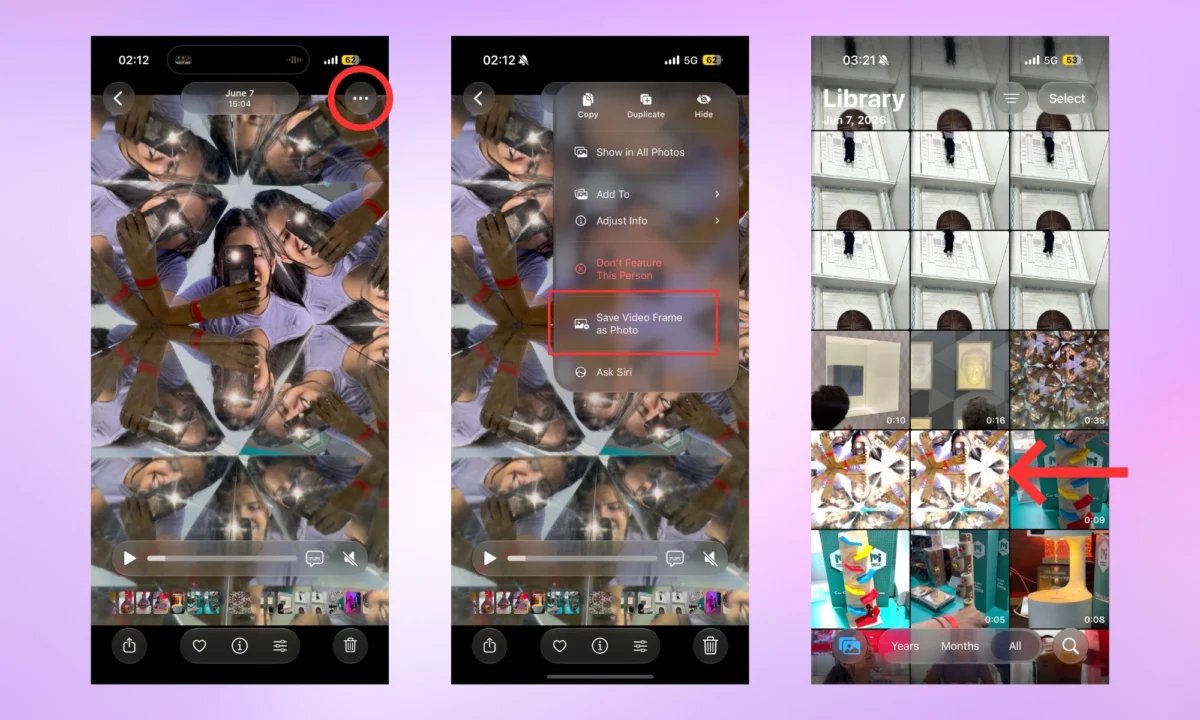
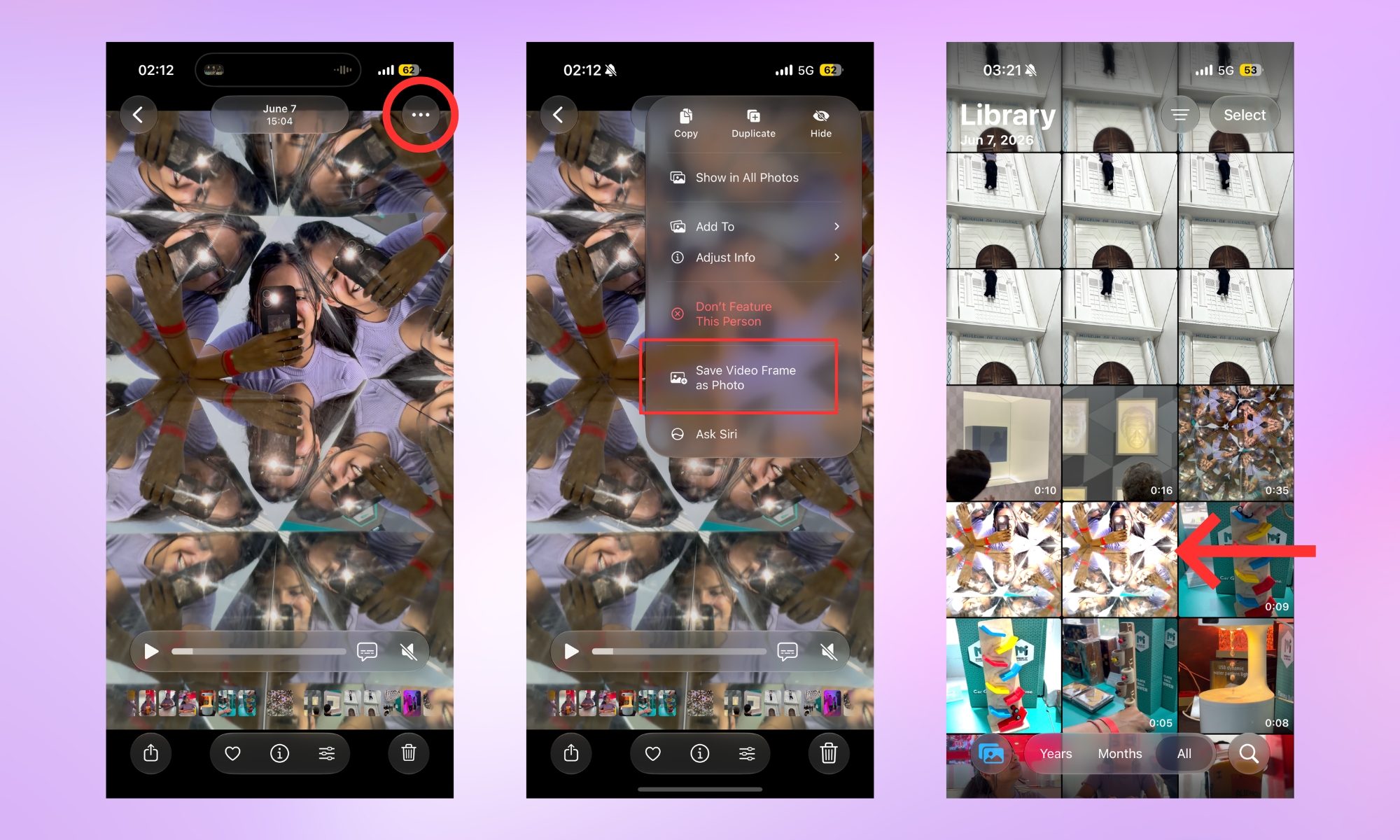
- Open your video in the Photos app.
- Scrub to the desired frame.
- Tap the three-dot menu in the top-right corner.
- Select "Save Video Frame as Photo."
The system instantly saves the frame to your library, placing it immediately adjacent to the original video file for easy organization.
The Precision-Edit Method
For those seeking the perfect frame in high-action sequences:
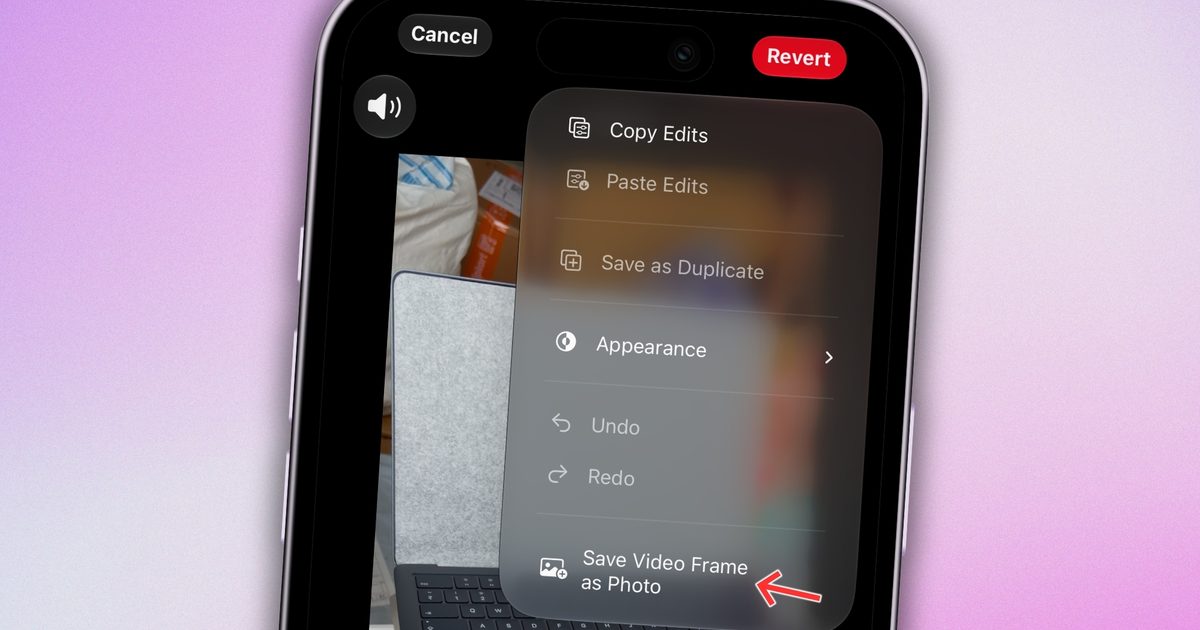
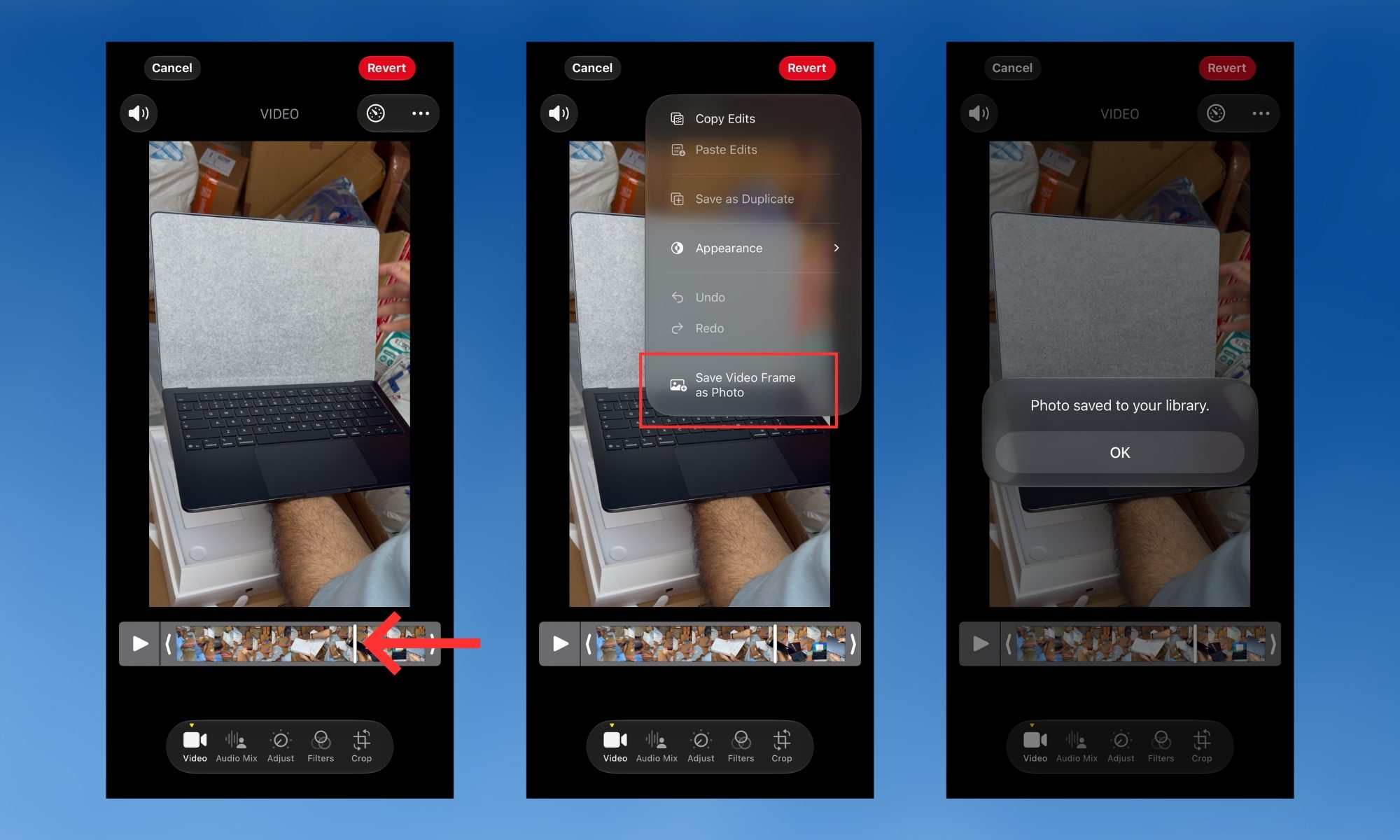
- Open the video and tap the hamburger menu at the bottom to enter the Edit interface.
- Utilize the frame-by-frame scrub tool at the bottom of the display. This allows for microscopic adjustments that are impossible to achieve with a finger swipe on the main playback bar.
- Once the exact frame is isolated, tap the three-dot menu and select "Save Video Frame as Photo."
- A confirmation prompt ("Photo saved to your library") will appear, providing a clear indication that the process was successful.
Official Stances and Industry Context
While Apple famously declined to highlight this feature during its high-profile stage keynotes, its inclusion speaks to a broader shift in the company’s software strategy. In recent years, Apple has focused on "quality-of-life" updates—small, highly requested changes that remove friction from the user experience.
Industry analysts suggest that this feature is a direct response to the "video-first" trend in social media. As users shift away from static photography in favor of 4K video for platforms like Instagram, TikTok, and professional portfolios, the need for a seamless transition between these two mediums has become a prerequisite for a premium mobile experience.
Implications: The Future of Mobile Photography
The implications of this feature are twofold.
First, it changes the way we document life. No longer do we have to choose between recording the sound and movement of a concert or a child’s birthday and taking a high-quality photo. We can record the video and feel confident that we can "harvest" the best moments later without loss of quality.
Second, it sets a new baseline for mobile software expectations. By turning a complex manual process into a single-tap function, Apple is putting pressure on third-party developers and competing mobile operating systems to provide similar, non-destructive extraction tools.
As we look toward future iterations of iOS, the success of this feature suggests that Apple is listening closely to the "hidden" frustrations of its user base. It is a reminder that the best technology is often that which makes the most difficult tasks seem entirely effortless.
Ultimately, "Save Video Frame as Photo" is more than just a button; it is a validation of the modern user’s workflow. It acknowledges that in a world of high-speed, high-resolution video, the lines between motion and stillness are blurring—and our tools should finally reflect that reality.